Applicable Products
Hardware
- QHora-301W
- QHora-321
- QHora-322
Software
- QuRouter 2.6 and later
- QuWAN Orchestrator 2.8.1 and later
Overview
You can configure QuWAN Orchestrator to backhaul internet-bound traffic from an edge router to a hub router. This setup routes all outgoing traffic from devices behind the edge router through an IPSec VPN tunnel to the hub, where it is forwarded to the internet. Centralizing internet access strengthens policy enforcement, and simplifies network security across distributed deployments.
QuWAN Orchestrator automatically creates IPSec VPN tunnels between routers using its auto mesh VPN feature. This secures site-to-site communication without manual configuration. In most networks, edge routers allow direct internet access. To maintain basic security, you can enable local firewall or intrusion prevention system (IPS) features on each device. For details, see How to configure intrusion prevention system (IPS) settings in QuWAN Orchestrator to automatically detect and block malicious network activity. However, if you need to inspect and enforce policies for all internet traffic through a network security device, you can enable backhaul internet on edge routers. With backhaul enabled, all internet-bound traffic is securely routed to the hub router before exiting to the internet. This allows you to apply uniform security policies and monitor internet usage from a single point.
QuWAN Orchestrator provides a centralized interface for managing these settings and tracking device connectivity. For advanced routing scenarios, such as sending specific traffic types through different paths, you can also configure policy-based routing in QuWAN Orchestrator. For details, see How do I configure policy-based routing in QuWAN Orchestrator?
Supported VPN topology for backhauling internet traffic
When you add a QNAP router to QuWAN Orchestrator, you must configure the organization, region, and device role settings. These parameters define how the router fits into the network topology and are essential for performance, routing, and secure communication.
QuWAN Orchestrator supports both hub-and-spoke and mesh VPN topologies. By assigning routers to specific regions and setting their roles, you can create a hub-and-spoke structure where edge routers connect only to designated hub devices. QuWAN Orchestrator automatically establishes a mesh between hub routers to ensure efficient connectivity across central sites. For details, see How do the concepts of organization, region, and device roles apply when adding your QNAP router to QuWAN Orchestrator?
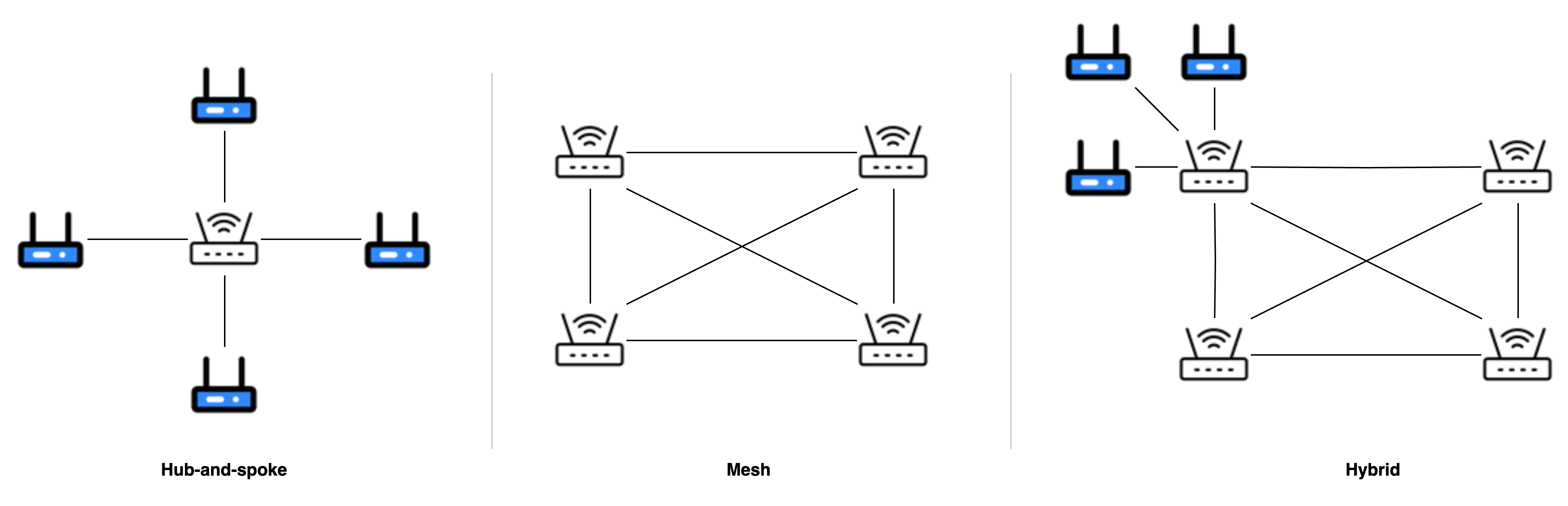 Illustration of supported network topologies in a QuWAN SD-WAN network
 - Hub-and-spoke (Left): A hub-and-spoke topology where edge routers (blue) route internet-bound traffic through a central hub router (white) using IPSec VPN. This is the supported and recommended design for centralized internet access.
- Mesh (Center): A full mesh hub-to-hub setup, which is not supported. Backhauling traffic between hub routers is not allowed.
- Hybrid (Right): A hybrid hub-and-spoke and mesh VPN topology. Backhauling traffic from edge router across multiple hub routers introduces latency and is not allowed.
Backhaul and fallback behavior
When you enable a backhaul internet rule on an edge router, all IPv4 internet-bound traffic is routed through its VPN tunnel to the hub router. The hub then forwards the traffic to the internet, allowing centralized security control. If the VPN tunnel goes down, the edge router will lose internet connectivity, even if its local internet connection remains active. To avoid service disruption, you can enable the fallback option. This setting allows the router to temporarily use its own WAN connection when the VPN is unavailable. Enable fallback if maintaining internet availability is more important than enforcing centralized routing at all times.
Important
- Only IPv4 traffic is supported for backhaul. IPv6 is not routed through the VPN.
- Router system services such as DNS, updates, and cloud connections always use the local internet connection, even with backhaul enabled.
- Backhaul is not supported between hub devices. Make sure to use a single-hop edge-to-hub connection.
- Use policy-based routing for fine-grained traffic control if needed.
Procedure
- Log in to QuWAN Orchestrator.
- Select your organization.
- Click Backhaul Internet.
- Click Create New Rule.
The Create Backhaul Internet Rule window appears. - Specify a rule name.
- Select the target region to enforce this rule within the hub-and-edge topology.
- Click
 next to Enable Rule, to enable the rule immediately after it is created.
 - Select one or more devices in the Branch Devices section.
- Enable Auto-apply to new edge devices in selected region.
Note
Enabling this option ensures that any newly added edge devices automatically inherit and apply the configured rule settings without requiring manual intervention.
- Enable Fall back to local WAN if hub is offline.
Note
When this option is selected, the system automatically falls back to the local WAN connection if the active hub devices in this rule are offline, ensuring continuous connectivity.
- Click Create.
QuWAN Orchestrator creates the backhaul internet rule.
Further Reading
适用产品
硬件
- QHora-301W
- QHora-321
- QHora-322
软件
- QuRouter 2.6 及更高版本
- QuWAN Orchestrator 2.8.1 及更高版本
概述
您可以配置 QuWAN Orchestrator,将面向互联网的流量从端点路由器回程到中心路由器。此设置通过 IPSec VPN 隧道将端点路由器后面的设备的所有出站流量路由到中心,然后转发到互联网。集中化的互联网访问加强了策略执行,并简化了分布式部署中的网络安全。
QuWAN Orchestrator 使用其自动网状 VPN 功能在路由器之间自动创建 IPSec VPN 隧道。这确保了站点到站点的通信无需手动配置。在大多数网络中,端点路由器允许直接访问互联网。为了保持基本的安全性,您可以在每个设备上启用本地防火墙或入侵防御系统(IPS)功能。详情请参见 如何在 QuWAN Orchestrator 中配置入侵防御系统(IPS)设置,以自动检测和阻止恶意网络活动 。但是,如果您需要通过网络安全设备检查和执行所有互联网流量的策略,可以在端点路由器上启用回程互联网。启用回程后,所有面向互联网的流量将安全地路由到中心路由器,然后再退出到互联网。这使您能够从单一位置应用统一的安全策略并监控互联网使用情况。
QuWAN Orchestrator 提供了一个集中界面来管理这些设置并跟踪设备连接性。对于高级路由场景,例如通过不同路径发送特定流量类型,您还可以在 QuWAN Orchestrator 中配置基于策略的路由。详情请参见 如何在 QuWAN Orchestrator 中配置基于策略的路由。
支持的互联网流量回程 VPN 拓扑
当您将 QNAP 路由器添加到 QuWAN Orchestrator 时,必须配置组织、区域和设备角色设置。这些参数定义了路由器如何融入网络拓扑,并对性能、路由和安全通信至关重要。
QuWAN Orchestrator 支持中心 -and-spoke 和网状 VPN 拓扑。通过将路由器分配到特定区域并设置其角色,您可以创建一个中心 -and-spoke 结构,其中端点路由器仅连接到指定的中心设备。QuWAN Orchestrator 自动在中心路由器之间建立网状结构,以确保中央站点之间的高效连接。详情请参见 在将您的 QNAP 路由器添加到 QuWAN Orchestrator 时,组织、区域和设备角色的概念如何应用?。
QuWAN SD-WAN 网络中支持的网络拓扑示意图- 中心 -and-spoke (左侧):一种端点路由器(蓝色)通过中央集线器路由器(白色)使用 IPSec VPN 路由互联网流量的星型拓扑结构。这是支持和推荐的集中式互联网访问设计。
- 网状(中间):一个完整的网状中心到集线器设置,不支持。在集线器路由器之间回程流量是不允许的。
- 混合(右侧):一种混合中心 -and-spoke 和网状 VPN 拓扑结构。从端点路由器跨多个集线器路由器回程流量会引入延迟,不允许。
回程和回退行为
当您在端点路由器上启用回程互联网规则时,所有 IPv4 互联网流量通过其 VPN 隧道路由到中心路由器。然后中心将流量转发到互联网,允许集中安全控制。如果 VPN 隧道断开,即使本地互联网连接仍然活跃,端点路由器将失去互联网连接。为了避免服务中断,您可以启用回退选项。此设置允许路由器在 VPN 不可用时暂时使用其自己的 WAN 连接。如果保持互联网可用性比始终执行集中路由更重要,请启用回退。
重要
- 仅支持 IPv4 流量回程。IPv6 不通过 VPN 路由。
- 路由器系统服务如 DNS、更新和云连接即使启用回程,也始终使用本地互联网连接。
- 不支持中心设备之间的回程。请确保使用单跳边缘到集线器连接。
- 如有需要,请使用基于策略的路由进行细粒度流量控制。
步骤
- 登录到 QuWAN Orchestrator。
- 选择您的组织。
- 点击回程互联网。
- 点击 创建新规则 。
出现 创建回程互联网规则 窗口。 - 指定规则名称。
- 选择目标区域以在集线器和边缘拓扑内执行此规则。
- 点击旁边启用规则,以便在创建规则后立即启用。
- 在分支设备部分中选择一个或多个设备。
- 启用自动应用于所选区域的新端点设备。
注意
启用此选项可确保任何新添加的端点设备自动继承并应用配置的规则设置,无需人工干预。
- 启用如果中心离线,则回退到本地 WAN。
注意
选择此选项时,如果此规则中的活动中心设备离线,系统会自动回退到本地 WAN 连接,以确保持续连接。
- 点击创建。
QuWAN Orchestrator 创建回程互联网规则。
进一步阅读


