Applicable Products
Symptom
When inserting a drive into a QNAP device, especially while migrating drives from an old NAS to a new NAS, you may encounter an error message similar to the following:
"[Firmware Update] The drive has come from a device with firmware version 5.2.4 Build 20250321 but this device's firmware version is 5.2.6 Build 20250715. The firmware versions must be the same to use this drive. You can update or re-install this device's firmware to synchronize the firmware versions of this device and drive."
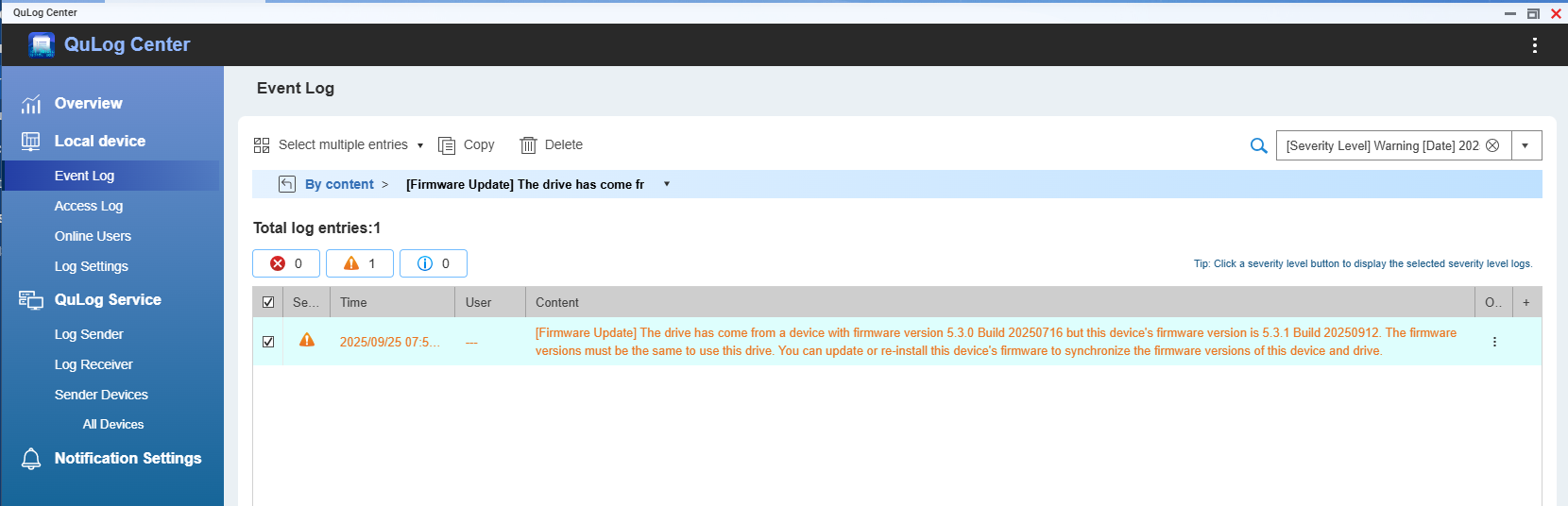
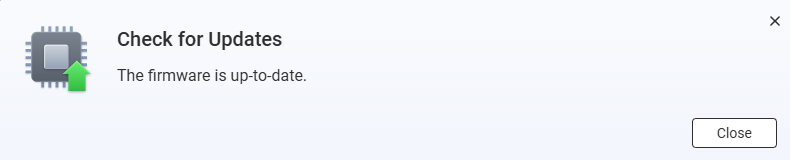
This message indicates that the firmware version on the drive does not match the firmware version on the current device. In some cases, when attempting to update the firmware using the online update feature, you may be informed that your firmware is already up-to-date. However, the system log may continue to report that the firmware versions on the device and the drive are inconsistent.
Solution
To resolve this issue, you must manually re-install the same firmware version that is currently running on your device. This process will synchronize the firmware version on both the device and the drive, even if your device reports that it is already up-to-date.
Manually re-install the current firmware version
- Go to the QNAP Download Center and download the exact firmware version that matches your device's current firmware.
- Ensure you select the correct model and firmware version.
- Extract the downloaded firmware package file.
- Go to Control Panel > System > Firmware Update > Manual Installation.
- Click Browse and select the extracted firmware package file.
- Click Update System and confirm when prompted.
- The device will restart automatically after the update.
- After the update, verify that the firmware version mismatch message no longer appears in the system log.
Warning: Do not power off your device during the firmware update process. QNAP recommends backing up all data and stopping all device operations before updating the firmware.
Note: You can check if the firmware installation was successful by going to Control Panel > QuLog Center > Local Device > Event Log.
适用产品
症状
当将硬盘插入 QNAP 设备时,尤其是在将硬盘从旧 NAS 迁移到新 NAS 时,您可能会遇到类似以下的错误信息:
"[固件更新] 硬盘来自一个固件版本为 5.2.4 Build 20250321 的设备,但此设备' 固件版本为 5.2.6 Build 20250715。固件版本必须相同才能使用此硬盘。您可以更新或重新安装此设备的固件以同步设备和硬盘的固件版本。"
此信息表明硬盘上的固件版本与当前设备上的固件版本不匹配。在某些情况下,当尝试使用在线更新功能更新固件时,您可能会被告知您的固件已是全新版本。然而,系统日志可能会继续报告设备和硬盘上的固件版本不一致。
解决方案
要解决此问题,您必须手动重新安装当前设备上运行的相同固件版本。此过程将同步设备和硬盘上的固件版本,即使您的设备报告它已经是全新版本。
手动重新安装当前固件版本
- 前往QNAP 下载中心并下载与您设备当前固件匹配的确切版本。
- 确保选择正确的型号和固件版本。
- 解压下载的固件包文件。
- 前往控制台 > 系统 > 固件更新 > 手动安装。
- 点击浏览并选择解压后的固件包文件。
- 点击更新系统并在提示时确认。
- 设备将在更新后自动重启。
- 更新后,确认系统日志中不再出现固件版本不匹配的信息。
警告:在固件更新过程中请勿关闭设备电源。QNAP 建议在更新固件之前备份所有数据并停止所有设备操作。
注意:您可以通过前往控制台 > QuLog Center > 本地设备 > 事件日志,检查固件安装是否成功。


