Applicable Products
- myQNAPcloud 1.0.90, 1.1.90 and later
- SSL 2.2.71 and later
- License center 1.8.56, 1.9.56, 2.0.42 and later
Overview
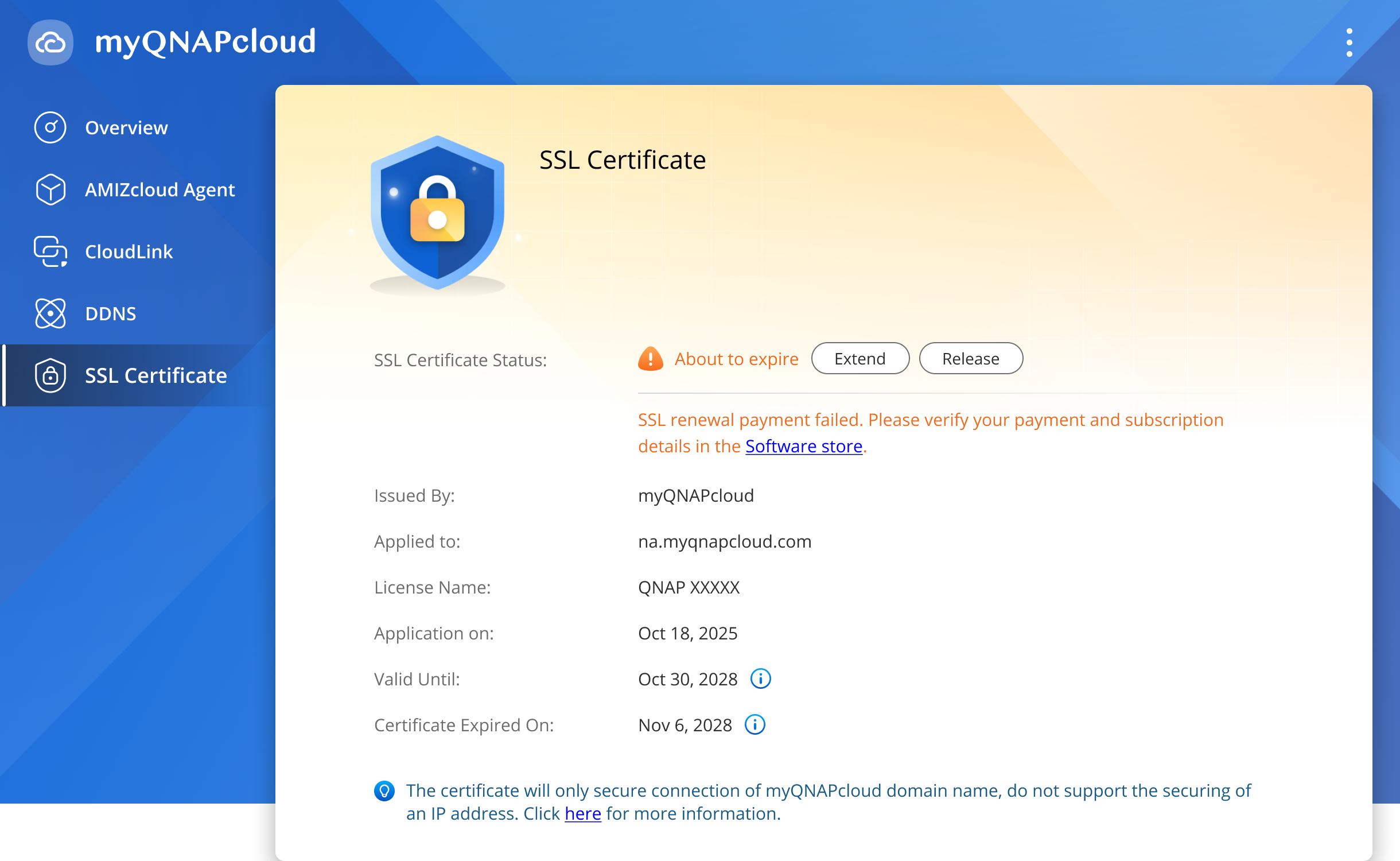
myQNAPcloud provides essential information for your SSL certificate to help you understand the current status of your certificate.
| Certificate Status | Description | Action |
|---|
| About to Expire | Your connection is still secure, but your certificate is nearing its validity period. | If you want to keep your connection secure, you must extend your certificate with an existing certificate or purchase a new certificate. |
| Expired | Your connection is no longer secure.
Your certificate validity period and license validity period have both ended.
| If you want to restore your secure connection, you must extend your certificate with an existing certificate or purchase a new certificate. |
Note
On the SSL Certificate Page, you can see both the license expiration date and certificate expiration date.
- License valid until: This is the expiration date of your current QNAP SSL license. QNAP will automatically renew your SSL certificate before this date. As long as your payment remains valid, your SSL protection will stay active without interruption.
- Certificate valid until: This is the expiration date issued by the CA (Certificate Authority). The CA/Browser Forum can only issue certificates up to 200 days. myQNAPcloud will automatically extend it one month before certificate expiration and keep renewing until your QNAP SSL license expires.
If you have passed the license expiration date but not the certificate expiration date, then you can still extend your SSL certificate without interrupting your secure connection. If you have passed both dates, your connection will become insecure.
Procedure
On your NAS, go to myQNAPcloud > SSL Certificate.
Beside the SSL certificate status, click Extend.
The system will verify whether your current SSL can be extended or not.
If your current SSL certificate can be extended
The system will automatically extend your certificate and reissue a certificate if needed.
After a successful extension, your certificate status will become Active.
If your current SSL certificate cannot be extended
The system will automatically search for other SSL corticate licenses under your QNAP ID.
If the system detects available SSL certificate
myQNAPcloud will list all available SSL certificate licenses. You can select an SSL certificate and click Install.
After a successful installation, your certificate status will become Active.
If the system does not detect available SSL licenses
You will be guided to purchase a new SSL certificate license. Follow the on-screen instructions to complete the purchase. After purchase, return to myQNAPcloud > SSL Certificate.
Click Extend. The system will automatically install and extend your SSL certificate. After a successful installation, your certificate status will become Active.
Note
If you have subscribed to a QNAP SSL certificate license but still see your certificate status labeled as
About to Expire, this means your license renewal has failed. Please go to the
QNAP Software Store and
ensure that your payment method is valid.
适用产品
- myQNAPcloud 1.0.90, 1.1.90 and later
- SSL 2.2.71 and later
- License center 1.8.56, 1.9.56, 2.0.42 and later
概述
myQNAPcloud 提供 SSL 证书的基本信息,帮助您了解证书的当前状态。
| 证书状态 | 描述 | 操作 |
|---|
| 即将过期 | 您的连接仍然安全,但您的证书即将到期。 | 如果您希望保持连接安全,必须使用现有证书延长或购买新证书。 |
| 已过期 | 您的连接不再安全。
您的证书有效期和许可证有效期均已结束。
| 如果您希望恢复安全连接,必须使用现有证书延长或购买新证书。 |
注意
在 SSL 证书页面,您可以看到许可证到期日期和证书到期日期。
- 许可证有效期至:这是您当前 QNAP SSL 许可证的到期日期。QNAP 将在此日期之前自动续订您的 SSL 证书。只要您的付款有效,您的 SSL 保护将保持不间断。
- 证书有效期至:这是由 CA(证书颁发机构)签发的到期日期。CA/ 浏览器论坛只能签发较长 200 天的证书。myQNAPcloud 将在证书到期前一个月自动延长,并持续续订,直到您的 QNAP SSL 许可证到期。
如果您已过许可证到期日期但未过证书到期日期,则您仍可以延长 SSL 证书而不中断安全连接。如果您已过两个日期,您的连接将变得不安全。
步骤
在您的 NAS 上,前往myQNAPcloud > SSL 证书。
在 SSL 证书状态旁边,点击扩展。
系统将验证您的当前 SSL 是否可以扩展。
如果您的当前 SSL 证书可以扩展
系统将自动扩展您的证书,并在需要时重新签发证书。
成功扩展后,您的证书状态将变为活跃。
如果您的当前 SSL 证书无法扩展
系统将自动搜索您 QNAP ID 下的其他 SSL 证书许可证。
如果系统检测到可用的 SSL 证书
myQNAPcloud 将列出所有可用的 SSL 证书许可证。您可以选择一个 SSL 证书并点击安装。
成功安装后,您的证书状态将变为活跃。
如果系统未检测到可用的 SSL 许可证
您将被引导购买新的 SSL 证书许可证。请按照屏幕上的说明完成购买。购买后,返回myQNAPcloud > SSL 证书。
点击扩展。系统将自动安装并扩展您的 SSL 证书。成功安装后,您的证书状态将变为活跃。
注意
如果您已订阅 QNAP SSL 证书许可证,但仍看到您的证书状态标记为
即将过期,这意味着您的许可证续订失败。请前往
QNAP 软件商店并
确保您的支付方式有效。


