阅读约 9 分钟


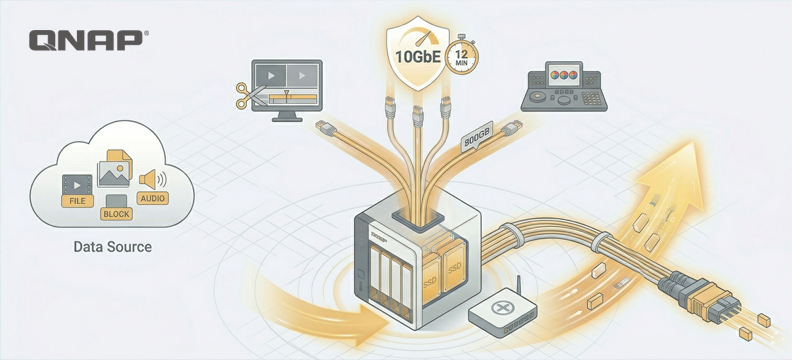
For audio and video editing applications, if you need to share materials or transfer video, DAS or external hard disk drives has always been the first choice in studios for a simple reason: speed. Through Thunderbolt or USB 4 interfaces, you can achieve high-speed access without being limited by the bandwidth of internal hard disk drives, and you can even use it directly as a working drive. The only drawback is that you can't share it with others in real time.
To give the simplest example, video may first provide a rough cut to the editor, and after editing, the colorist will do the color grading. As long as the workflow is well defined and version control of the files is done properly, using external hard disk drives to transfer files is a very straightforward and simple method.
However, USBs need to be plugged in and out, which is actually a bit silly. Most people just want to synchronize data on their laptops, desktops, or mobile devices, and most have long abandoned portable drives in favor of the cloud. If it weren't for the fact that data files are relatively large and heavy, who would still use such old-fashioned methods for audio and video editing?
No mistake—if you store the materials you want to edit on NAS, you can avoid these hassles. As long as each workstation is connected to Networking, you don't need to frequently plug and unplug external storageunit. The issue is bandwidth: in most small studios, home Networking, or even office environments, GbE bandwidth is already more than enough. However, for audio and video data used in editing, it may not necessarily be sufficient.
How much bandwidth do you need for editing audio and video data?
Let's discuss from two perspectives: transferring video and direct access.
Suppose there is a YouTuber who uses two GoPro HERO 13 Black cameras to shoot a full 8-hour video, using the highest image quality and frame rate settings. The final file size will be around 800GB.
After storing this 800GB on the computer, if the editor wants to copy the footage to their own workstation for editing, the time required will vary depending on the following interfaces:
- 100Mbps Ethernet Networking - 20 hours
- GbE (1000Mbps) Ethernet Networking - 2 hours
- 10GbE (10,000Mbps) Ethernet Networking - 12 minutes
- USB4 (40Gbps) - 3 minutes
If you have time, letting it transfer slowly is fine. However, if you need to edit materials directly on the remote end, that's another matter. If the transfer bandwidth isn't sufficient, the direct result will be 'choppy playback', making editing very cumbersome.
The maximum bitrate of GoPro HERO Black 13 is about 120Mbps, and after unlocking it can reach 200Mbps. In theory, as long as you have GbE, you can stream smoothly. However, don't forget, GoPro HERO Black 13 still can't be considered a broadcast-grade unit. If your studio today uses, for example, RED or RED ONE to record 8k resolution video, then the maximum bitrate can reach 2400Mbps. Industrial-grade unit falls around 5000Mbps.
So, how much bandwidth you need depends on whether you are “just transferring data” or “editing data remotely.” The latter might seem easier, but actually, it’s not, because most editing software still reads the entire file and creates a cache on the local machine. So, overall efficiency still depends on how fast the file can be transferred.
Is a typical Networking environment not enough?
In general network environments, the transmission speed of Networking mostly falls between 100Mbps and GbE. This is a mixed result under unsynchronized network transmission speeds, usually limited by the following factors:
-
Router or switch with too low a level If the boss's office Router breaks down, he just asks the engineer to buy the cheapest one, so there are still quite a few very cheap model on the market that only support 100Mbps Fast Networking. This situation is still very common in many office environments.
-
Overly old Fast Networking cables Due to electrical and physical properties, the specifications and quality of Networking cables will directly affect transmission speed. There are many environments where Networking should be able to run GbE, but certain nodes only reach 100Mbps, which is usually caused by cable issues.
-
Limitations of the host end Unless it's a computer that's over 15 years old, most motherboards should at least have GbE for the Networking slot. Modern motherboards typically come with GbE, 2.5GbE, or 5GbE as factory settings, depending on the model tier.
In the scenario of transferring files over a local network, GbE is probably sufficient for general document use. Even with 10GbE, you won't see a significant speed boost unless you frequently transfer files larger than 100MB, which is when you might fully utilize the Networking. As for 100Mbps, it's definitely not enough, as it can easily saturate the Networking and even affect web browsing performance.
So, how large is a single video file from the GoPro HERO Black 13? It's about 12GB, which will definitely max out your Networking during transfer. The difference is that a slightly faster Networking can prevent network congestion for too long. Networks with QoS implemented can indeed avoid congestion, but having 10GbE still allows for faster transfers.
The key is that 10GbE is no longer out of reach
"10GbE is fast"—this is nothing new, and it's been discussed for over a decade in the practical applications of audio and video editing. More than ten years ago, setting up a 10GbE network environment was relatively expensive; today, achieving the same goal is much simpler. Although the price of related unit hasn't quite reached the point where it's affordable for every household, at least for a studio with a workload that already requires 10GbE to boost efficiency, the cost is now manageable and not a burden."
Because NAS will be the main target to benefit from high-speed Networking, building a complete 10GbE network environment starting from NAS will be much simpler, and QNAP provides a comprehensive solution.
What unit are needed to build a 10GbE Networking environment?
- Router Unless you want your computer to connect directly to NAS (which is not very meaningful; if you want to do this, it's better to use DAS), otherwise Router will be the core of the entire high-speed network.
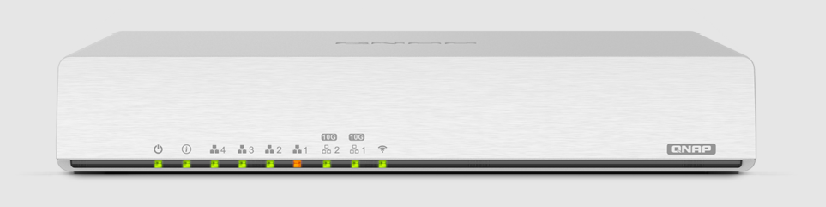
QHora-301W provides two 10GbE ports, which can meet the needs of ultra-high-speed Networking transmission between two devices within the network, while the remaining unit communicates via GbE. In practical applications, we can connect the main workstation used for editing video and NAS to 10GbE, while the other ports are used for backup.
- High-speed Networking cable Many people think that 10GbE must use SFP fiber optic cables, but actually CAT6 can achieve this speed, and the operating distance indoors is not considered short. In practice, it can support up to 50 meters.
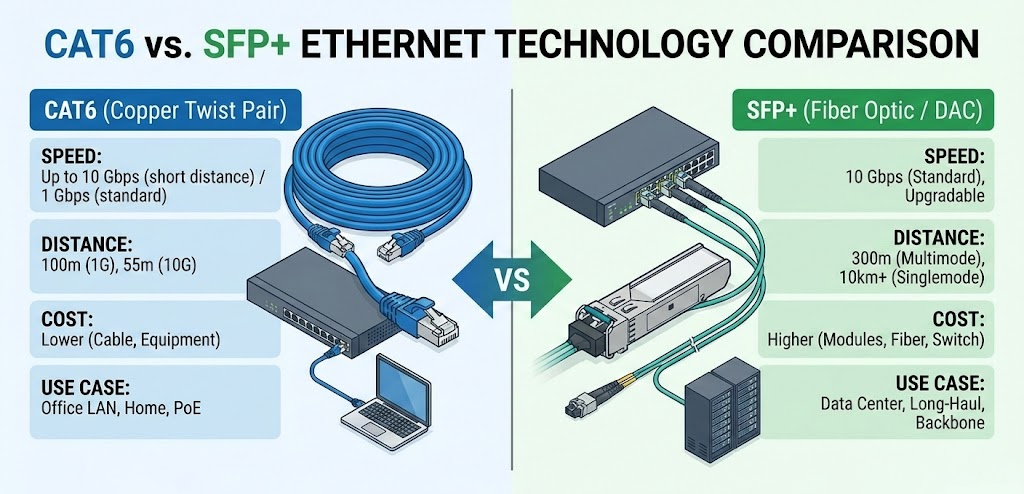
- Corresponding Networking card No matter if it's on NAS or on a computer, you can now find affordable 10GbE Networking cards. Just make sure the connector is CAT6 or SFP, and the Router end is the same.
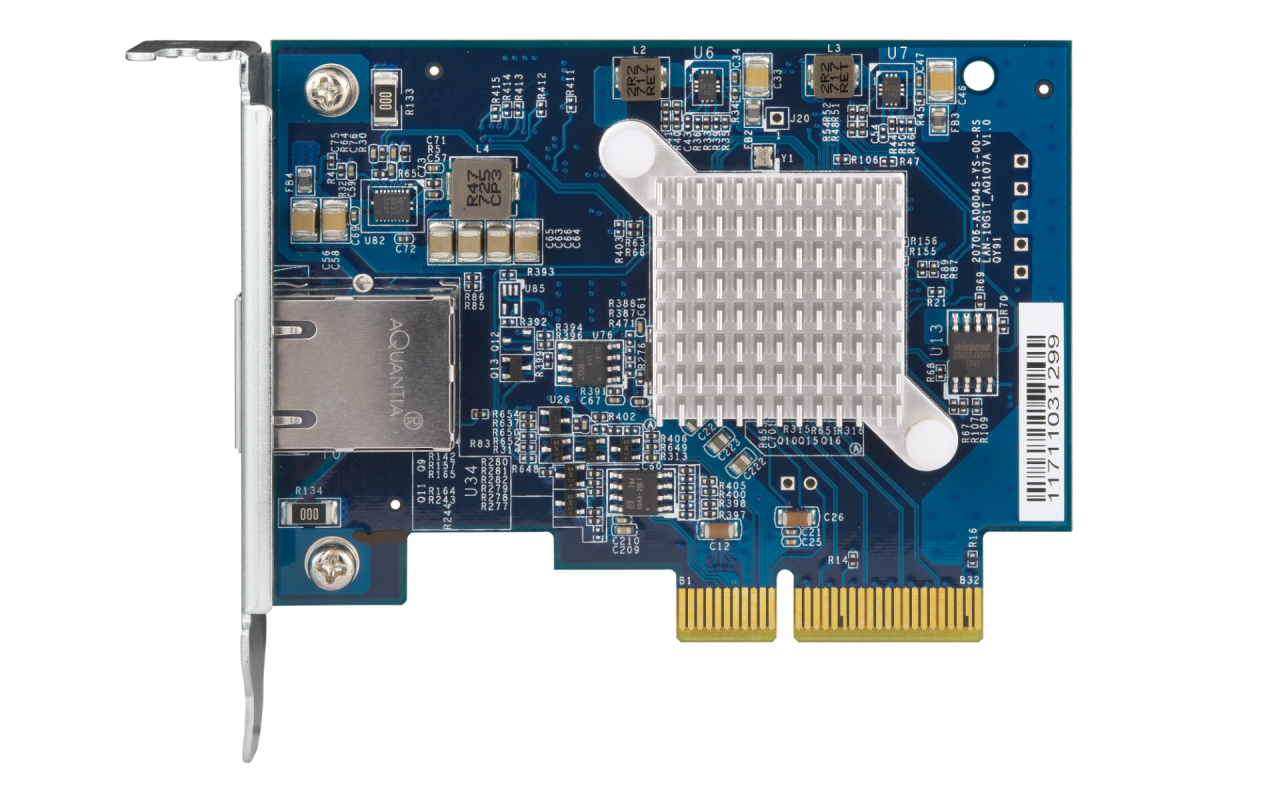
QXG-10G1T is a Networking card that uses CAT6 interface. If you have CAT6 cables on hand, simply plug and play for maximum convenience.
After preparing unit, let's compare the differences in speed across different network zones. The testing method is to install an NVME solid state drive in NAS, mount it as Networkingdisk, and then use the CrystalDiskMark software to test its read/write speed. Additionally, Blackmagic Diskspeed Test is used to check whether the bandwidth of Networkingdisk can handle various decoding levels of video.
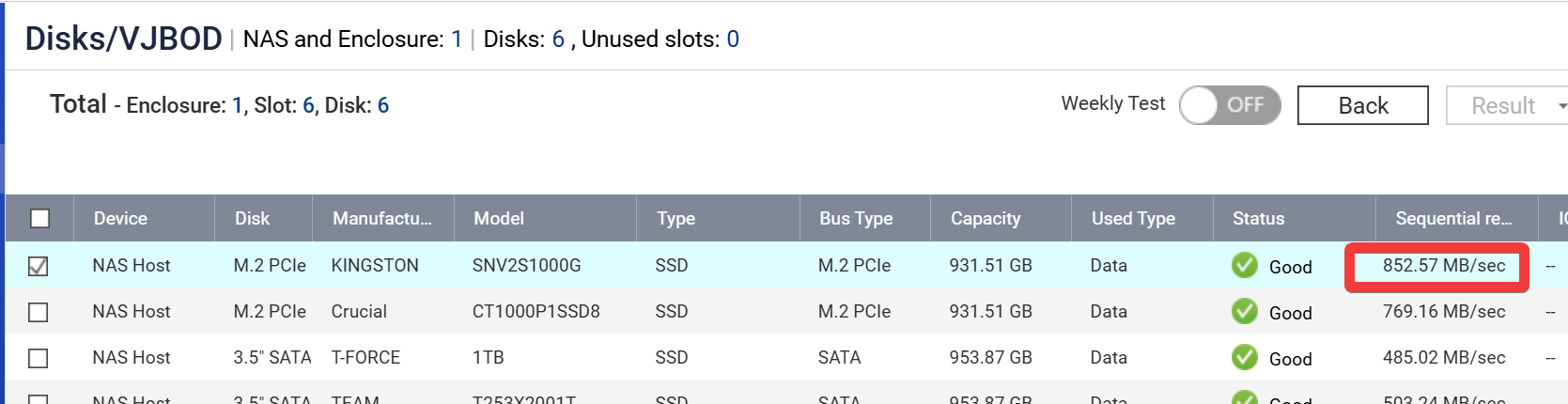
The internal read/write speed of this solid state drive in NAS is about 800+ megabyte per second. First, let's see what happens if the Networking speed is only 100Mbps:
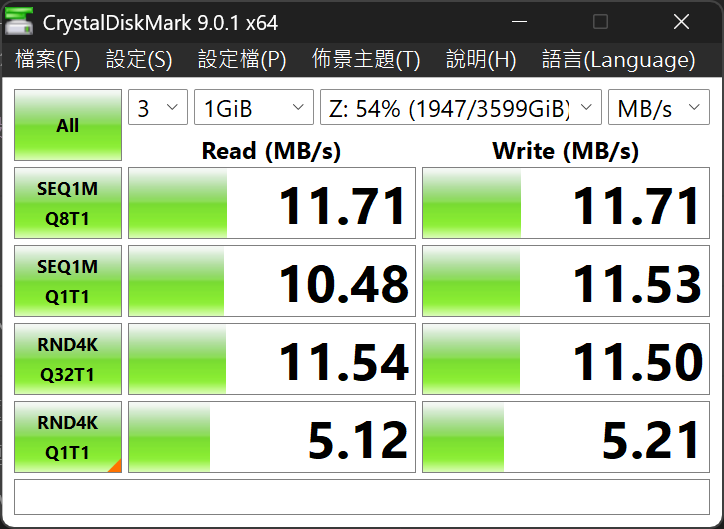
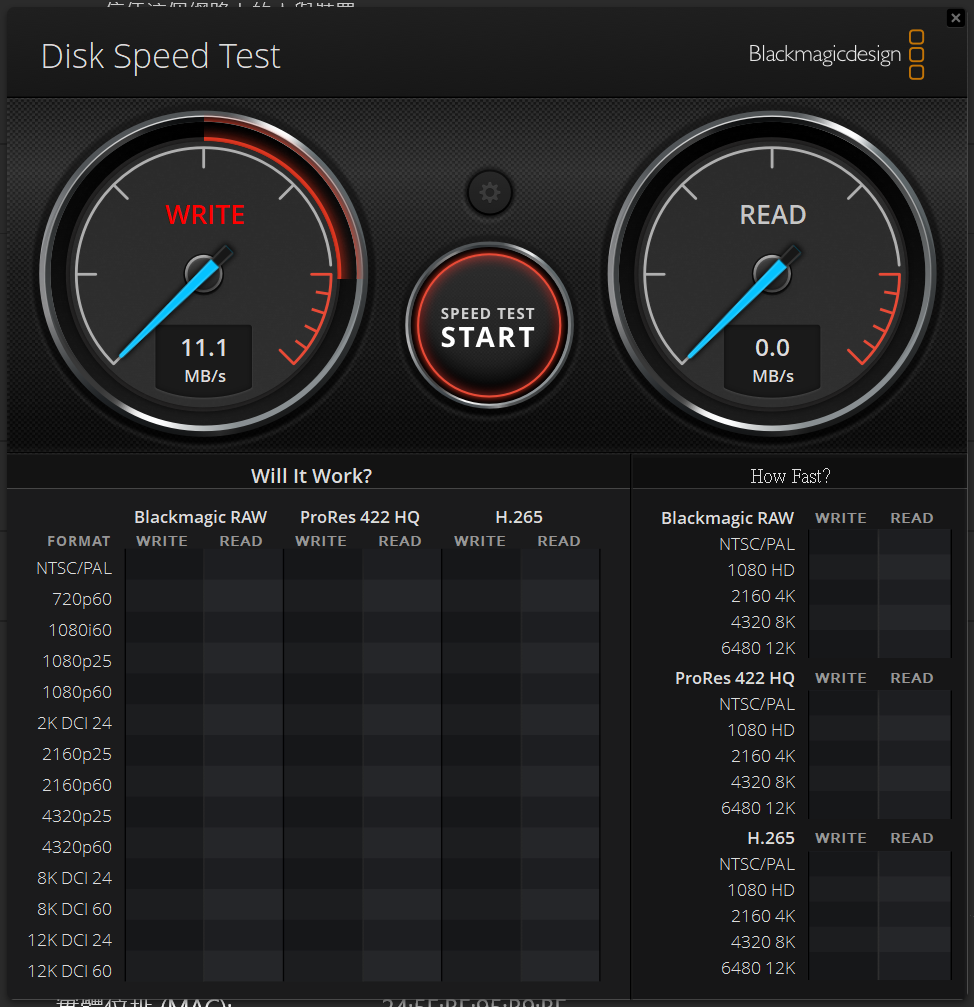
File transfer is barely possible, but video editing software cannot run the data at all. 100Mbps is enough for external Networking or watching Netflix, but for frequent file backups or video editing, it's completely unworkable.
Next is the section on GbE Networking, which is also the most common setting in general Networking environments:
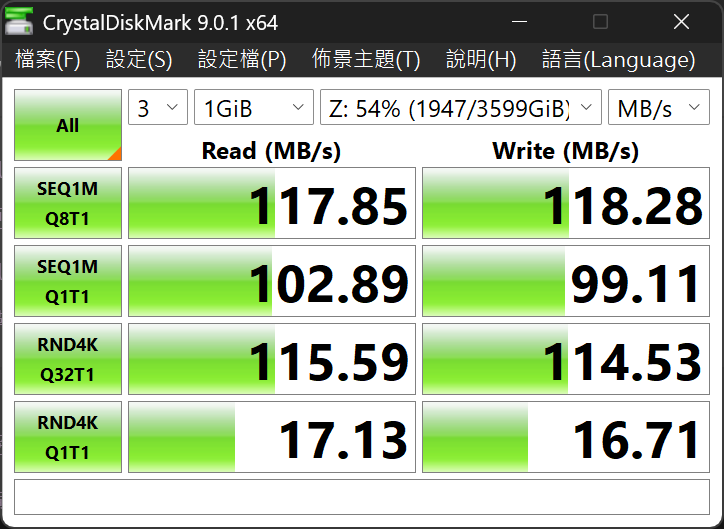
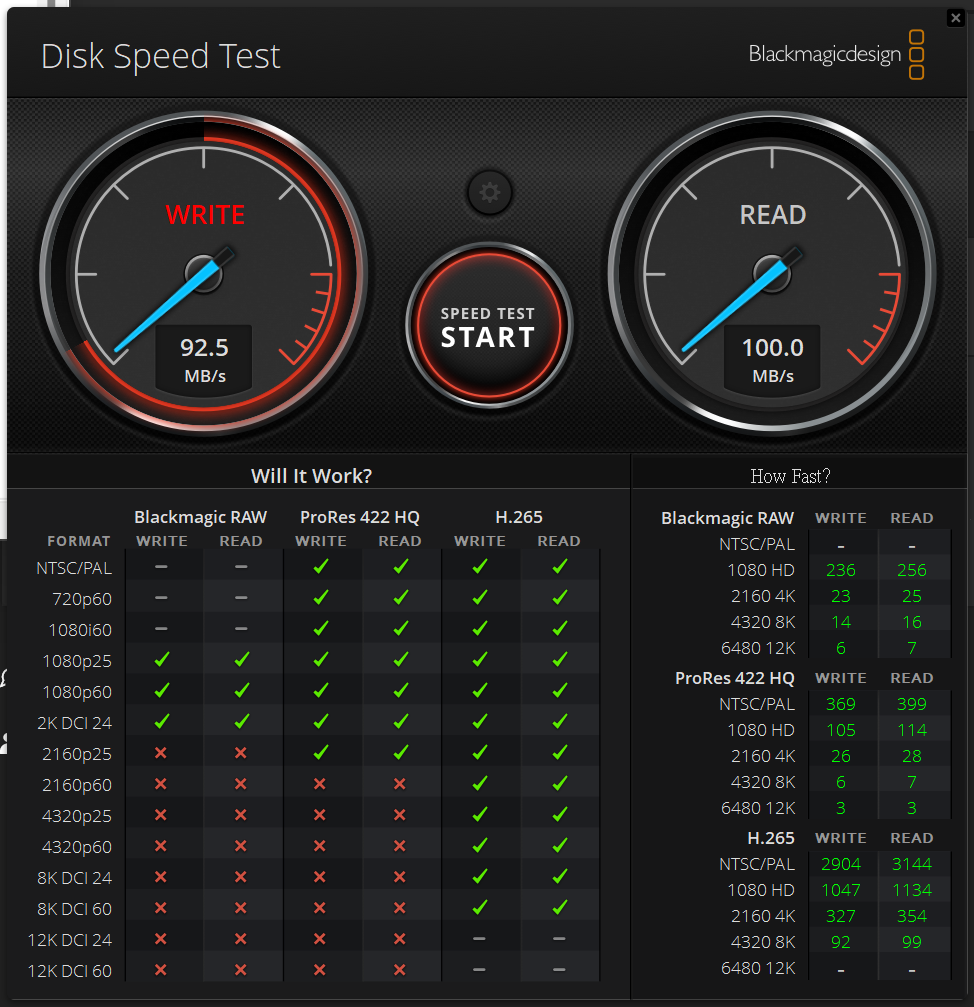
In terms of file read/write, it is roughly equivalent to using traditional hard disk drives, meaning the advantages of solid state drive will disappear. As for audio and video editing, you can see that with H.265 encoding, read/write up to 8K can be tested, but if you use higher bitrate encoding, such as ProRes 422 HQ, it can only handle up to 4K footage.
Finally, let's look at the results after upgrading to a 10GbE environment:
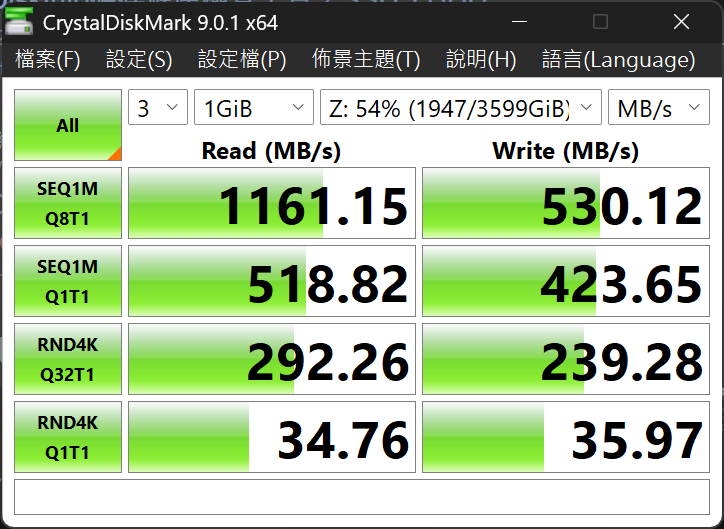
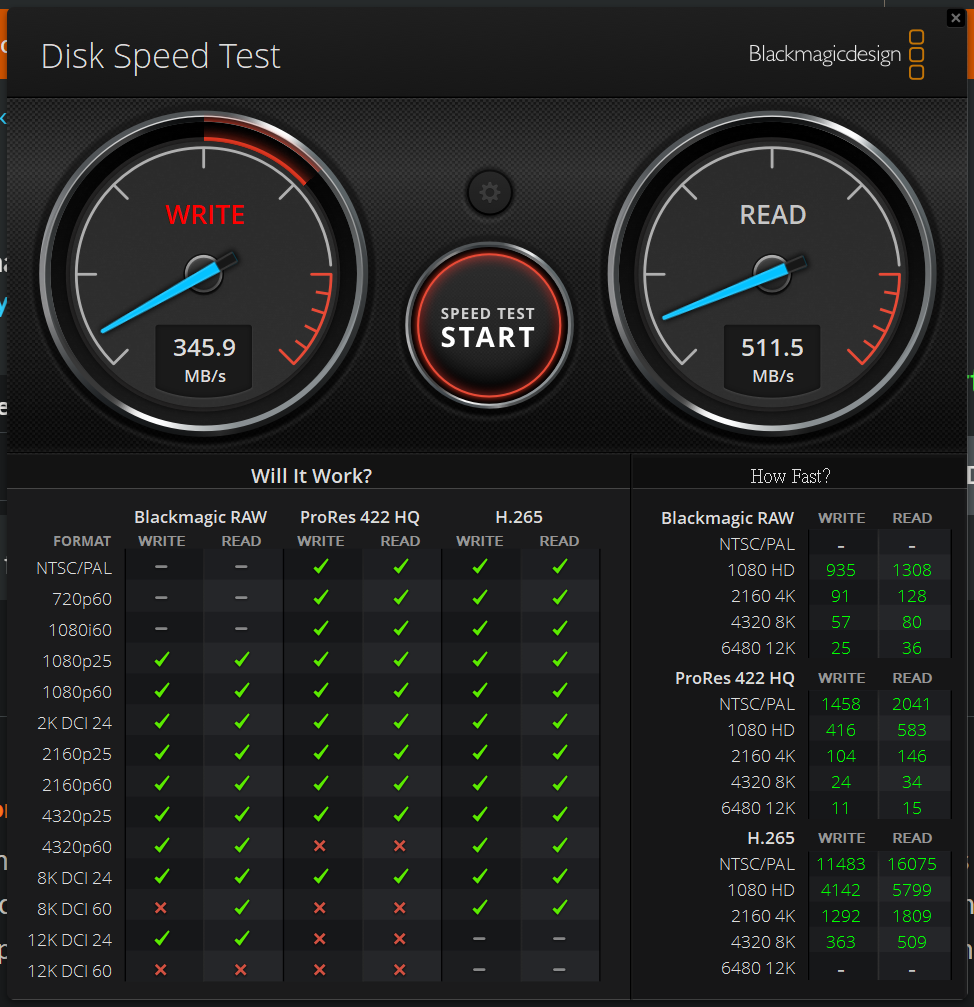
The file's read and write capabilities meet the standards for entry-level solid state drive, while audio and video editing enjoys even more generous space.
Exchanges speed for creative freedom
Through real-world test data, it's easy to see that the frequency bandwidth advantage of 10GbE not only increases the number of accounts, but also unleashes solid state drive efficiency, with the key being the bandwidth bottleneck. This means editors no longer have to lose inspiration waiting for file transfers, nor do they have to endure the complicated process of plugging and unplugging USB external hard disk drives between different computers.
When lighting technicians, editors, and special effects artists can simultaneously and smoothly access the same project files online, it saves a lot of hidden costs related to communication and version management. For audio-visual studios where every second counts, upgrading to a 10GbE network environment provides the hardware support needed, and compared to the manpower and time saved as well as the greatly improved collaboration efficiency, it can be said to be a very cost-effective investment.