


如何在 Windows 服务器上为 iSCSI LUN 配置 MPIO 策略?
最后修订日期:
2022-06-24
适用产品:
- Qutil
- Windows 服务器
要在 Windows 服务器上为 iSCSI LUN 配置多路径 I/O (MPIO) 策略,请确保系统中已设置 MPIO 服务(有关详细信息,请参见 https://www.qnap.com/en/how-to/tutorial/article/configuring-microsoft-iscsi-storage-with-qnap-enterprise-class-es-nas)。
- 在 Windows 服务器中,打开“Computer Management”(计算机管理)。
- 转到“Storage”(存储)>“Disk Management”(磁盘管理)。
- 找到 iSCSI LUN 磁盘。
- 右键单击 iSCSI LUN 磁盘,然后选择“Properties”(属性)。
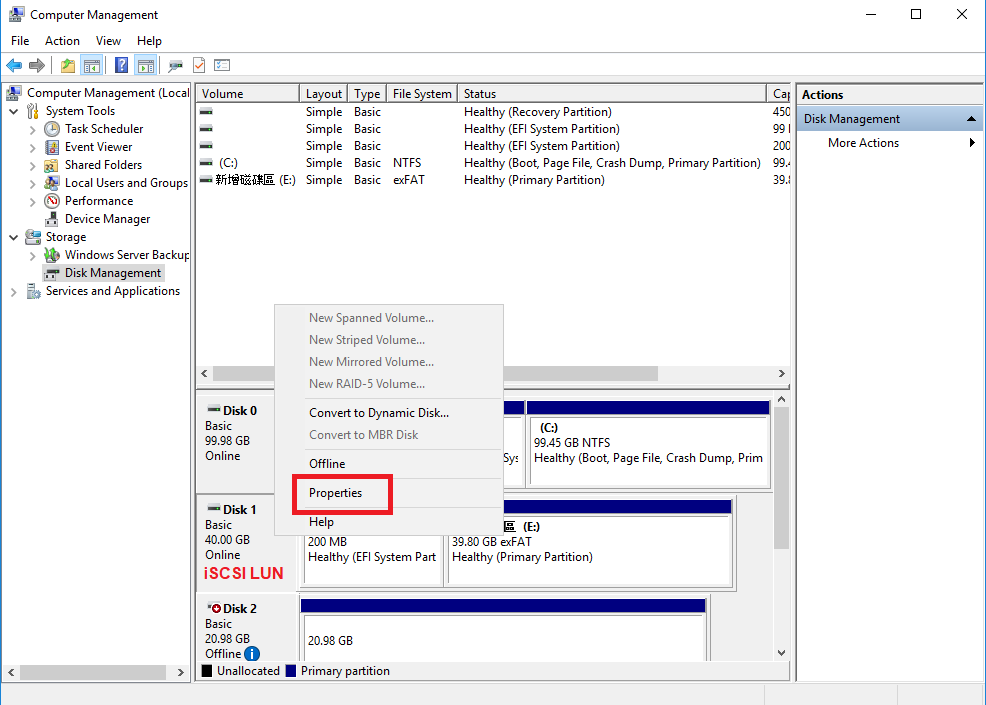
此时会打开一个属性窗口。 - 转到 MPIO。
- 选择一个 MPIO 策略。
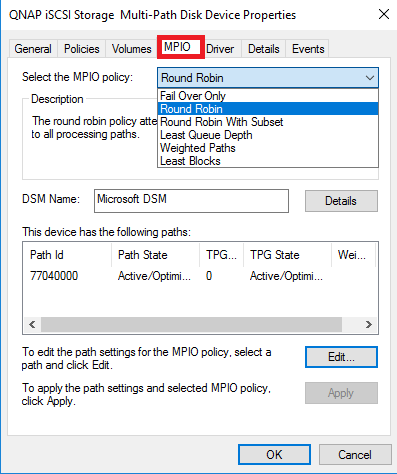
- 单击“OK”(确定)。
需要进一步协助,欢迎前往官方社区发帖,与其他用户及 QNAP 专家交流。 前往 QNAP 官方社区


