Applicable Products
Explanation
In QuMagie, you can filter photos by multiple people using either:
- AND logic: show only photos where all selected people appear together.
- OR logic: show photos where any of the selected people appear.
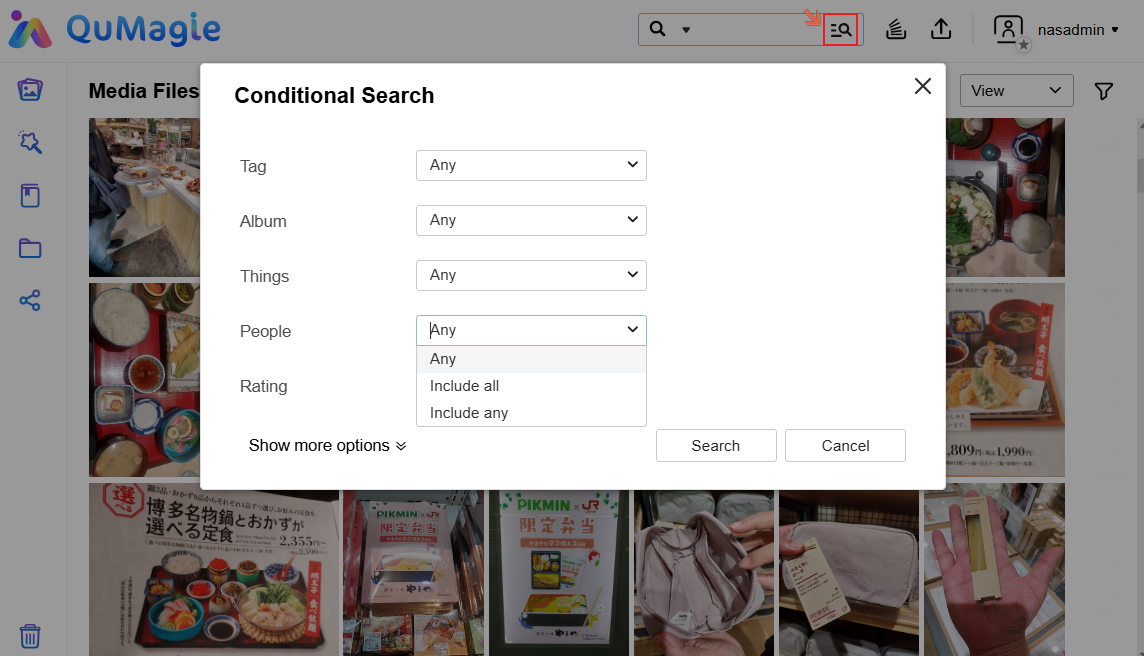
This behavior is controlled in the Conditional Search panel under the People section. Some users are not aware that the AND/OR logic can be changed there, which can cause confusion when filtering by multiple people.
Solution
Use Conditional Search to choose AND or OR logic
- Open QuMagie on your QNAP NAS.
- Click the icon next to the search bar to open Conditional Search (the advanced search panel).
- In the People section, open the logic dropdown and choose:
- Include all: show photos where all selected people appear together (AND logic).
- Include any: show photos where at least one selected person appears (OR logic).
- Select the people you want to filter by.
- Review the results and confirm that they match your intended logic:
- With Include all, only photos where all selected people co-appear are shown.
- With Include any, photos containing any of the selected people are shown.
Reminder: Face recognition and tagging quality, as well as indexing status, can affect how complete your search results are. If some photos are missing, ensure that:
- Face recognition has finished processing.
- People are correctly tagged in QuMagie.
适用产品
说明
在 QuMagie 中,您可以通过以下方式按多人筛选照片:
- AND 逻辑:仅显示所有选定人物同时出现的照片。
- OR 逻辑:显示任何选定人物出现的照片。
此行为在条件搜索面板的人物部分中控制。有些用户不知道可以在那里更改 AND/OR 逻辑,这可能会导致按多人筛选时产生混淆。
解决方案
使用条件搜索选择 AND 或 OR 逻辑
- 在您的 QNAP NAS 上打开QuMagie。
- 点击搜索栏旁边的图标以打开条件搜索(优异搜索面板)。
- 在人物 部分,打开逻辑下拉菜单并选择:
- 包含所有:显示所有选定人物同时出现的照片(AND 逻辑)。
- 包含任意:显示至少一个选定人物出现的照片(OR 逻辑)。
- 选择您要筛选的人员。
- 查看结果并确认它们符合您的预期逻辑:
- 使用包含所有,仅显示所有选定人物共同出现的照片。
- 使用包含任意,显示包含任何选定人物的照片。
提醒:面部识别和标记质量以及索引状态可能会影响搜索结果的完整性。如果某些照片缺失,请确保:
- 面部识别已完成处理。
- 人物在 QuMagie 中已正确标记。


