


How to verify if the router ports are really open?
Applied models:
Applied Firmware:
-
All QTS Versions
On occasions “Myqnapcloud” APP in the section “Auto router configuration” is showing that UPnP is working properly and the ports are open and forwarded in our router, but we are still not able to access the NAS remotely.
In this case we can use a third party tool to verify the Port status. There are many web pages and desktop tools for it. As an example we can use the free tool offered from “you get signal” (https://www.yougetsignal.com/tools/open-ports/). In this tool we will be able to check an IP or server url and desired port. After clicking on the button check we will see the Port status.
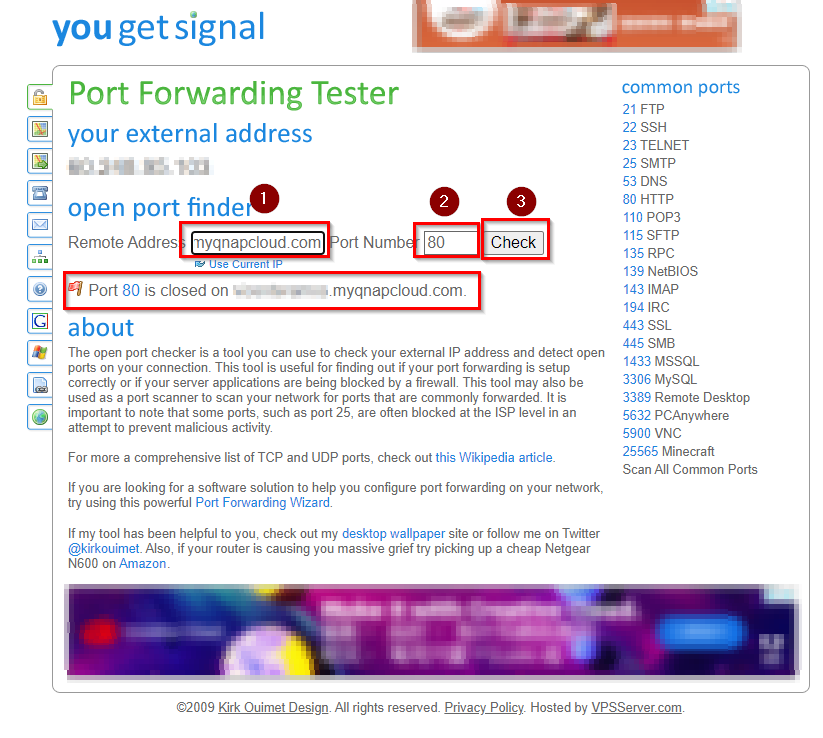
If the port is displayed as closed, you will need to try to open and forward the port manually and in case that the port still displayed as closed, please contact your ISP to verify the port status.
需要进一步协助,欢迎前往官方社区发帖,与其他用户及 QNAP 专家交流。 前往 QNAP 官方社区


