Applicable Products
All QNAP NAS models
Solution
You may try the following methods to see if it can resolve the FW004 error.
- Check the firmware file:
- Ensure you have downloaded the correct firmware version for your NAS model from the QNAP Download Center.
- Verify that the firmware file is not corrupted. If in doubt, download it again.
- If your device requires it, extract the firmware package before uploading.
- Perform the firmware update again.
- Reboot the NAS and retry the update:
- Restart your NAS.
- Attempt the firmware update again using the verified firmware file.
- Update firmware using Qfinder Pro:
- Power off your NAS and remove all hard drives. (Important: Label the drives and note their order for reinstallation.)
- Power on the NAS without disks. Wait for one short beep followed by one long beep.
- Run Qfinder Pro to locate your NAS.
- Right-click your device's row and select Update Firmware to start the update process.
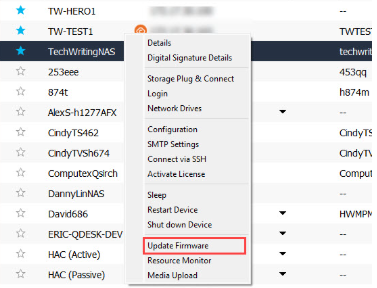
Note: Removing disks will not delete data, but please make sure disks are reinstalled in the same order after the update.
If you continue to receive the FW004 error after performing the above steps, the issue may be caused by a defective NAS DOM (Disk On Module). The DOM is an internal component that stores firmware. If it is faulty, firmware updates may fail.
In this case, please contact QNAP Support for assistance. Provide details about the error, your NAS model, and the troubleshooting steps you have already tried. Repair or replacement may be required.
Further Reading
适用产品
所有 QNAP NAS 型号
解决方案
您可以尝试以下方法来查看是否能解决 FW004 错误。
- 检查固件文件:
- 确保您已从QNAP 下载中心下载了适合您 NAS 型号的正确固件版本。
- 确认固件文件未损坏。如有疑问,请重新下载。
- 如果您的设备需要,请在上传前解压固件包。
- 重新执行固件更新。
- 重启 NAS 并重试更新:
- 重启您的 NAS。
- 使用已验证的固件文件再次尝试固件更新。
- 使用 Qfinder Pro 更新固件:
- 关闭您的 NAS 并移除所有硬盘。(重要提示:标记硬盘并记录其顺序以便重新安装。)
- 在无硬盘的情况下启动 NAS。等待一个短鸣声后接一个长鸣声。
- 运行Qfinder Pro以定位您的 NAS。
- 右键点击设备行并选择更新固件以开始更新过程。
注意:移除硬盘不会删除数据,但请确保更新后硬盘按原顺序重新安装。
如果在执行上述步骤后仍然收到 FW004 错误,问题可能是由有缺陷的 NAS DOM(磁盘模块)引起的。DOM 是存储固件的内部组件。如果它有故障,固件更新可能会失败。
在这种情况下,请联系QNAP 支持寻求帮助。提供有关错误、您的 NAS 型号和您已尝试的故障排除步骤的详细信息。可能需要维修或更换。
进一步阅读


