Applicable Products
- QNAP NAS running QuTS hero with a storage pool and thin shared folders or thin-provisioned volumes
Scenario
If QuTS hero shows Warning (Threshold reached) on thin shared folders even though the actual file data appears to be well below the physical pool capacity, the warning can still be valid.
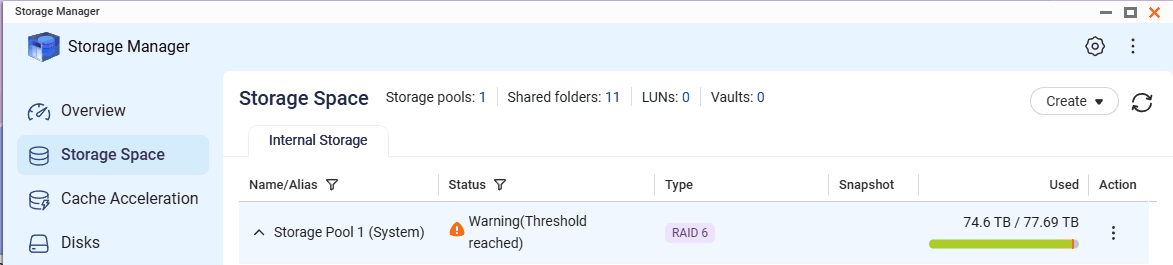
The direct cause was not ordinary file data alone. The warning was driven by a combination of:
- Thin provisioning / over-allocation across multiple shared folders
- Guaranteed snapshot space reserving capacity in the pool
- Pool usage being measured against real physical capacity, not only the visible file size reported by a client computer
Why this happens
Thin shared folders can be assigned more logical capacity than the storage pool physically has. This is called over-provisioning or over-subscription. That is not always wrong, but it means the pool warning is based on actual consumed and reserved space in the pool, not on the sum of user-visible file sizes alone.
If guaranteed snapshot space is enabled, QuTS hero reserves part of the pool for snapshots even when no snapshots are currently being used. That reserved space reduces the remaining usable capacity and can make the pool appear close to full much earlier than expected.
Recommended fix
- Open Storage & Snapshots.
- Select the affected storage pool.
- Review the following items:
- Total pool capacity
- Used pool capacity
- Provisioned capacity of thin shared folders or thin volumes
- Snapshot settings for the pool
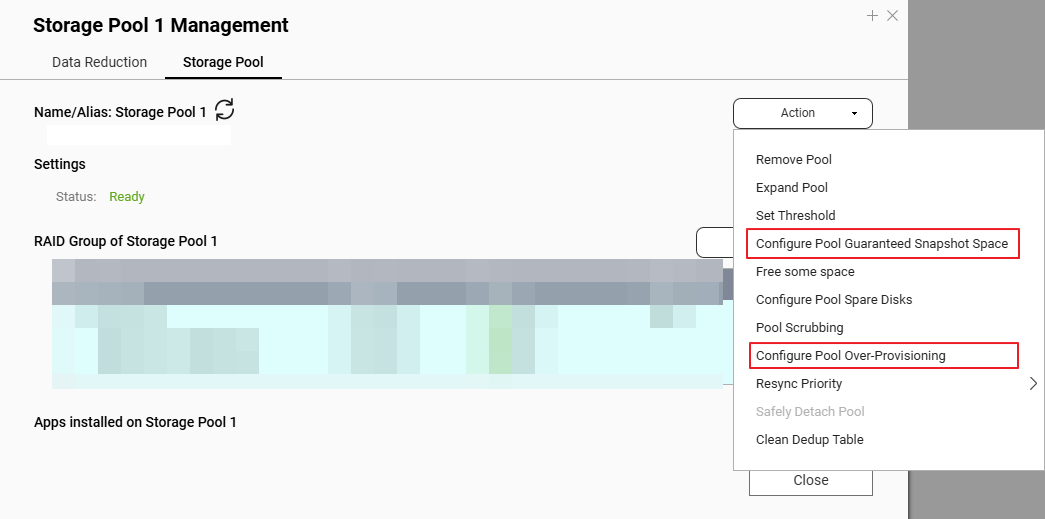
- If Guaranteed Snapshot Space is enabled and you do not need it, disable it or reduce it.
- Recheck the pool usage after the change.
- If the thin shared folders are heavily over-allocated, reduce the logical allocation or redesign the layout so the total provisioned size is closer to the real pool capacity.
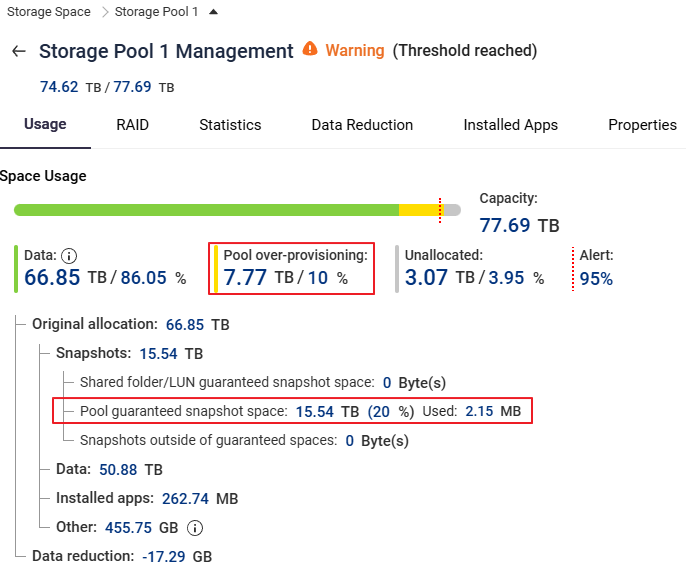
In this scenario, pool over-provisioning was configured at around 10% (about 7.77 TB on a 77.6 TB pool). If additional free space is needed, the percentage can be lowered, for example to 5%. However, the recommended first action is to disable Pool guaranteed snapshot space because snapshots were not used in this case.
If you want shared folders to behave more like normal folders
If your goal is to let multiple shared folders draw from the same common free space and only warn when the overall pool is genuinely getting full, use a simpler layout:
- Keep the storage design simple and avoid unnecessary over-allocation.
- Avoid enabling Guaranteed Snapshot Space unless you actually need snapshot reservation.
- Use fewer thin-provisioned objects, or consider a less fragmented layout.
- Create shared folders on top of a storage design that is sized close to real capacity rather than assigning large logical capacities to every folder.
This reduces the chance of threshold warnings caused by reserved or over-provisioned capacity rather than by real file growth.
Verification Steps
- In Storage & Snapshots, confirm the storage pool no longer shows excessive reserved snapshot space.
- Confirm the reported used pool capacity drops after disabling or reducing guaranteed snapshot space.
- Confirm the warning clears or the warning threshold is no longer reached.
- Compare the total provisioned thin capacity against the physical pool capacity and make sure the gap is understood and acceptable.
Tip
Thin provisioning is useful, but it requires active monitoring. If you prefer simpler capacity behavior, avoid large over-allocation.
Warning
Do not disable snapshot reservation or redesign the storage layout without confirming your backup and recovery plan.
Related Articles
适用产品
- QNAP NAS running QuTS hero with a storage pool and thin shared folders or thin-provisioned volumes
场景
如果 QuTS hero 在精简共享文件夹上显示警告(达到阈值),即使实际文件数据远低于物理池容量,该警告仍可能有效。
直接原因不仅仅是普通文件数据。警告是由以下因素组合引起的:
- 精简置备 / 多重共享文件夹的过度分配
- 保证的快照空间在池中保留容量
- 池使用量是相对于实际物理容量来衡量的,而不仅仅是客户端计算机报告的可见文件大小
为什么会发生这种情况
精简共享文件夹可以被分配比存储池实际拥有的更多的逻辑容量。这被称为预留空间或过度订阅。这并不总是错误的,但这意味着池警告是基于池中实际消耗和保留的空间,而不仅仅是用户可见文件大小的总和。
如果启用了保证的快照空间,QuTS hero 会为快照保留池的一部分,即使当前没有使用快照。这种保留空间减少了剩余可用容量,并可能使池看起来比预期更早接近满。
推荐修复
- 打开存储与快照总管。
- 选择受影响的存储池。
- 查看以下项目:
- 池总容量
- 已用池容量
- 精简共享文件夹或精简卷的配置容量
- 池的快照设置
- 如果启用了保证的快照空间且不需要,请禁用或减少它。
- 在更改后重新检查池的使用情况。
- 如果精简共享文件夹严重超分配,减少逻辑分配或重新设计布局,使总配置大小更接近实际池容量。
在这种情况下,池预留空间配置在大约10%(在 77.6 TB 池上约为7.77 TB)。如果需要额外的可用空间,可以降低百分比,例如到5%。然而,建议的首要措施是禁用池保证快照空间,因为在这种情况下没有使用快照。
如果您希望共享文件夹的行为更像普通文件夹
如果您的目标是让多个共享文件夹从同一个公共可用空间中提取,并且只有在整体池真正满时才发出警告,请使用更简单的布局:
- 保持存储设计简单,避免不必要的超分配。
- 除非您确实需要快照保留,否则避免启用保证的快照空间。
- 使用更少的薄配置对象,或考虑使用更少碎片化的布局。
- 在接近实际容量的存储设计上创建共享文件夹,而不是为每个文件夹分配大的逻辑容量。
这减少了由于保留或超配容量而非实际文件增长引起的阈值警告的可能性。
验证步骤
- 在存储与快照总管中,确认存储池不再显示过多的保留快照空间。
- 确认在禁用或减少保证的快照空间后,报告的已用池容量下降。
- 确认警告已清除或不再达到警告阈值。
- 比较总配置的精简容量与物理池容量,并确保理解和接受差距。
提示
精简置备很有用,但需要积极监控。如果您更喜欢简单的容量行为,请避免大规模超额分配。
警告
在确认您的备份和恢复计划之前,请勿禁用快照保留或重新设计存储布局。
相关文章


