


Why can't I see NAS in Windows File Explorer via USB QuickAccess
最后修订日期:
2022-06-24
Applicable Products:
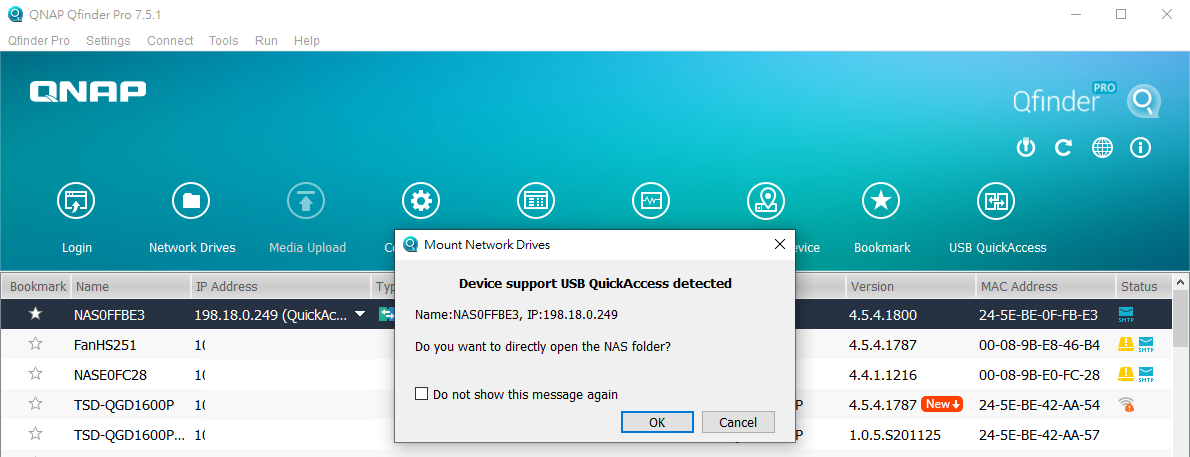
Open Qfinder Pro utility on you PC/Mac first, then use an USB cable connection between your PC/Mac USB port & NAS USB QuickAccess port (in the NAS front panel), the Qfinder Pro utility will automatically detect NAS device and ask “Do you want to directly open the NAS folder?” message, click “OK” button.
The Qfinder Pro utility will open Windows File Explorer to show the NAS device and list the NAS share folders after type NAS Username and password.
- Support Network & virtual switch and USB QuickAccess NAS model (Which models support Network & Virtual Switch?)
- USB QuickAccess NAS model
Open Qfinder Pro utility on you PC/Mac first, then use an USB cable connection between your PC/Mac USB port & NAS USB QuickAccess port (in the NAS front panel), the Qfinder Pro utility will automatically detect NAS device and ask “Do you want to directly open the NAS folder?” message, click “OK” button.
The Qfinder Pro utility will open Windows File Explorer to show the NAS device and list the NAS share folders after type NAS Username and password.
需要进一步协助,欢迎前往官方社区发帖,与其他用户及 QNAP 专家交流。 前往 QNAP 官方社区


