Qremote still fails to connect to the NAS after reading the other article
Applicable products:
- Latest Qremote for Android and iOS
I’ve already read and done everything mentioned in the article “No apps available You have not installed any apps or you are not logged in to HybriddDesk Station” but Qremote still fails to connect to the NAS.
Answers:
If you have already read and done everything in the article mentioned in the title, please check the information below to see if the issue can be fixed afterward.
Note: Qremote can only work in LAN and it needs port 9812 and 55831.
Are ports 9812 and 5583 allowed in the LAN environment
Does your phone connect to the same Wi-Fi router as your NAS does?
Qremote version: ______
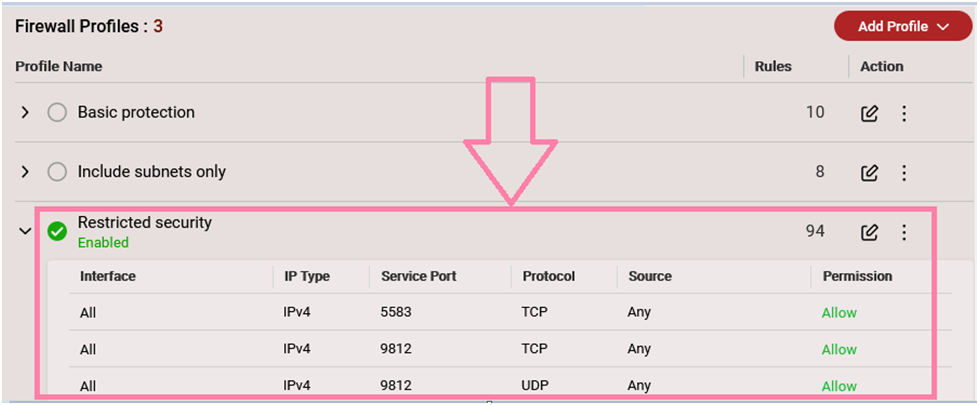
Do you recently apply a firewall in your network environment or enable QuFirewall in the NAS? Take QuFirewall as an example; the steps below show how to allow port 9812 and 5583 in the firewall rules.
- Tap on Edit and the find the port 9812 > move your mouse to the 3 bar icon of the rule (cursor icon will become a hand icon) > drag and drop both TCP and UDP 9812 to the top of the list.
- Tap on Edit and then add a new allow rule for TCP 5583
- Tap on Edit and the find the port 5583 > move your mouse to the 3 bar icon of the rule (cursor icon will become a hand icon) > drag and drop both TCP and UDP 5583 to the top of the list.
Could you try rebooting the NAS to see if the issue can be fixed afterward?If none of the above questions helps solve the issue, please contact QNAPsupport.