


My TVS-1271U-RP sometimes cannot detect existing disks and needs to reboot a couple of times in order to detect it. Why?
You may also refer to this solution if your TVS-1271U-RP cannot detect disk 9-disk 12 after installing the add-on network interface card.
This is a known issue and fixed in new BIOS version QW10IR12. To check the BIOS version you can run below command.

To update the BIOS, please follow the steps below:
-
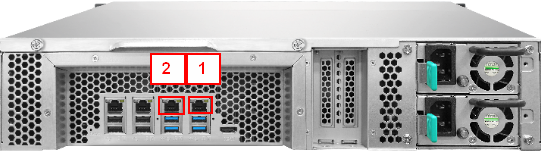
Connect two network cables to network port 1 & 2.
-
Download TVS-1271U-RP BIOS file from below link.
https://download.qnap.com/Storage/tsd/bios/TVS-1271U_QW10IR12.zip -
Extract the download BIOS file and copy files, flashrom and QW10IR12.ROM to NAS shared folder. (e.g. /share/Public)
-
Download below file, “e1000e.ko” and copy it into NAS shared folder (e.g. /share/Public)
https://download.qnap.com/Storage/tsd/bios/e1000e.ko -
Use Putty to connect to NAS (with Port 1 IP address) via SSH and login NAS console.
Before starting to flash the BIOS from the command line, you need to check and keep the MAC address of each internal network port. Run below commands to show each network port MAC address:
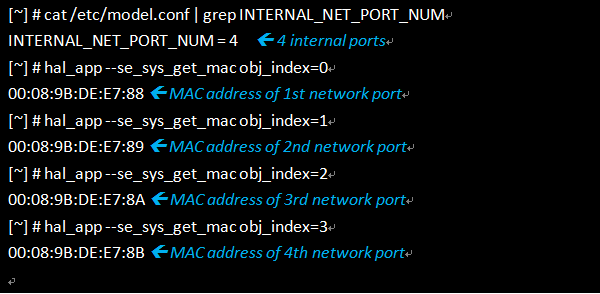
Please keep the above MAC addresses of each network port. Later you will need to write them back to the system.
Now we can start to flash the BIOS by running below commands:
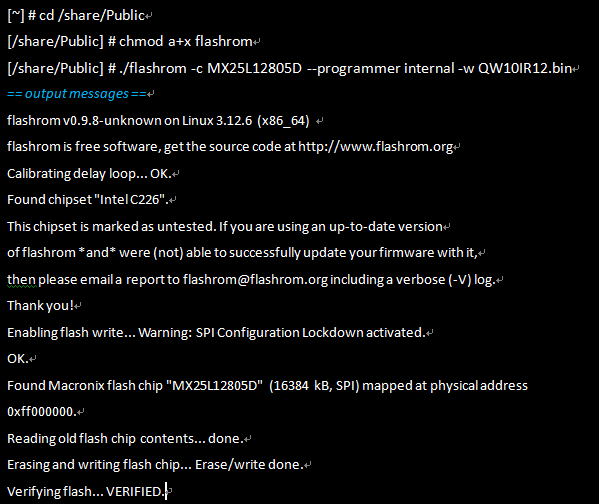
Once the BIOS flash is done, you will need to write the MAC addresses back to the system. For example, the MAC addresses we kept for each port are:
1st network port ➔ 00:08:9B:DE:E7:88
2nd network port ➔ 00:08:9B:DE:E7:89
3rd network port ➔ 00:08:9B:DE:E7:8A
4th network port ➔ 00:08:9B:DE:E7:8B
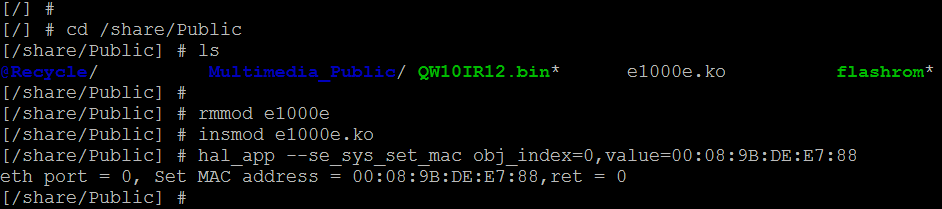
Then you can run the commands below to write back MAC addresses:
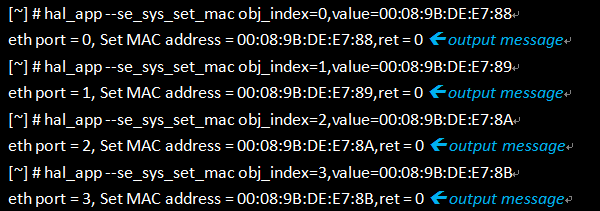
You may encounter an error when trying to write MAC address to 1st network port. In this case, please try below steps to replace the driver first. Before doing it, you need to re-connect to NAS console (with Port 2 IP address) via SSH because the network connection to Port 1 will disconnect during this process.
-
Reboot the NAS. Done.


