


What is the Maximum Number of Snapshots Supported and What Happens When the Limit is Reached?
最后修订日期:
2022-03-30
Applied models:
-
All NAS Series
Applied Firmware:
-
4.4.1 or above
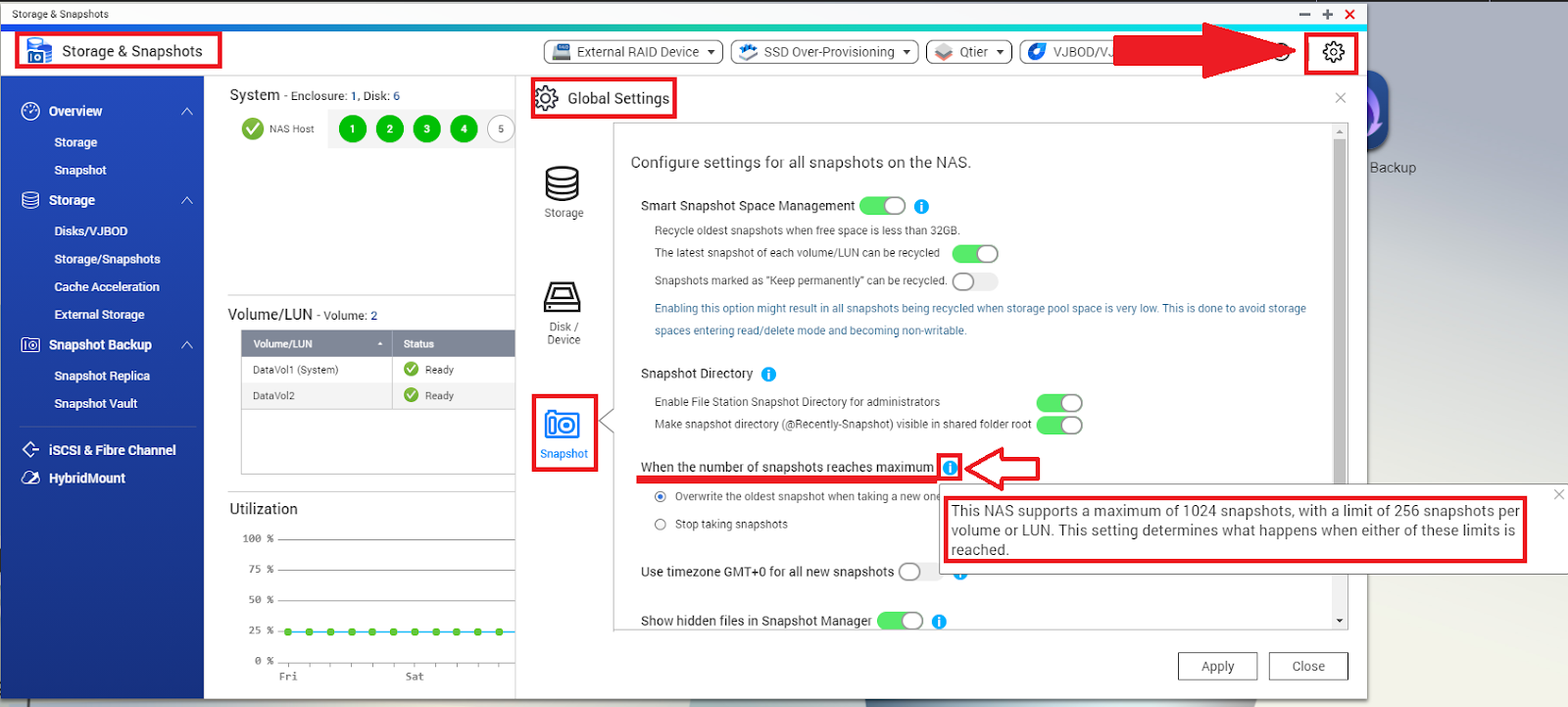
The maximum number of Snapshots supported by the NAS can be found in Storage & Snapshots Global Settings: open Storage & Snapshots > Global Settings > Snapshot, and click on the information bubble next to the option “When the number of snapshots reaches maximum”.
Additionally, this setting lets you configure the snapshots behavior when the limit is reached: either overwrite old snapshots when a new snapshot is taken, or stop taking snapshots.
需要进一步协助,欢迎前往官方社区发帖,与其他用户及 QNAP 专家交流。 前往 QNAP 官方社区


