Applicable Products
- QuTS hero h6.0.0 and later versions
Overview
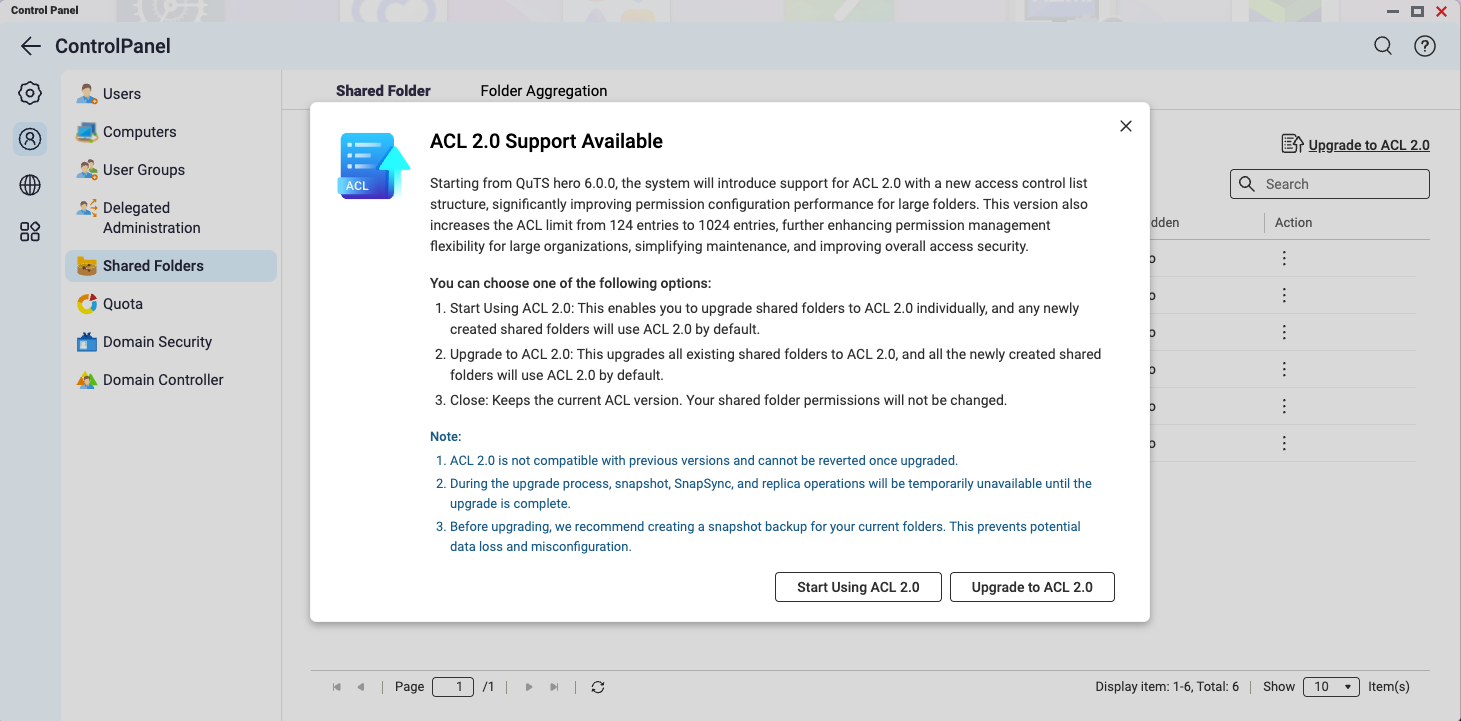
Starting from QuTS hero h6.0.0, the system introduces support for ACL 2.0, which features a new access control list structure that significantly improves permission configuration efficiency for larger shared folders.
In addition, the ACL entry limit has been increased from 124 to 1024, in which a maximum of 1020 entries can be configured via the user interface. This enhancement improves permission management flexibility for enterprise environments, simplifies maintenance, and strengthens overall access control security.
Procedure
To upgrade ACL to 2.0, follow these steps:
- Go to Control Panel > Privilege > Shared Folders and open the ACL 2.0 introduction window.
- Select an upgrade option:
- Start Using ACL 2.0: After confirmation, you can selectively upgrade shared folders to ACL 2.0 using the Upgrade to ACL 2.0 option in the Action column.
- Upgrade to ACL 2.0: Immediately enables ACL 2.0 and upgrades all existing shared folders to ACL 2.0.
Default settings for new shared folders: Newly created shared folders will use ACL 2.0 by default. You can switch back to ACL 1.0 in the Create Shared Folder wizard under Advanced Settings > Storage Settings if needed.
Limitations
- Compatibility: ACL 2.0 is not compatible with earlier firmware versions. Downgrading the firmware after enabling ACL 2.0 may cause storage pool errors and affect file access or backup features.
- Upgrade impact: During the upgrade process, Snapshot, SnapSync, and replica operations will be temporarily unavailable until the upgrade is complete.
Further Reading
How does upgrading to ACL 2.0 affect my use of Snapshot Manager?
适用产品
- QuTS hero h6.0.0 and later versions
概述
从 QuTS hero h6.0.0 开始,系统引入了对 ACL 2.0 的支持,该版本具有新的访问控制列表结构,大大提高了大型共享文件夹的权限配置效率。
此外,ACL 条目限制已从 124 增加到 1024,其中较多可通过用户界面配置 1020 个条目。此增强功能提高了企业环境的权限管理灵活性,简化了维护,并加强了整体访问控制安全性。
步骤
要升级到 ACL 2.0,请按照以下步骤操作:
- 前往控制台 > 权限 > 共享文件夹 并打开 ACL 2.0 介绍窗口。
- 选择一个升级选项:
- 开始使用 ACL 2.0:确认后,您可以使用升级到 ACL 2.0选项选择性地将共享文件夹升级到 ACL 2.0。操作列中。
- 升级到 ACL 2.0:立即启用 ACL 2.0 并将所有现有共享文件夹升级到 ACL 2.0。
新建共享文件夹的默认设置:新创建的共享文件夹将默认使用 ACL 2.0。您可以在创建共享文件夹向导中的优异设置 > 存储设置中切换回 ACL 1.0(如有需要)。
限制
- 兼容性:ACL 2.0 与早期固件版本不兼容。启用 ACL 2.0 后降级固件可能导致存储池错误,并影响文件访问或备份功能。
- 升级影响:在升级过程中,快照、SnapSync 和复制操作将暂时不可用,直到升级完成。
进一步阅读
升级到 ACL 2.0 如何影响我使用快照管理器?


