


How do I view ES NAS snapshots in Windows Explorer?
The scheduled snapshots captured in the ES NAS will be displayed in the "Previous Versions” list in Windows Explorer. To view manually-captured snapshots in the "Previous Versions” list, the snapshot file must be named according to the default naming conventions of QES.
You can also go into the NAS management interface, select the relevant option, and the “@Snapshot” directory will appear in the shared folder. This directory will contain records of all manually-captured and scheduled snapshots.
To display the Snapshot Directory in Windows File Explorer, log in to QES, go to "Storage Manager" > "Storage Space", and select the shared folder to configure. Next, click the snapshot button in the top-right corner, followed by Snapshot Manager. Click the Global Settings button in the top-right corner, and check the "Make snapshot directory (@Snapshot) visible” option.
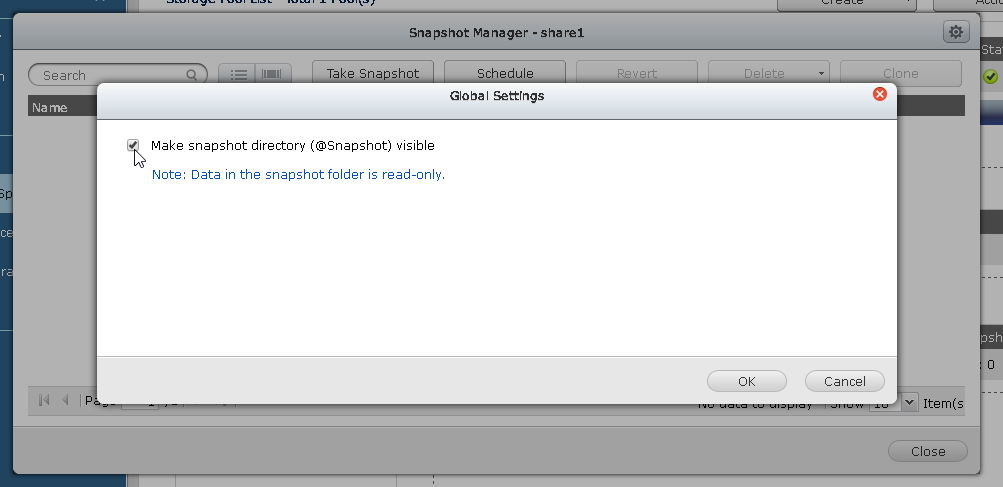
Enable this option in Snapshot Manager and the Snapshot Directory will be seen in the Client.
需要进一步协助,欢迎前往官方社区发帖,与其他用户及 QNAP 专家交流。 前往 QNAP 官方社区


