ADRA NDR Standalone
ADRA NDR Standalone is a network security solution built for SMEs, instantly transforming your QNAP NAS into an enterprise-grade Network Detection and Response (NDR) center. Simply connect a compatible QNAP switch to automatically identify malicious behaviors and isolate high-risk devices before threats escalate.
System Requirements
Hardware
- NAS device: Supports X73A series or higher models. (See the list below.)
- Switch: QNAP switch with NDR mode support. (See the list below.)
- Network Interface Card: Recommended to install 10GbE or higher expansion cards. (See the list below.)
Software Version
- QTS or QuTS hero 5.2.x
Important
The current version does not support High Availability (HA) architecture, which means ADRA NDR Standalone cannot be installed on QTS or QuTS hero 5.3.x.
Account Permissions
- Administrator User Group privileges required
Network Configuration
- NAS requires at least two physical network ports:
- One for management (Management Port)
- One for receiving mirrored traffic from the switch (Mirrored Port)
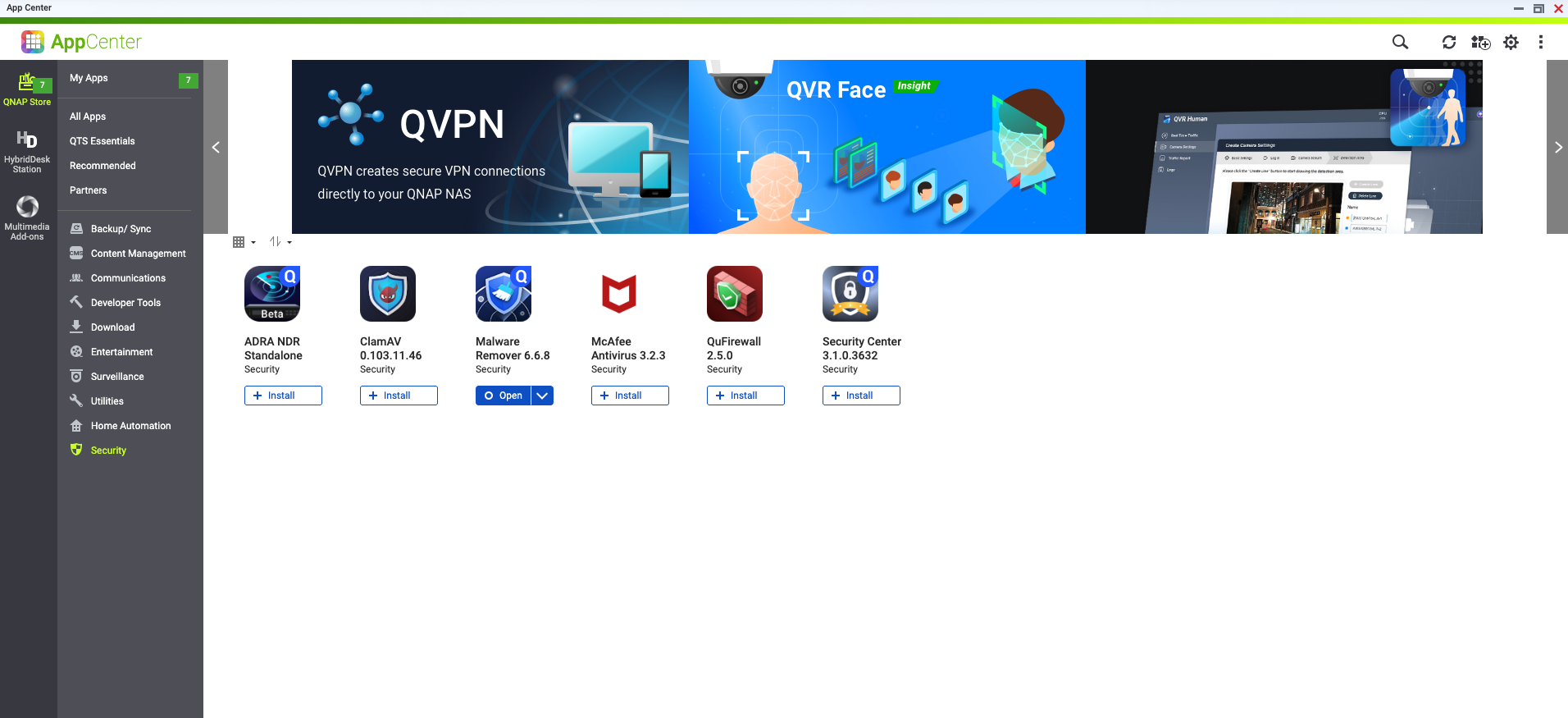
Step 1: Install ADRA NDR Standalone
- Log in to the QTS/QuTS hero management interface.
- Open App Center.
- Enter "ADRA NDR Standalone" in the search bar, or find the application in the "Security" category.
- Click "Install".
Step 2: Register QNAP Switch
After installation, you need to register the switch to establish an analysis channel.
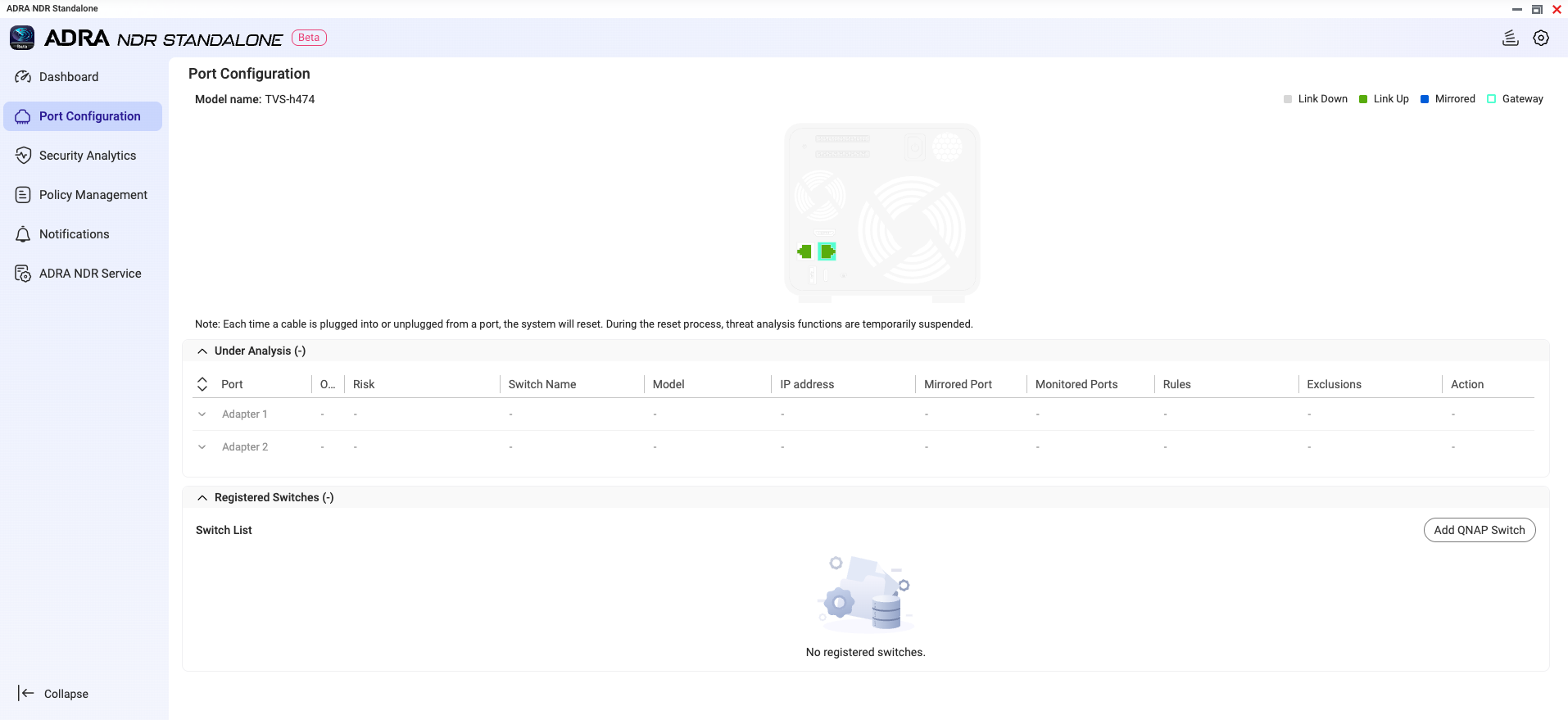
- Open the ADRA NDR Standalone application.
- Navigate to "Port Configuration" page.
- Click "Add QNAP Switch".
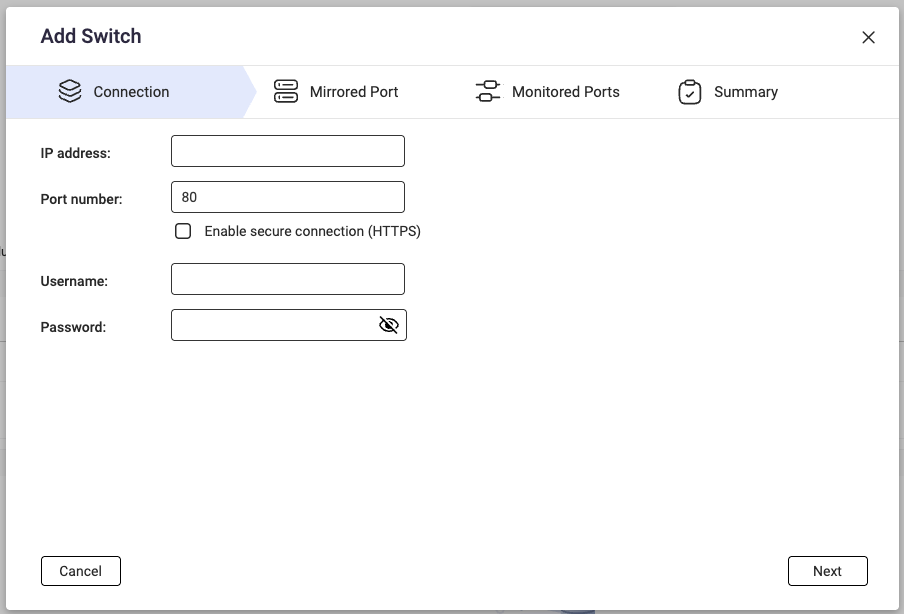
- Enter the switch connection information:
- IP Address
- Port Number
- Username
- Password
- Select the switch's Mirrored Port (the interface used to mirror traffic to the NAS).
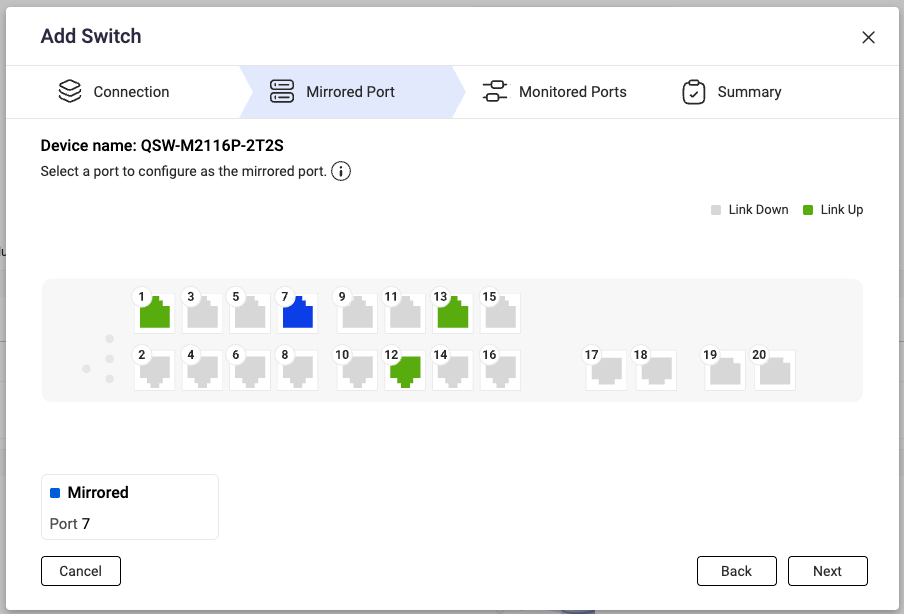
- Select the interfaces to monitor (Monitored Ports).
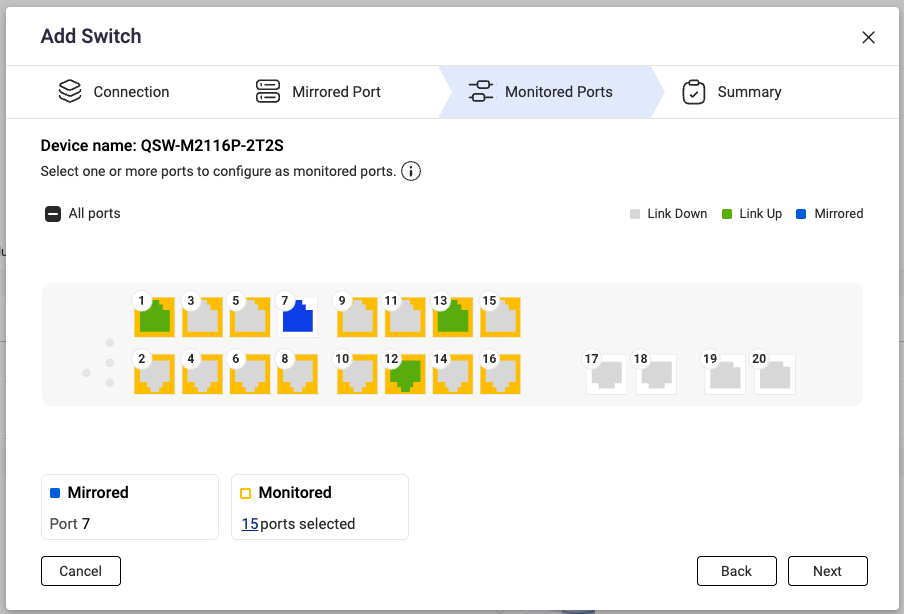
- After successful registration, the system will display a confirmation message. You can click "Configure now" to proceed to configure rules and exclusions.
Step 3: Connect Physical Network Cable
After completing switch registration, use a network cable to connect the switch's Mirrored Port to the NAS to begin receiving traffic for analysis.
Other Configuration (Optional)
Rules
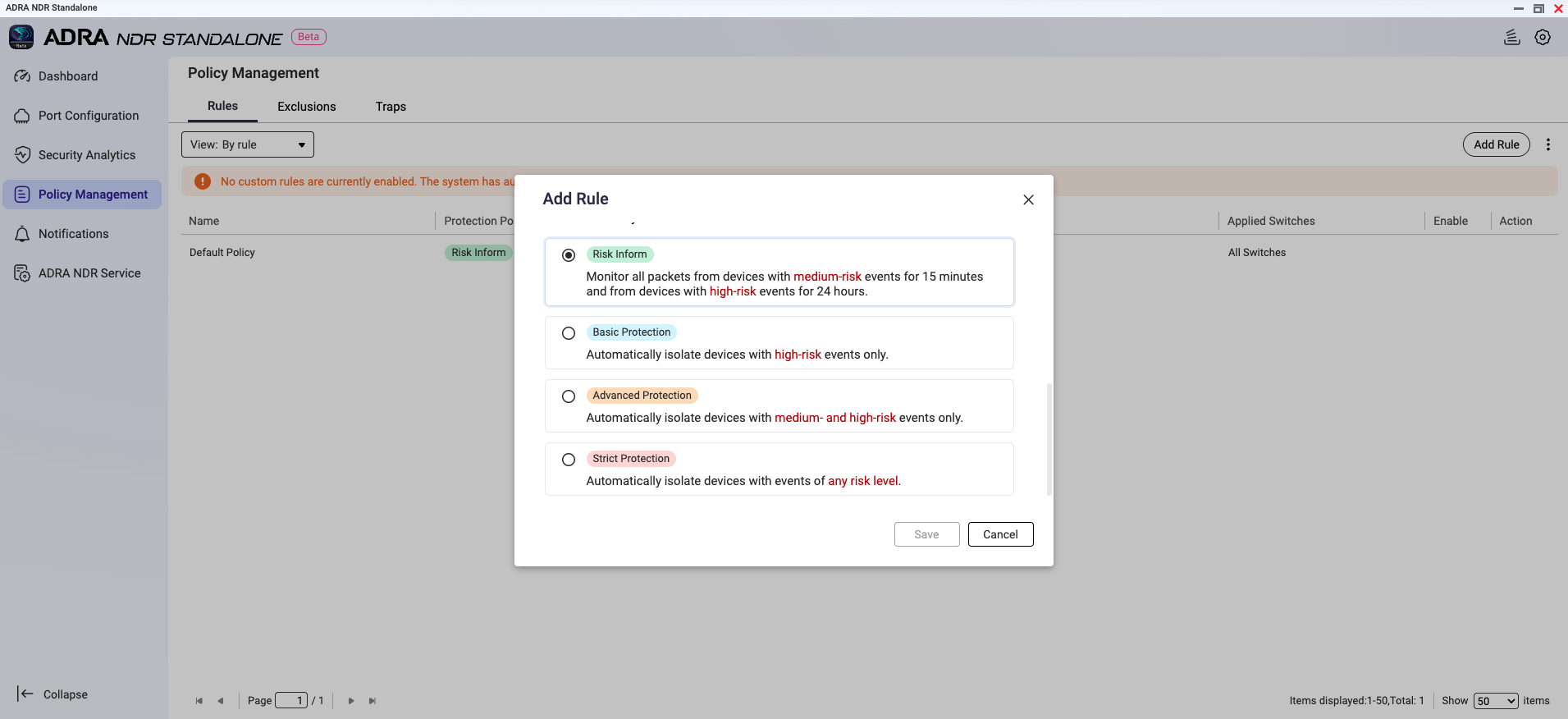
ADRA NDR Standalone provides multiple protection policies. You can select the appropriate rule based on your organization's risk tolerance.
- Navigate to "Policy Management" > "Rules".
- Select one of the following protection policies:
- Strict Protection: Automatically blocks all potentially risky devices
- Advanced Protection: Automatically blocks medium and high-risk devices
- Basic Protection: Automatically blocks high-risk devices only
- Risk Inform: Only sends alert notifications without actively intervening connections (suitable for observation period during initial deployment)
Exclusion List
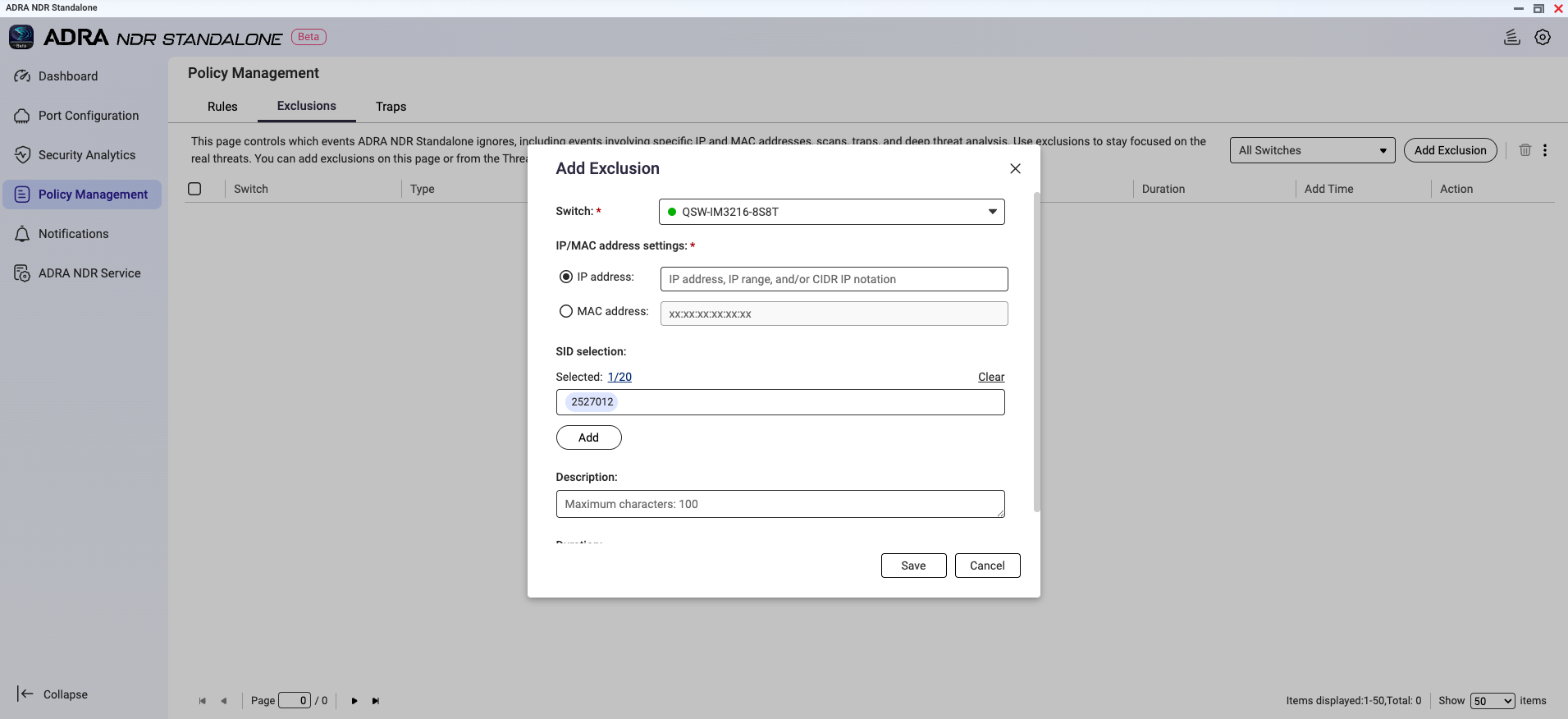
To avoid false alarms from specific devices or events, you can configure an exclusion list.
- Navigate to "Policy Management" > "Exclusions".
- Add devices to exclude or select specific SIDs for granular exclusions.
Traps
ADRA NDR Standalone features built-in honeypot technology that can create virtual traps in your internal network to detect potential attackers.
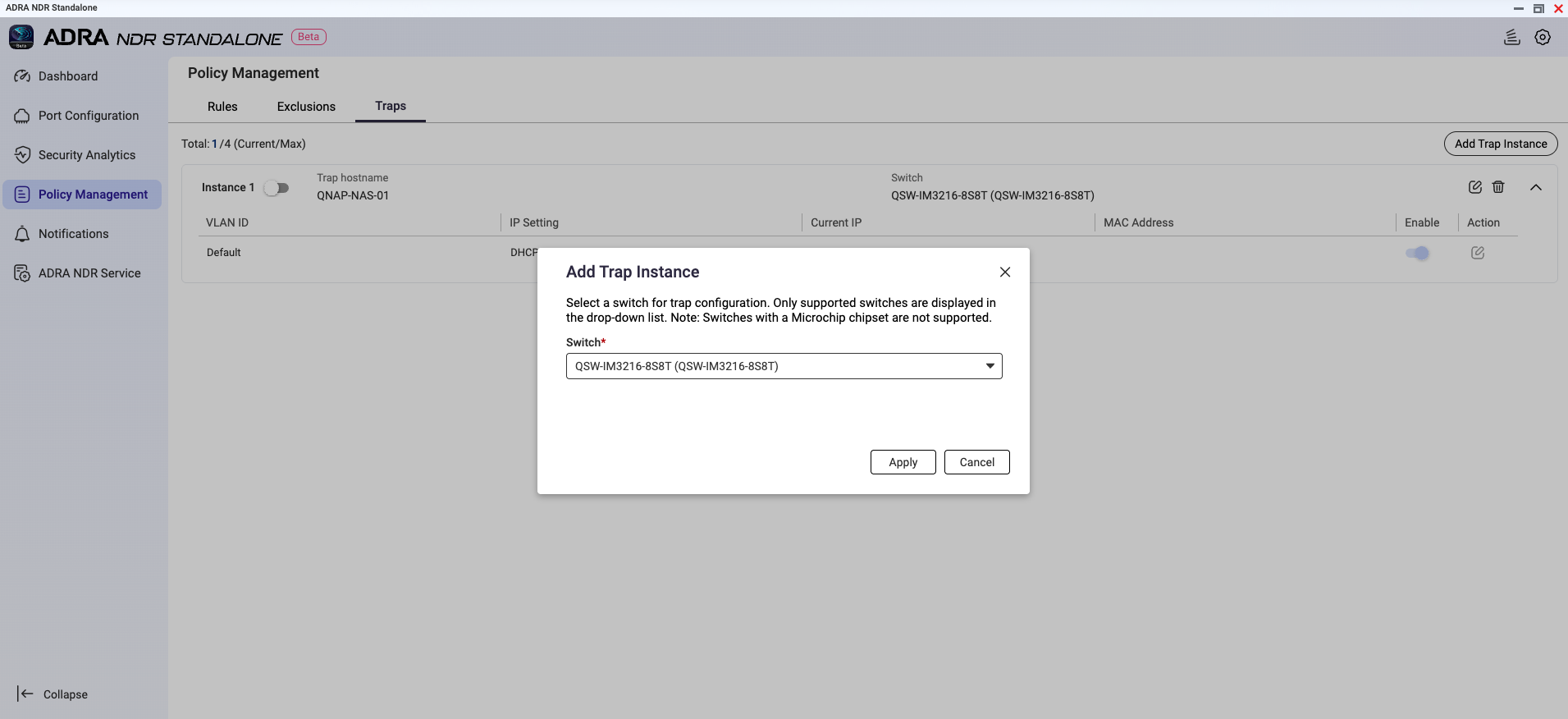
- Navigate to "Policy Management" > "Traps".
- Select a switch to configure trap instances.
Important
QSW-M2116P-2T2S does not support trap configuration due to chipset limitations.
- Once a device accesses these non-existent IPs, the system will identify it as a potential attacker and issue an alert.
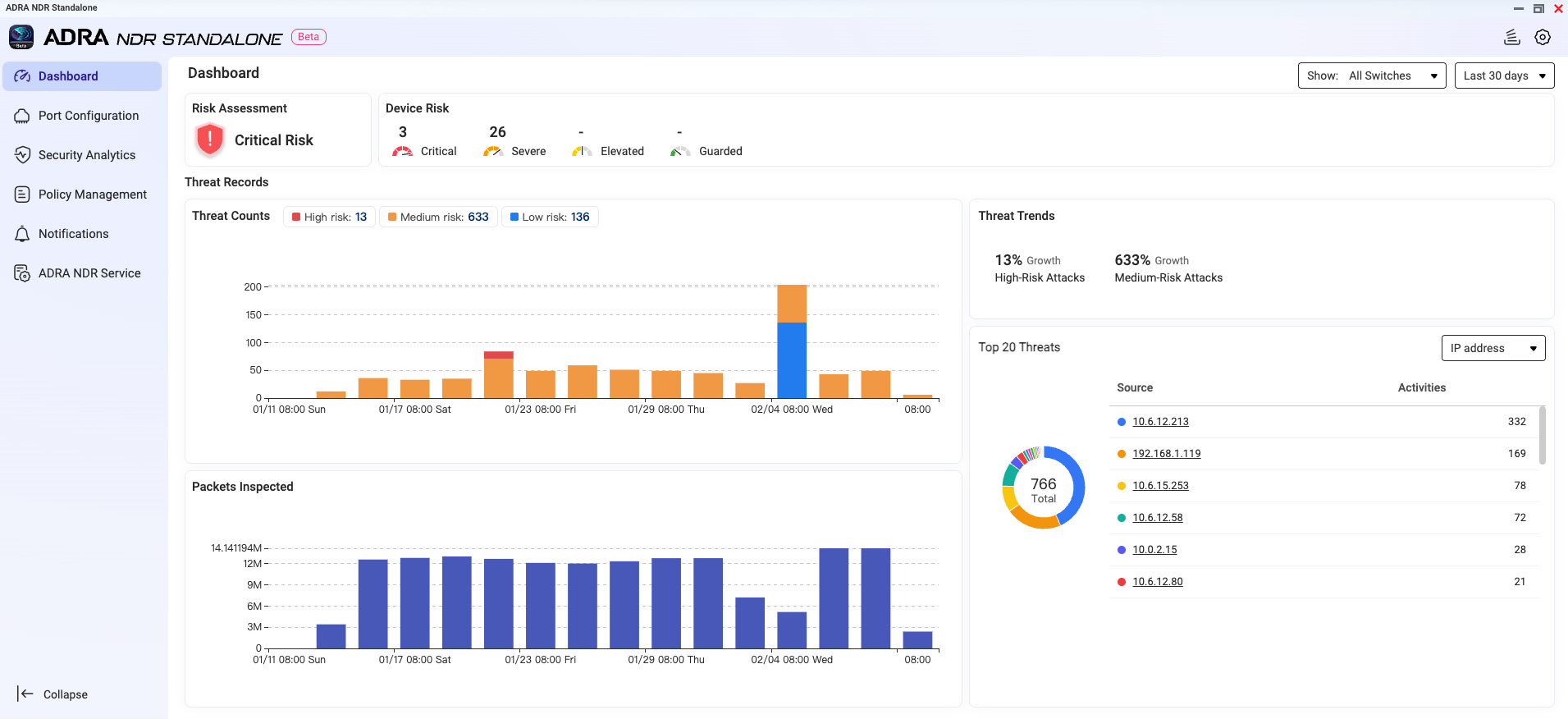
Monitor Dashboard
After completing all configurations, you can monitor your internal network's security status in real-time through the Dashboard.
The dashboard displays:
- Current environment risk level
- Number of detected risky devices
- Recent threat event trends
Frequently Asked Questions
Q: Why can't I find ADRA NDR Standalone in App Center?
A: Please verify the following:
- Your NAS model is in the supported list
- Operating system has been updated to QTS/QuTS hero 5.2.x
- Your account has Administrator privileges
Q: What are Mirrored Port and Monitored Port?
A: Monitored Port is the interface on the switch where traffic needs to be monitored. Mirrored Port is the interface that copies traffic from Monitored Ports and sends it to the NAS.
Q: Does it support High Availability (HA) architecture?
A: Currently, v0.9.0 Beta does not support HA architecture, which means ADRA NDR Standalone cannot be installed on QTS or QuTS hero 5.3.x.
Support NAS Model
| TS-473A / TS-673A / TS-873A / TS-h973AX |
| TS-1273AU-RP / TS-1273AU / TS-1673AU-RP / TS-873AU-RP / TS-873AU / TS-873AeU-RP / TS-873AeU |
| TVS-h474 / TVS-h674 / TVS-h874 / TVS-h474X / TVS-h674T / TVS-h674X / TVS-h874T / TVS-h874X |
| TS-1277 / TS-1677X / TS-677 / TS-877 |
| TS-1277XU-RP / TS-1277XU / TS-1677XU-RP / TS-1677XU / TS-2477XU-RP / TS-2477XU / TS-877XU-RP / TS-877XU / TS-h977XU-RP / TS-h977XU |
| TVS-1282 / TVS-682 / TVS-882 / TVS-882BR |
| TS-h1283XU-RP / TS-1283XU-RP / TS-1283XU / TS-h1683XU-RP / TS-1683XU-RP / TS-1683XU / TS-h2483XU-RP / TS-2483XU-RP / TS-2483XU / TS-883XU-RP/ TS-883XU / TS-983XU-RP / TS-983XU |
| TES-1885U / TES-3085U / TS-h1886XU R2 / TS-h1886XU-RP R2 / TS-1886XU-RP / TS-1886XU |
| TS-h1887XU-RP / TS-h1887XU / TS-h2287XU-RP / TS-h2287XU / TS-h3087XU-RP / TS-h3087XU / TS-h987XU-RP / TS-h987XU |
| TS-2888X / TVS-h1288X / TVS-h1688X |
| TS-h3088XU-RP / TS-3088XU-RP / TS-h3088XU |
| TDS-h2489FU R2 / TDS-h2489FU |
| QAI-h1290FX / TS-h1290FX |
| TS-h1090FU / TS-h2490FU |
Compatible QNAP Switch
| QSW-M2116P-2T2S |
| QSW-M3212R-8S4T / QSW-M3216R-8S8T / QSW-IM3216-8S8T / QSW-M3224-24T |
| QSW-M7308R-4X |
Compatible Network Interface Card
QXG-100G2SF-E810
|
QXG-25G2SF-E810
|
QXG-10G2SF-NXE
|
QXG-ES10G1T
|
QXG-10G1T
|
QXG-10G1TB
|
QM2-10G2T
|
QM2-2P10G1TB
|
QXG-2G4T-I225
|
ADRA NDR 独立版
ADRA NDR 独立版是一款为中小企业打造的网络安优化方案,可瞬间将您的 QNAP NAS 转变为企业级网络检测与响应 (NDR) 中心。只需连接兼容的 QNAP 交换机,即可自动识别恶意行为并在威胁升级前隔离高风险设备。
系统要求
硬件
- NAS 设备:支持 X73A 系列或更高型号。(请参见下方列表。)
- 交换机:支持 NDR 模式的 QNAP 交换机。(请参见下方列表。)
- 网络接口卡:建议安装 10GbE 或更高的扩展卡。(请参见下方列表。)
软件版本
- QTS 或 QuTS hero 5.2.x
重要事项
当前版本不支持高可用性 (HA) 架构,这意味着 ADRA NDR 独立版无法安装在 QTS 或 QuTS hero 5.3.x 上。
账户权限
网络配置
- NAS 需要至少两个物理网络端口:
- 一个用于管理(管理端口)
- 一个用于接收来自交换机的镜像流量(镜像端口)
步骤 1:安装 ADRA NDR 独立版
- 登录到 QTS/QuTS hero 管理界面。
- 打开App Center。
- 在搜索栏中输入 "ADRA NDR 独立版",或在"安全" 类别中找到该应用程序。
- 点击 "安装"。
步骤 2:注册 QNAP 交换机
安装后,您需要注册交换机以建立分析通道。
- 打开 ADRA NDR 独立版应用程序。
- 导航到“端口配置”页面。
- 点击“添加 QNAP 交换机”。
- 输入交换机连接信息:
- IP 地址
- 端口号
- 用户名
- 密码
- 选择交换机的镜像端口 (用于将流量镜像到 NAS 的接口)。
- 选择要监控的接口(监控端口)。
- 注册成功后,系统将显示确认信息。您可以点击“立即配置”以继续配置规则和排除项。
步骤 3:连接物理网络线缆
完成交换机注册后,使用网线将交换机的镜像端口连接到 NAS,以开始接收流量进行分析。
其他配置(可选)
规则
ADRA NDR Standalone 提供多种保护策略。您可以根据组织的风险承受能力选择合适的规则。
- 导航到“策略管理” > “规则”。
- 选择以下保护策略之一:
- 严格保护:自动阻止所有潜在风险设备
- 优异保护:自动阻止中高风险设备
- 基本保护:仅自动阻止高风险设备
- 风险通知:仅发送警报通知,不主动干预连接(适用于初始部署的观察期)
排除列表
为避免特定设备或事件的误报,您可以配置排除列表。
- 导航到“策略管理” > “排除项”。
- 添加要排除的设备或选择特定 SID 进行细粒度排除。
诱捕器
ADRA NDR Standalone 具有内置的蜜罐技术,可以在您的内部网络中创建虚拟诱捕器以检测潜在攻击者。
- 导航到“策略管理” > “诱捕器”。
- 选择一个交换机以配置诱捕实例。
重要
由于芯片组限制,QSW-M2116P-2T2S 不支持诱捕配置。
- 一旦设备访问这些不存在的 IP,系统将识别其为潜在攻击者并发出警报。
监控仪表板
完成所有配置后,您可以通过仪表板实时监控内部网络的安全状态。
仪表板显示:
- 当前环境风险等级
- 检测到的风险设备数量
- 近期威胁事件趋势
常见问题
问:为什么我在 App Center 中找不到 ADRA NDR Standalone?
答:请确认以下几点:
- 您的 NAS 型号在支持列表中
- 操作系统已更新至 QTS/QuTS hero 5.2.x
- 您的账户具有管理员权限
问:什么是镜像端口和监控端口?
答:监控端口是交换机上需要监控流量的接口。镜像端口是从监控端口复制流量并将其发送到 NAS 的接口。
问:它支持高可用性 (HA) 架构吗?
答:目前,v0.9.0 Beta 不支持 HA 架构,这意味着 ADRA NDR Standalone 无法安装在 QTS 或 QuTS hero 5.3.x 上。
支持的 NAS 型号
| TS-473A / TS-673A / TS-873A / TS-h973AX |
| TS-1273AU-RP / TS-1273AU / TS-1673AU-RP / TS-873AU-RP / TS-873AU / TS-873AeU-RP / TS-873AeU |
| TVS-h474 / TVS-h674 / TVS-h874 / TVS-h474X / TVS-h674T / TVS-h674X / TVS-h874T / TVS-h874X |
| TS-1277 / TS-1677X / TS-677 / TS-877 |
| TS-1277XU-RP / TS-1277XU / TS-1677XU-RP / TS-1677XU / TS-2477XU-RP / TS-2477XU / TS-877XU-RP / TS-877XU / TS-h977XU-RP / TS-h977XU |
| TVS-1282 / TVS-682 / TVS-882 / TVS-882BR |
| TS-h1283XU-RP / TS-1283XU-RP / TS-1283XU / TS-h1683XU-RP / TS-1683XU-RP / TS-1683XU / TS-h2483XU-RP / TS-2483XU-RP / TS-2483XU / TS-883XU-RP/ TS-883XU / TS-983XU-RP / TS-983XU |
| TES-1885U / TES-3085U / TS-h1886XU R2 / TS-h1886XU-RP R2 / TS-1886XU-RP / TS-1886XU |
| TS-h1887XU-RP / TS-h1887XU / TS-h2287XU-RP / TS-h2287XU / TS-h3087XU-RP / TS-h3087XU / TS-h987XU-RP / TS-h987XU |
| TS-2888X / TVS-h1288X / TVS-h1688X |
| TS-h3088XU-RP / TS-3088XU-RP / TS-h3088XU |
| TDS-h2489FU R2 / TDS-h2489FU |
| QAI-h1290FX / TS-h1290FX |
| TS-h1090FU / TS-h2490FU |
兼容的 QNAP 交换机
| QSW-M2116P-2T2S |
| QSW-M3212R-8S4T / QSW-M3216R-8S8T / QSW-IM3216-8S8T / QSW-M3224-24T |
| QSW-M7308R-4X |
兼容的网络接口卡
QXG-100G2SF-E810
|
QXG-25G2SF-E810
|
QXG-10G2SF-NXE
|
QXG-ES10G1T
|
QXG-10G1T
|
QXG-10G1TB
|
QM2-10G2T
|
QM2-2P10G1TB
|
QXG-2G4T-I225
|


