


Received an Upcoming License Expiration Email but Unable to Locate It in the License Center
Applicable Products
myQNAPcloud SSL certificate
Scenario
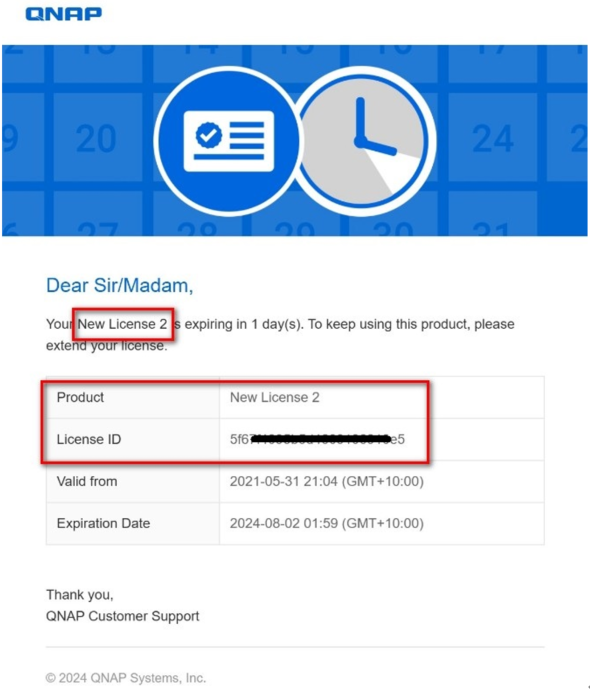
I received an email notification to tell me that my license is expiring soon, like below. But I don't know which license of mine expires soon and I cannot even find it in the License Center of my NAS.
Solution
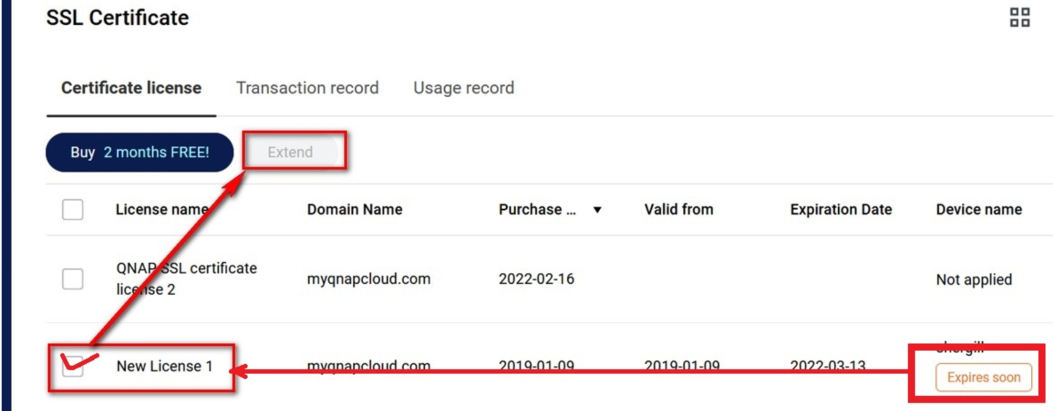
Regarding the 'New License' mentioned in the QNAP email, it refers to the myQNAPcloud SSL certificate product. If you find that the default name of the SSL certificate can easily confuse with other licenses, you can change it from 'New License' to a specified name on the myQNAPcloud website (https://www.myqnapcloud.com/) -> SSL Certificate page.
Additionally, you can purchase an extended SSL certificate on the myQNAPcloud website (https://www.myqnapcloud.com/) and then renew your SSL certificate on the NAS.
需要进一步协助,欢迎前往官方社区发帖,与其他用户及 QNAP 专家交流。 前往 QNAP 官方社区


