Applicable Products
QuTS hero h5.3.0 and later, HDP for SaaS
Starting from version 2.4, the product previously known as Boxafe has been renamed to HDP for SaaS.
Scenario A (HDP for SaaS 2.3.0 and later)
In a High Availability (HA) environment, you have activated licenses on both active node and passive node. When an HA switchover occurs, HDP for SaaS (Boxafe) automatically reassigns the licenses to your users and services. However, if the license on the new active node is missing, inconsistent, or expired, HDP for SaaS (Boxafe) cannot reassign licenses, and the license status will become Not Available. As a result, backup tasks on the new active node will fail.
Solutions
To continue backing up user/service data in HDP for SaaS (Boxafe) on the new active node after an HA switchover over, you must verify the statuses of your licenses or purchase and activate new licenses:
Verify license status on both nodes
- Log in to the new active node as an administrator.
- Open License Center.
- Go to HA License.
- HDP for SaaS (Boxafe) licenses appear both in the Active Node License tab and Passive Node License tab.
- Ensure that HDP for SaaS (Boxafe) licenses meet all of the following conditions:
- HDP for SaaS (Boxafe) licenses are activated on both the active node and the passive node.
- The license plans on both the active and passive node are the same. For example, the following licenses are the same:
- Active node: HDP for SaaS for Microsoft 365, 10 Users, 1 Month
- Passive node: HDP for SaaS for Microsoft 365, 10 Users, 1 Month
- The licenses are valid and not expired on both the active node and pasive nde.
- If all of the above conditions are met, HDP for SaaS (Boxafe) will automatically reassign licenses to users/services after the HA switchover, and backup tasks will continue.
Optional: Purchase and activate additional HDP for SaaS (Boxafe) licenses on both nodes
In order for HDP for SaaS (Boxafe) to support High Availability environments, you need to purchase two identical HDP for SaaS (Boxafe) licenses and activate one on the active node and one on the passive node. Both active and passive nodes must have the same HDP for SaaS (Boxafe) license for an HA switch over to successfully occur.
- Purchase two new HDP for SaaS (Boxafe) licenses.
- Log in to the active node as an administrator.
- Open License Center.
- Go to HA License.
- Go to the Active Node Licenses tab.
- Click on +Activate License.
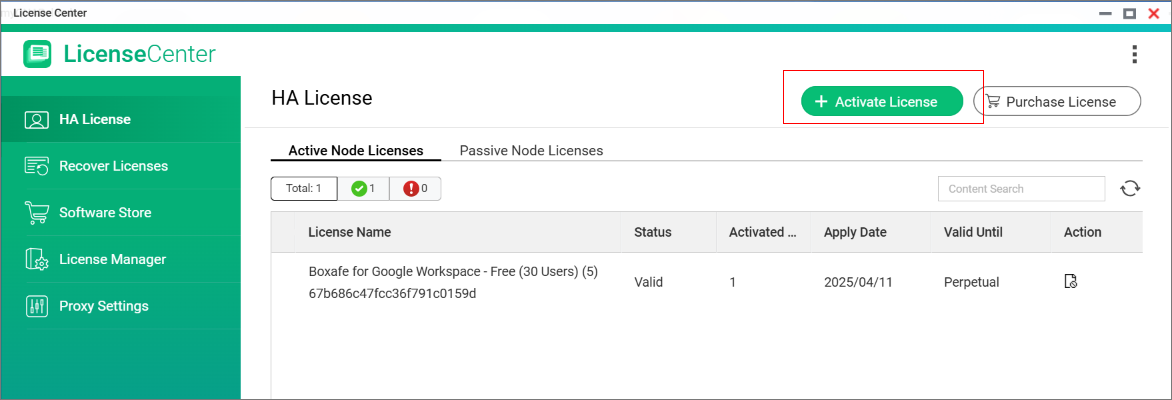 The License Activation - Active and Passive Nodes window opens.
 - Select a HDP for SaaS (Boxafe) license.
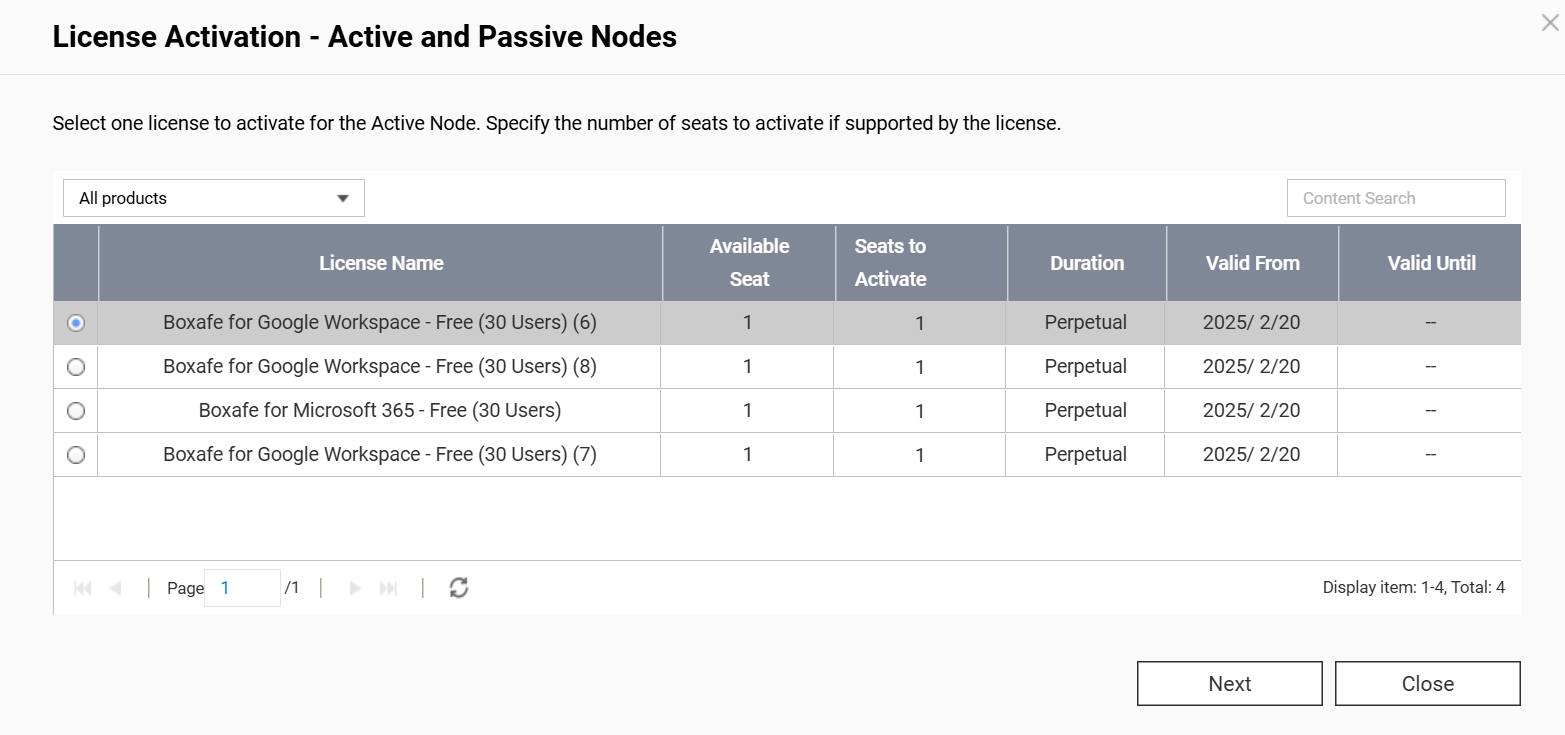
- Click Next.
- The License Activation - Active and Passive Nodes window asks you to additionally activate the same license type on the passive node. Click Yes to confirm license activation on the passive node.
- After the License Activation - Active and Passive Node window closes, view the status of your licenses on the Active Node Licenses and Passive Node Licenses tab. If the activation was successful, then the status of your licenses will be "valid" on both nodes.
- Activate remaining HDP for SaaS (Boxafe) licenses by repeating the previous steps 5-9.
- After activating all the licenses, HDP for SaaS (Boxafe) will automatically reassign licenses to any users/services.
Scenario B (HDP for SaaS 2.2.2 and earlier)
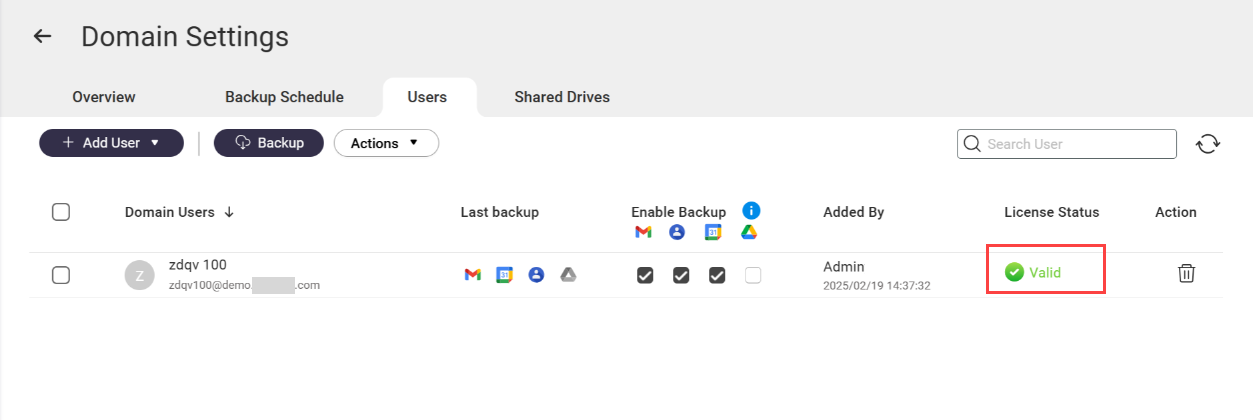
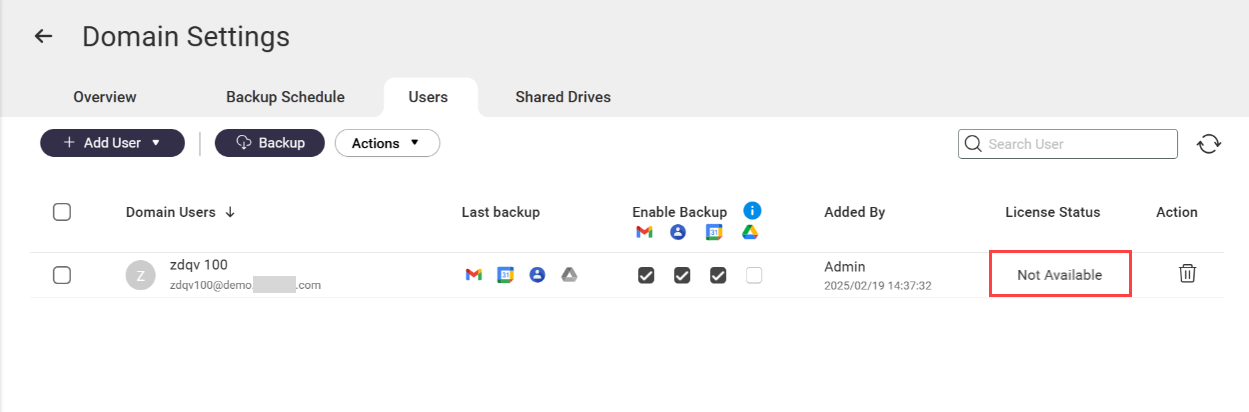
You have assigned HDP for SaaS (Boxafe) licenses to users or services on an active node in a High Availability (HA) environment and a HA switchover occurs. After the switchover, the HDP for SaaS (Boxafe) licenses on the new active node are not assigned to any users/services and they have the license status Not available. As a result, HDP for SaaS (Boxafe) cannot backup data for the users/services on the new active node.
Active node before switchover
New active node after switchover
Solution
To continue backing up user/service data in HDP for SaaS (Boxafe) on the new active node after an HA switcher over, perform the following steps:
1. Activate HDP for SaaS (Boxafe) licenses on the new active node
Important
If you previously activated HDP for SaaS (Boxafe) licenses on both active and passive nodes before the switchover occurred, you can skip this step.
- Log in to the new active node as an administrator.
- Open License Center.
- Go to HA License.
- Go to the Active Node Licenses tab.
- Click on +Activate License.
The License Activation - Active and Passive Nodes window opens. - Select a HDP for SaaS (Boxafe) license.
- Click Next.
- The License Activation - Active and Passive Nodes window asks you to actviate licenses for the passive node. Since you do not need to activate licenses for a passive node, click Close to skip this operation.
- After the License Activation - Active and Passive Node window closes, view the status of your licenses on the Active Node Licenses tab. If the activation was successful, then the status of your licenses will be "valid".
- Activate remaining HDP for SaaS (Boxafe) licenses by repeating the previous steps 5-9.
2. Assign HDP for SaaS (Boxafe) licenses on the new active node
To assign HDP for SaaS (Boxafe) licenses to the required users and services on the new active node, do the following:
- Open HDP for SaaS (Boxafe) on the new active node.
- Go to Domains.
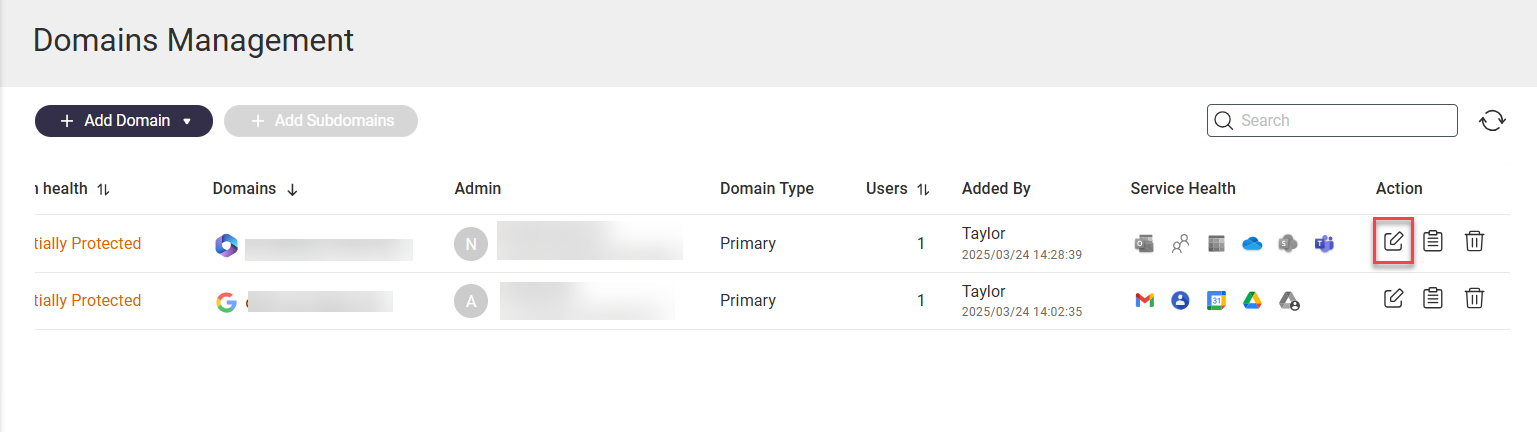
- Locate a domain and click
 in the Action column to open the Domain Settings page for the domain.
- Click the Users tab or a service tab such as Shared Drive.
- Select one or more user or service accounts.
- Click Actions > Licenses > Assign.
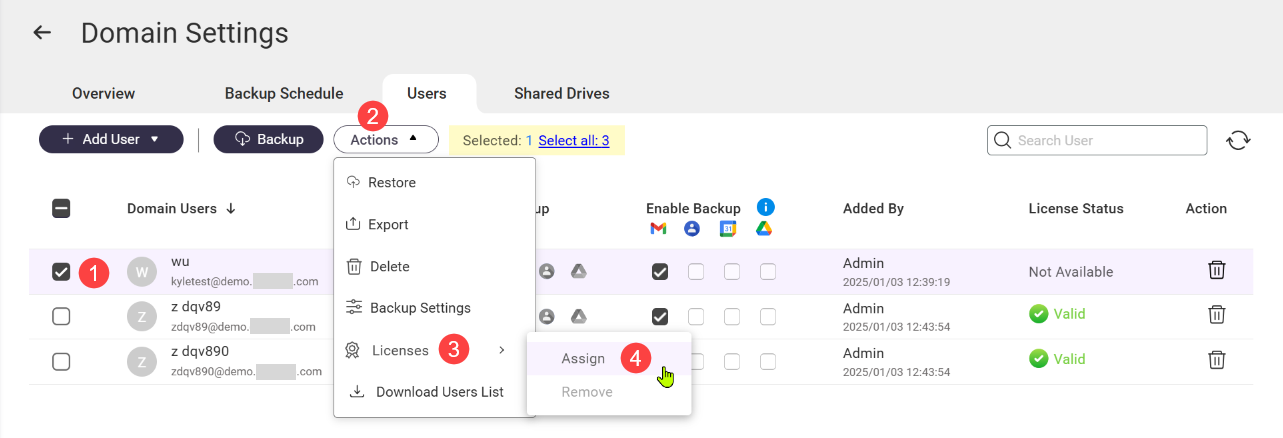 The Select HDP for SaaS (Boxafe) License for Users window opens.
 - Select valid licenses.
- Click Select.
The selected licenses are applied to the selected users/services and HDP for SaaS (Boxafe) can now backup the selected users/services on the new active node.
Further Reading
Official Boxafe product page
QTS User Guide
QuTS hero User Guide
适用产品
QuTS hero h5.3.0 及更高版本,HDP for SaaS
从 2.4 版本开始,之前称为 Boxafe 的产品已更名为 HDP for SaaS。
场景 A(HDP for SaaS 2.3.0 及更高版本)
在高可用性(HA)环境中,您已在活动节点和被动节点上激活了许可证。当发生 HA 切换时,HDP for SaaS(Boxafe)会自动将许可证重新分配给您的用户和服务。但是,如果新活动节点上的许可证缺失、不一致,或已过期,HDP for SaaS(Boxafe)无法重新分配许可证,并且许可证状态将变为不可用。因此,新活动节点上的备份任务将失败。
解决方案
要在 HA 切换后继续在新活动节点上备份用户 / 服务数据,您必须验证许可证的状态或购买并激活新的许可证:
验证两个节点上的许可证状态
- 以管理员身份登录到新活动节点。
- 打开许可证中心。
- 进入HA 许可证。
- HDP for SaaS(Boxafe)许可证同时出现在活动节点许可证选项卡和被动节点许可证选项卡中。
- 确保 HDP for SaaS(Boxafe)许可证满足以下所有条件:
- HDP for SaaS(Boxafe)许可证在活动节点和被动节点上均已激活。
- 活动节点和被动节点上的许可证计划相同。例如,以下许可证是相同的:
- 活动节点:HDP for SaaS for Microsoft 365,10 用户,1 个月
- 被动节点:HDP for SaaS for Microsoft 365,10 用户,1 个月
- 活动节点和被动节点上的许可证均有效且未过期。
- 如果满足以上所有条件,HDP for SaaS (Boxafe) 将在 HA 切换后自动重新分配许可证给用户 / 服务,并继续备份任务。
可选:在两个节点上购买并激活额外的 HDP for SaaS (Boxafe) 许可证
为了让 HDP for SaaS (Boxafe) 支持高可用性环境,您需要购买两个相同的 HDP for SaaS (Boxafe) 许可证,并在活动节点和被动节点上分别激活。活动和被动节点必须拥有相同的 HDP for SaaS (Boxafe) 许可证,才能成功进行 HA 切换。
- 购买两个新的 HDP for SaaS (Boxafe) 许可证。
- 以管理员身份登录活动节点。
- 打开许可证中心。
- 前往HA 许可证。
- 前往活动节点许可证选项卡。
- 点击+ 激活许可证。
将打开许可证激活 - 活动和被动节点窗口。 - 选择一个HDP for SaaS (Boxafe) 许可证。
- 点击下一步。
- 该许可证激活 - 活动和被动节点窗口要求您在被动节点上额外激活相同类型的许可证。点击是以确认在被动节点上激活许可证。
- 在许可证激活 - 主动和被动节点窗口关闭后,在主动节点许可证和被动节点许可证选项卡中查看许可证的状态。如果激活成功,那么在两个节点上许可证的状态将为“有效”。
- 通过重复之前的步骤 5 -9,激活剩余的HDP for SaaS (Boxafe) 许可证。
- 激活所有许可证后,HDP for SaaS (Boxafe)将自动重新分配许可证给任何用户 / 服务。
场景 B(HDP for SaaS 2.2.2 及更早版本)
您已在高可用性(HA)环境中的主动节点上将HDP for SaaS (Boxafe) 许可证分配给用户或服务,并且发生了 HA 切换。切换后,新主动节点上的HDP for SaaS (Boxafe) 许可证未分配给任何用户 / 服务,并且它们的许可证状态为不可用。因此,HDP for SaaS (Boxafe)无法为新主动节点上的用户 / 服务备份数据。
切换前的主动节点
切换后的新主动节点
解决方案
要在 HA 切换后继续在新主动节点上使用HDP for SaaS (Boxafe)备份用户 / 服务数据,请执行以下步骤:
1. 在新的活动节点上激活 SaaS (Boxafe) 许可证的 HDP
重要提示
如果您之前在切换发生前已在活动和被动节点上激活了 SaaS (Boxafe) 许可证的 HDP,您可以跳过此步骤。
- 以管理员身份登录新的活动节点。
- 打开许可证中心。
- 前往 HA 许可证。
- 前往 活动节点许可证 标签。
- 点击+ 激活许可证。
将打开许可证激活 - 活动和被动节点窗口。 - 选择一个HDP for SaaS (Boxafe) 许可证。
- 点击 下一步。
- 该 许可证激活 - 活动和被动节点 窗口要求您为被动节点激活许可证。由于您不需要为被动节点激活许可证,请点击 关闭 以跳过此操作。
- 在 许可证激活 - 活动和被动节点 窗口关闭后,查看您的许可证的状态于 活动节点许可证 标签。如果激活成功,那么您的许可证状态将为“有效”。
- 通过重复之前的步骤 5 -9,激活剩余的HDP for SaaS (Boxafe) 许可证。
2. 在新的活动节点上分配 HDP for SaaS (Boxafe) 许可证
要将 HDP for SaaS (Boxafe) 许可证分配给新活动节点上的所需用户和服务,请执行以下操作:
- 在新的活动节点上打开 HDP for SaaS (Boxafe)。
- 转到域。
- 找到一个域并点击,在操作列中打开该域的域设置页面。
- 点击用户选项卡或服务选项卡,例如共享驱动器。
- 选择一个或多个用户或服务账户。
- 点击操作 > 许可证 > 分配。
打开选择HDP for SaaS (Boxafe) 许可证用户窗口。 - 选择有效的许可证。
- 点击选择。
所选的许可证将应用于所选用户 / 服务,HDP for SaaS (Boxafe) 现在可以在新的活动节点上备份所选用户 / 服务。
进一步阅读
官方 Boxafe 产品页面
QTS 用户指南
QuTS hero 用户指南


