Applicable Products
QVPN Device Client - Windows
Intel® Killer™ Wireless Adapters
Intel® Wi-Fi 7 Wireless Adapters
Scenario
You use QVPN Device Client together with an Intel® Killer™ wireless adapter or an Intel® Wi-Fi 7 wireless adapter, and you notice network connection issues.
Solution
Intel® Killer™ wireless adapters leverage the Killer Control Center application to ensure optimal bandwidth allocation for speed-critical applications. The application offloads processing of the TCP/IP stack from the device's processor to the network adapter. This may cause issues when using third-party applications, including QVPN Device Client, that rely on the device's process to perform VPN functions.
Ensure that you disable Killer Prioritization Engine and Intel Connectivity Network Service when using the QVPN Device Client to avoid any unnecessary conflicts.
If you use an Intel® Wi-Fi 7 wireless adapter, you should also disable Intel Connectivity Network Service to ensure normal network functionality.
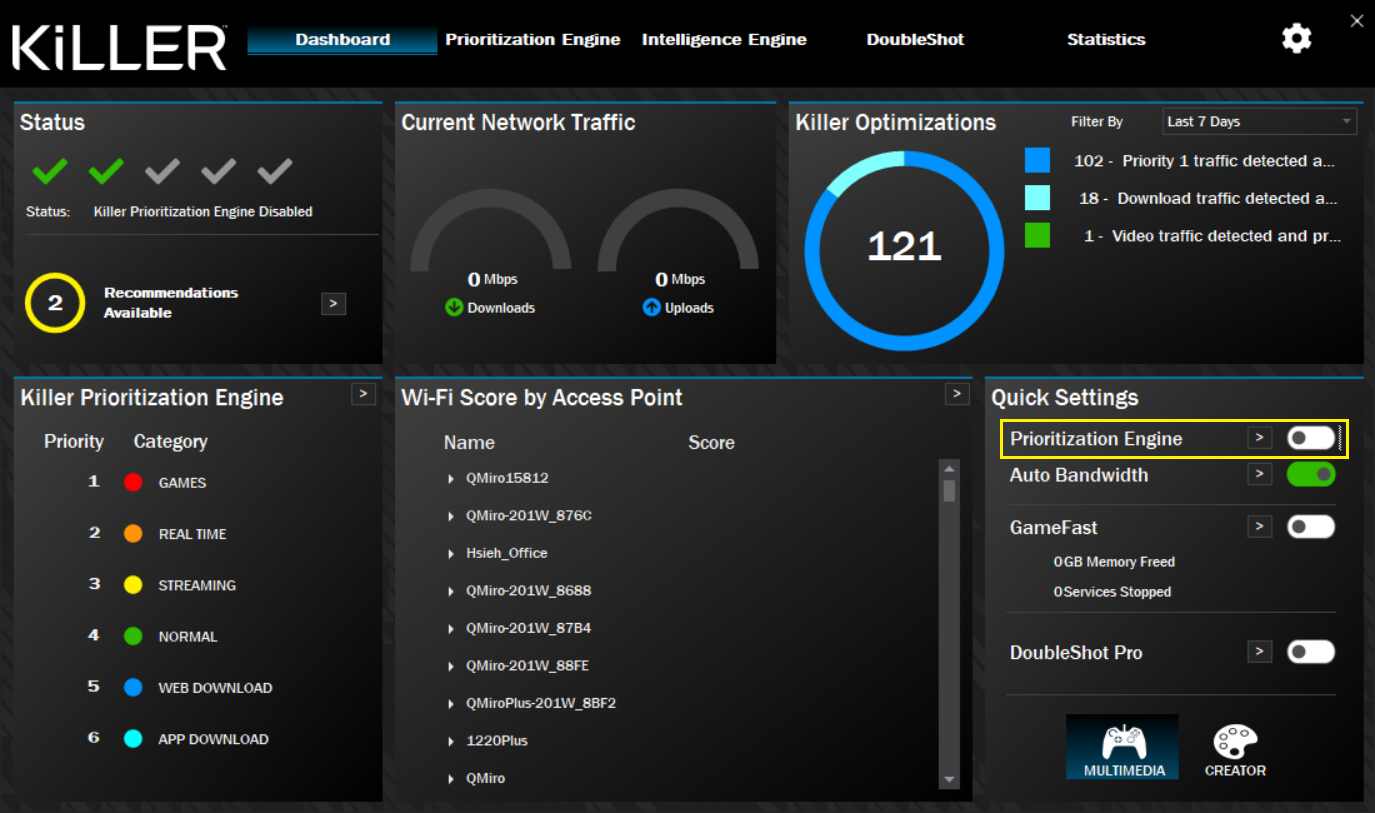
Disable the Killer Prioritization Engine
- Open Killer Control Center.
- Find and disable the option for Prioritization Engine.

Disable Intel Connectivity Network Service
This service is part of Intel's Performance Enhancement Suite. Disable this service to ensure that QVPN Device Client can work normally.
- Open Computer Management.
- Go to Services and Applications > Services.
- Disable Intel Connectivity Network Service.
If this issue persists when you use Intel® Wi-Fi wireless adapters and QVPN Device Client simultaneously, contact QNAP Customer Service.
For details, see How do I open a technical support ticket with QNAP?
适用产品
QVPN 设备客户端 - Windows
英特尔® Killer™无线适配器
英特尔® Wi-Fi 7 无线适配器
场景
您使用 QVPN 设备客户端与英特尔® Killer™无线适配器或英特尔® Wi-Fi 7无线适配器一起使用时,发现网络连接问题。
解决方案
英特尔® Killer™无线适配器利用Killer 控制中心应用程序来确保速度关键应用程序的较佳带宽分配。该应用程序将 TCP/IP 协议栈的处理从设备的处理器卸载到网络适配器。这可能会导致使用第三方应用程序(包括 QVPN 设备客户端)时出现问题,这些应用程序依赖于设备的进程来执行 VPN 功能。
确保在使用 QVPN 设备客户端时禁用 Killer 优先引擎和英特尔连接网络服务,以避免不必要的冲突。
如果您使用英特尔® Wi-Fi 7 无线适配器,您还应禁用英特尔连接网络服务以确保正常的网络功能。
禁用 Killer 优先引擎
- 打开 Killer 控制中心。
- 找到并禁用 优先引擎的选项。
禁用英特尔连接网络服务
此服务是英特尔性能增强套件的一部分。禁用此服务以确保 QVPN 设备客户端能够正常工作。
- 打开计算机管理。
- 进入服务和应用程序 > 服务。
- 禁用英特尔连接网络服务。
如果在同时使用英特尔® Wi-Fi 无线适配器和 QVPN 设备客户端时此问题仍然存在,请联系QNAP 客户服务。
详情请参阅如何向 QNAP 提交技术支持票?