Applicable Products
Overview
Port breakout enables you to split a high-speed QSFP port into multiple lower-speed interfaces, increasing flexibility and port utilization on your QNAP switch. The most common use case is breaking out a QSFP28 100GbE port into four independent 25GbE interfaces using a breakout cable and compatible SFP28 modules.
The QNAP M7308R-4X also supports breaking out a QSFP+ 40GbE port into four 10GbE interfaces with SFP+ modules and the appropriate breakout cable.
Note: A breakout cable is a special cable that allows a single high-speed port to function as several independent, lower-speed ports, often called "sub-interfaces."
Important: Configuring or changing breakout modes may interrupt data traffic. If your switch is in production use, consider performing these operations during scheduled downtime.
Procedure: Configuring 100GbE to 4x25GbE breakout
- Log in to the switch management interface.
- Go to System > Port Management > Port Breakout Configuration.
- Select the QSFP28 100GbE port you want to break out.
- Enable breakout mode and select 4x25GbE as the breakout option.
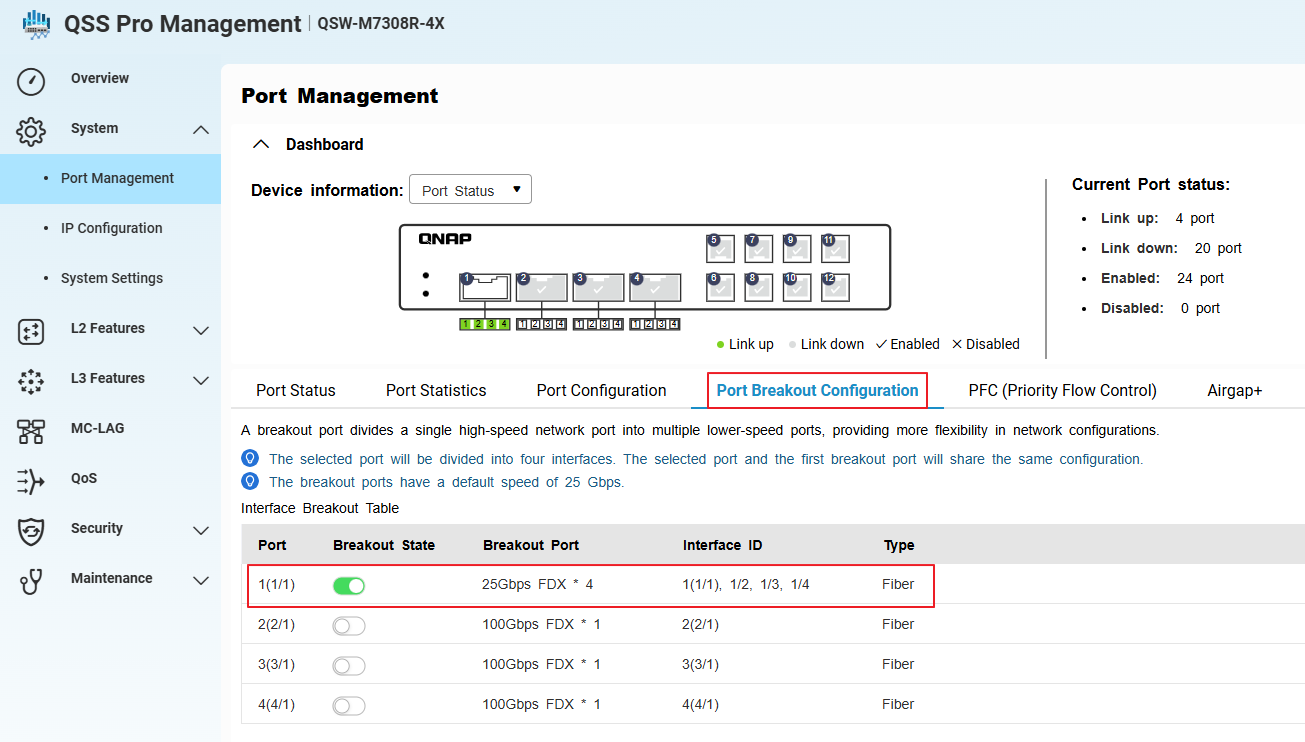
- Go to System > Port Management > Port Configuration.
- Confirm that the system has created four sub-interfaces (virtual ports) for the selected port, each operating at 25GbE.
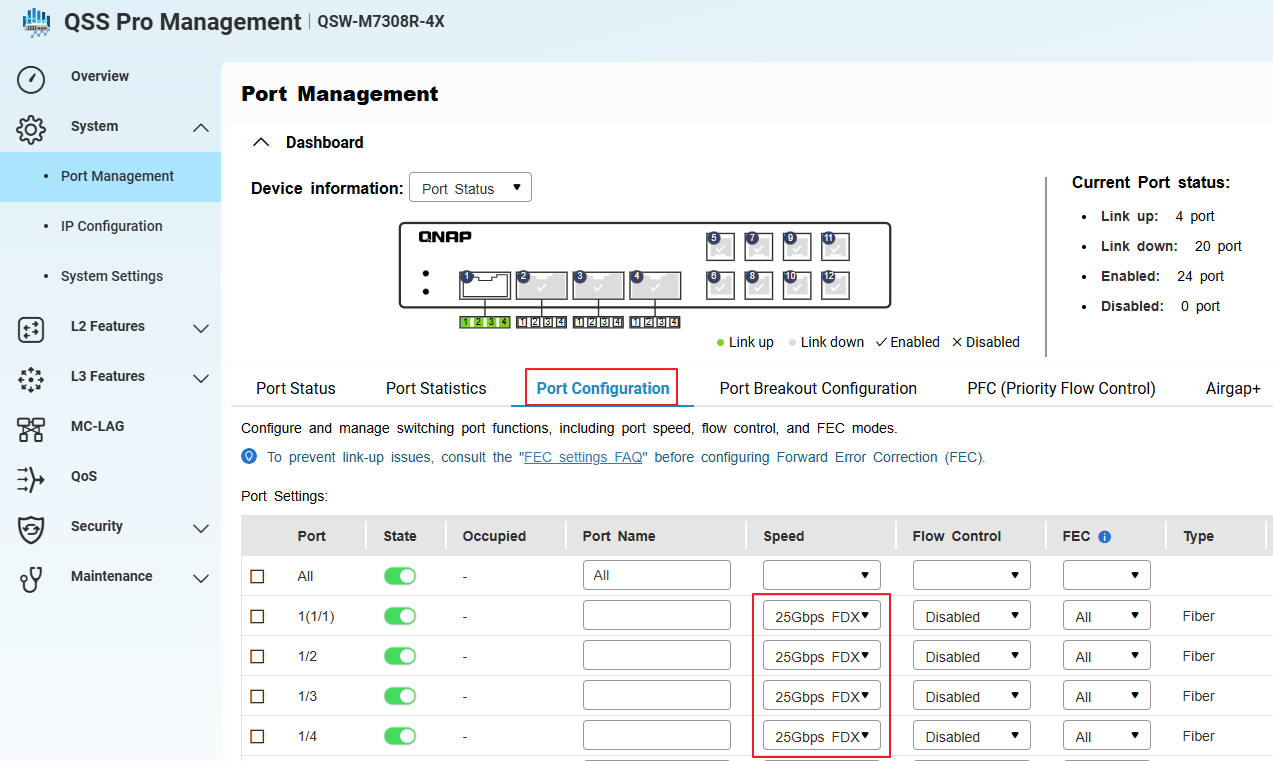
- Install compatible SFP28 modules and connect the 100GbE-to-4x25GbE breakout cable to the QSFP28 port.
- Apply and save the configuration.
Each breakout port will now function as an independent 25GbE interface. Make sure all connected devices, cables, and modules support 25GbE operation.
Procedure: Configuring 40GbE to 4x10GbE breakout or switching from 100GbE to 40GbE breakout
- Physically disconnect any existing 100GbE breakout cable and SFP28 modules from the QSFP28 port. (if any)
- Install a compatible QSFP+ 40GbE breakout cable and SFP+ modules for each intended 10GbE sub-interface.
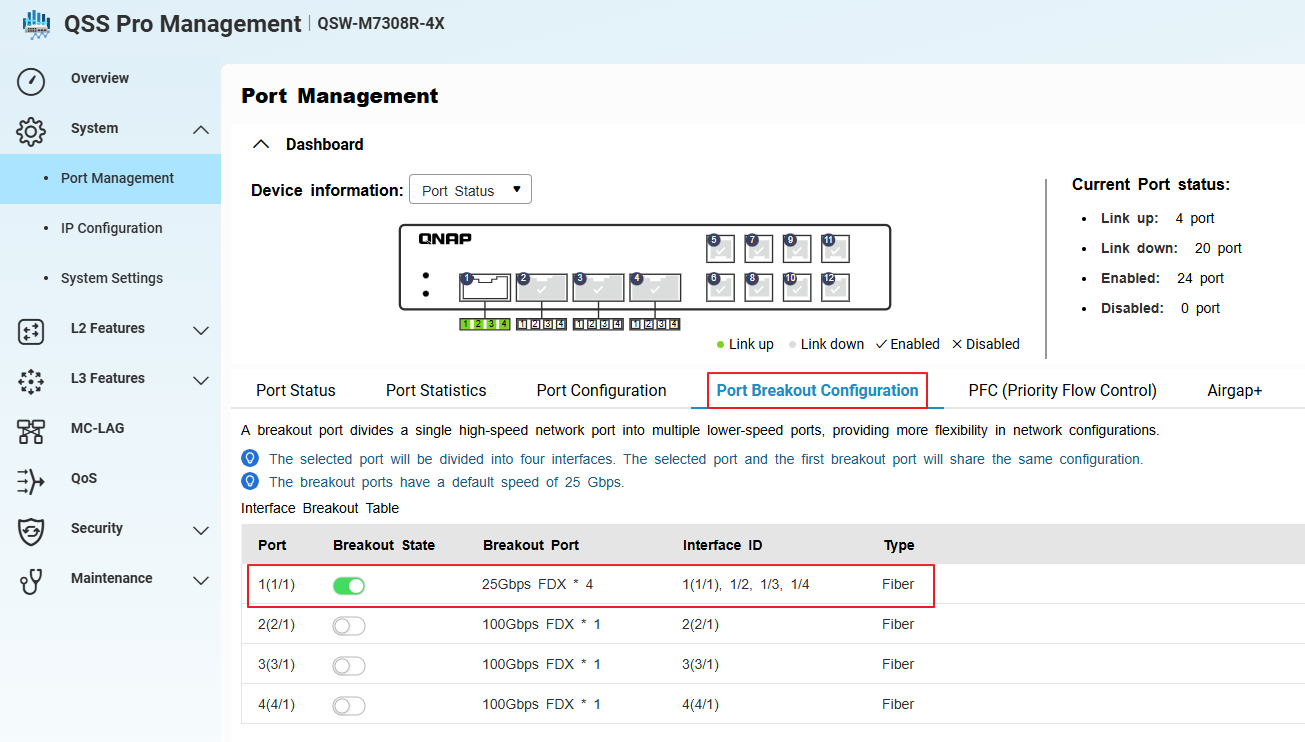
- In the switch management interface, go to System > Port Management > Port Breakout Configuration.
- Select the same QSFP port (now using a 40GbE cable and modules).
- Enable breakout mode.
- Go to System > Port Management > Port Configuration.
- Confirm that the system has created four sub-interfaces (virtual ports) for the selected port, each operating at 10GbE.
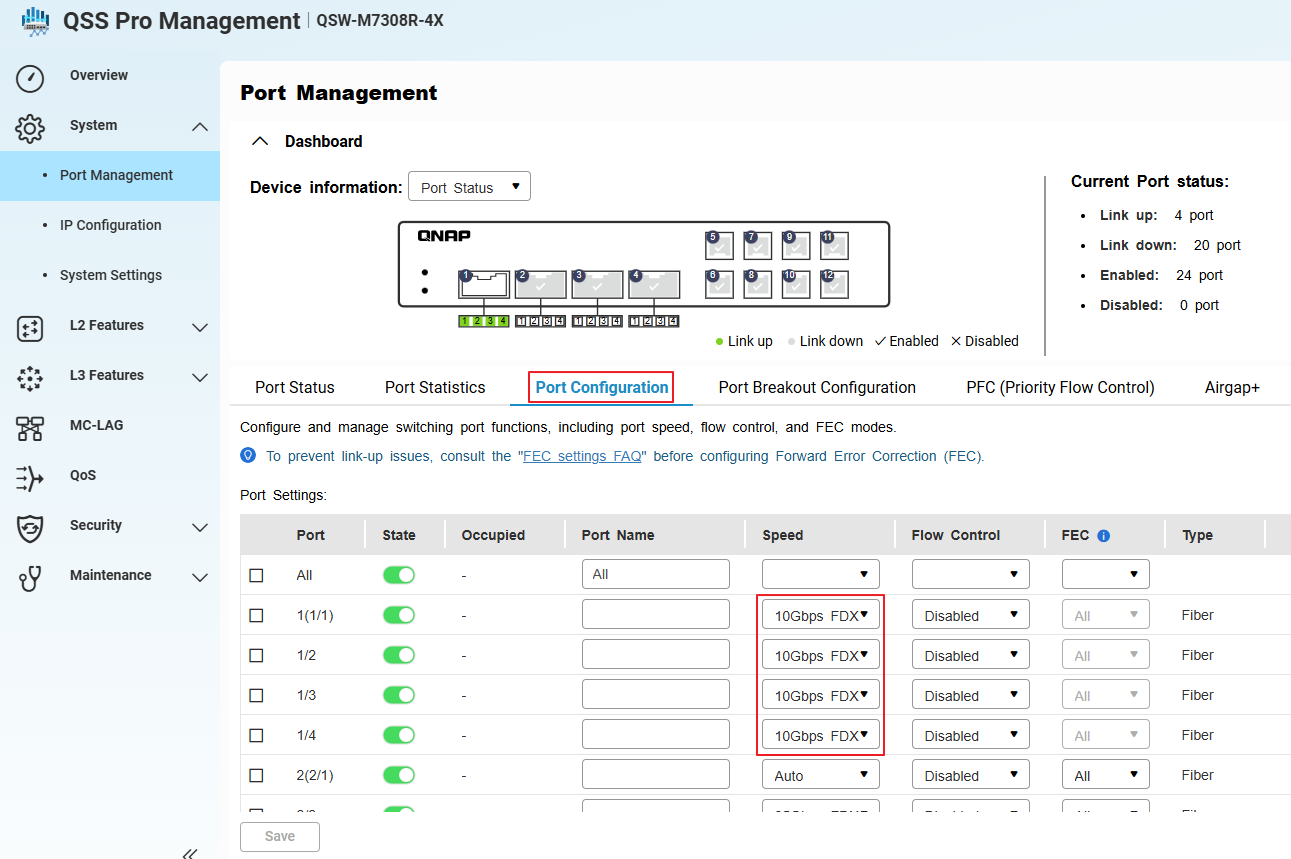
- Apply and save the configuration.
When switching from a 100GbE to 40GbE breakout, always physically replace the cables and modules before reconfiguring in the management interface.
Tip: Verify that all connected devices support 10GbE speeds.
适用产品
概述
端口分解功能可以将高速 QSFP 端口分解为多个低速接口,从而提高 QNAP 交换机的灵活性和端口利用率。较常见的用例是使用分解电缆和兼容的 SFP28 模块将 QSFP28 100GbE 端口分解为四个独立的 25GbE 接口。
QNAP M7308R-4X 还支持将 QSFP+ 40GbE 端口分解为四个 10GbE 接口,使用 SFP+ 模块和适当的分解电缆。
注意:分解电缆是一种特殊电缆,允许单个高速端口作为多个独立的低速端口运行,通常称为“子接口”。
重要提示: 配置或更改分解模式可能会中断数据流量。如果您的交换机正在生产使用中,请考虑在计划的停机时间内执行这些操作。
步骤:配置 100GbE 到 4x25GbE 分解
- 登录到交换机管理界面。
- 进入 系统 > 端口管理 > 端口分解配置。
- 选择 QSFP28 100GbE 端口进行分解。
- 启用分解模式并选择4x25GbE作为分解选项。
- 进入 系统 > 端口管理 > 端口配置。
- 确认系统已为所选端口创建了四个子接口(虚拟端口),每个子接口的运行速度为 25GbE。
- 安装兼容的 SFP28模块并将 100GbE 到 4x25GbE 分线电缆连接到 QSFP28 端口。
- 应用并保存配置。
每个分线端口现在将作为独立的 25GbE 接口运行。确保所有连接的设备、电缆和模块支持 25GbE 操作。
步骤:配置 40GbE 到 4x10GbE 分线或从 100GbE 切换到 40GbE 分线
- 物理断开任何现有的 100GbE 分线电缆和 SFP28 模块与 QSFP28 端口的连接。(如果有的话)
- 安装兼容的QSFP+ 40GbE分线电缆和SFP+模块用于每个预期的 10GbE 子接口。
- 在交换机管理界面中,进入系统 > 端口管理 > 端口分线配置。
- 选择相同的 QSFP 端口(现在使用 40GbE 电缆和模块)。
- 启用分线模式。
- 进入系统 > 端口管理 > 端口配置。
- 确认系统已为所选端口创建了四个子接口(虚拟端口),每个运行在 10GbE。
- 应用并保存配置。
从 100GbE 切换到 40GbE 分线时,始终在管理界面重新配置之前物理更换电缆和模块。
提示:验证所有连接的设备支持 10GbE 速度。


