Applicable Products
- All QNAP NAS models running QTS or QuTS hero system
- QTS 4.3.6 (or later), including QTS 5.x and QTS 6.x
- QuTS hero 4.5.0 (or later), including QuTS hero 5.x and QuTS hero 6.x
Overview
iPerf3 is an open-source network performance testing tool that measures TCP/UDP bandwidth, latency, and packet loss between two devices.
Installing iPerf3 on a QNAP NAS allows the NAS to act directly as a test endpoint (server or client), which is useful in the following scenarios:
- Verify network throughput: Confirm whether the actual transfer
speed between the NAS and a computer, switch, or other device meets
expectations (e.g., 1GbE, 10GbE).
- Diagnose network performance issues: When NAS access speed is
unexpectedly slow, use iPerf3 to determine whether the bottleneck
is at the network layer or the storage layer.
- Evaluate the impact of network configuration changes: Compare
actual bandwidth before and after adjusting settings such as MTU,
Jumbo Frames, port bonding, or VLANs.
- Isolate hardware or cabling issues: Use point-to-point testing
to verify whether a network adapter, cable, or switch is functioning
correctly.
iPerf3 is not built into QTS or QuTS hero by default and must be installed separately.
Solution
iPerf3 can be installed on a QNAP NAS in either of two ways: as a container in Container Station, or using an Entware QPKG file.
Method 1: Run iPerf3 in Container Station
-
Open the App Center, then search for and install Container Station.
-
On first launch, complete the setup wizard and specify the storage location for container data.
-
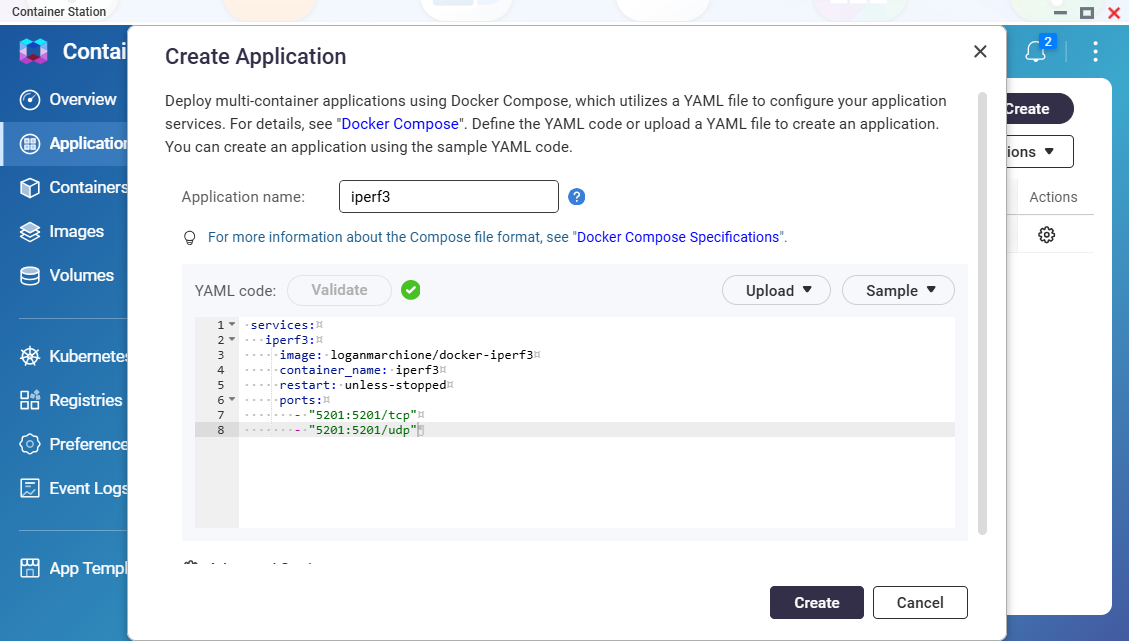
In Container Station, select Create > Create Application, then enter the following Docker Compose configuration:
services:
  iperf3:
    image: loganmarchione/docker-iperf3
    container_name: iperf3
    restart: unless-stopped
    ports:
      - "5201:5201/tcp"
      - "5201:5201/udp"
Refer to the documentation for the loganmarchione/docker-iperf3 image for its supported environment variables and parameters. To have the NAS act as the iPerf3 client rather than the server, or to use host network mode for more accurate results, adjust the configuration accordingly.
-
Click Validate to verify the correctness of the yaml code.
-
Click Create and wait for the image to be pulled and the container to start.
-
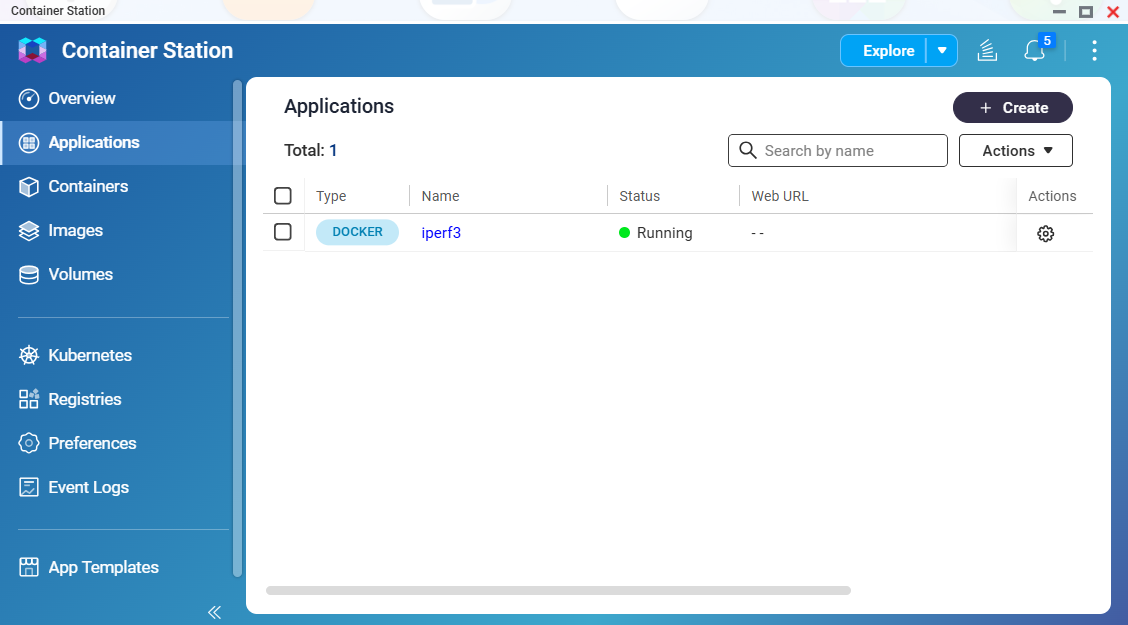
Confirm the container status is Running.
-
iPerf3 is now ready to use on your NAS.
If a firewall or security policy blocks port 5201, clients will report a refused connection. Confirm the port is not blocked under Control Panel > System > Security.
Method 2: Install iPerf3 using an Entware QPKG file
-
Download Entware_1.02std.qpkg from QNAP's download portal.
-
Install the QPKG file:
- Open the App Center
- Select Install Manually
- Click Browse and locate the downloaded QPKG file
- Click Install
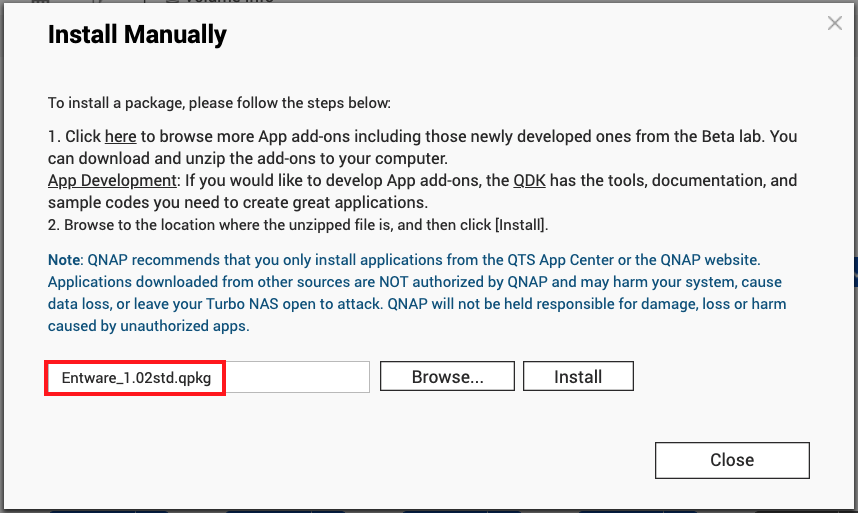
- Accept the risk acknowledgment checkbox and confirm installation
- Verify that Entware-std 1.02 appears in the App Center
-
Access the NAS command line via an SSH connection.
-
Navigate to the Entware installation directory:
# cd /share/CACHEDEV1_DATA/.qpkg/Entware/bin
The volume name in this path varies by model and storage configuration, and differs on QuTS hero systems. If the directory does not exist, locate it with:
# ls -d /share/*/.qpkg/Entware/bin
-
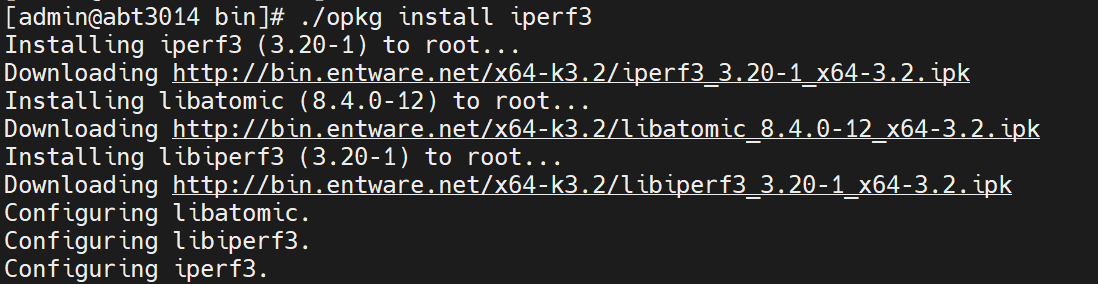
Execute the package installation command:
# ./opkg install iperf3
6. iPerf3 is now ready to use on your NAS.

适用产品
- All QNAP NAS models running QTS or QuTS hero system
- QTS 4.3.6 (or later), including QTS 5.x and QTS 6.x
- QuTS hero 4.5.0 (or later), including QuTS hero 5.x and QuTS hero 6.x
概述
iPerf3 是一个开源的网络性能测试工具,用于测量两个设备之间的 TCP/UDP 带宽、延迟和丢包率。
在 QNAP NAS 上安装 iPerf3 可以使 NAS 直接作为测试端点(服务器或客户端),在以下场景中较为有用:
- 验证网络吞吐量:确认 NAS 与计算机、交换机或其他设备之间的实际传输
速度是否符合预期(例如,1GbE,10GbE)。
- 诊断网络性能问题:当 NAS 访问速度
意外缓慢时,使用 iPerf3 确定瓶颈是否在网络层或存储层。
- 评估网络配置更改的影响:比较调整设置(如 MTU,
巨型帧,端口绑定或 VLAN)前后的实际带宽。
- 隔离硬件或布线问题:使用点对点测试
验证网络适配器、电缆或交换机是否正常工作。
iPerf3 默认未内置于 QTS 或 QuTS hero 中,必须单独安装。
解决方案
可以通过两种方式在 QNAP NAS 上安装 iPerf3:作为 Container Station 中的容器,或使用 Entware QPKG 文件。
方法 1:在 Container Station 中运行 iPerf3
-
打开App Center,然后搜索并安装Container Station。
-
启动时,完成设置向导并指定容器数据的存储位置。
-
在 Container Station 中,选择创建 > 创建应用程序,然后输入以下 Docker Compose 配置:
services:
  iperf3:
    image: loganmarchione/docker-iperf3
    container_name: iperf3
    restart: unless-stopped
    ports:
      - "5201:5201/tcp"
      - "5201:5201/udp"
参考loganmarchione/docker-iperf3镜像的文档,了解其支持的环境变量和参数。若要让 NAS 作为 iPerf3 客户端而非服务器,或使用主机网络模式以获得更更贴合的结果,请相应调整配置。
-
点击验证以确认 yaml 代码的正确性。
-
点击创建,等待镜像被拉取并启动容器。
-
确认容器状态为运行中。
-
iPerf3 现在可以在您的 NAS 上使用。
如果防火墙或安全策略阻止了端口 5201,客户端将报告连接被拒绝。请确认在控制台 > 系统 > 安全下端口未被阻止。
方法 2:使用 Entware QPKG 文件安装 iPerf3
-
从 QNAP 的下载门户下载Entware_1.02std.qpkg。
-
安装 QPKG 文件:
- 打开App Center
- 选择手动安装
- 点击浏览并找到下载的 QPKG 文件
- 点击安装
- 接受风险确认框并确认安装
- 确认Entware-std 1.02出现在 App Center 中
-
通过 SSH 连接访问 NAS 命令行。
-
导航到 Entware 安装目录:
# cd /share/CACHEDEV1_DATA/.qpkg/Entware/bin
此路径中的卷名称因型号和存储配置而异,并且在 QuTS hero 系统上有所不同。如果目录不存在,请使用以下命令定位:
# ls -d /share/*/.qpkg/Entware/bin
-
执行软件包安装命令:
# ./opkg install iperf3
6. iPerf3 现在可以在您的 NAS 上使用了。


