QVR Surveillance 3.0 is the upgraded NVR solution for QVR Elite, and will be directly updated from QVR Elite.
In the NAS App Center, the icon will automatically change to “QVR Surveillance,” even if the system hasn’t been updated yet (this is by design in App Center).
Note
If you’re currently using QVR Elite 2.7.1, upgrading to Surveillance 3.0.0 requires no data migration, and all existing licenses remain valid.
Comparison Table
| Feature | QVR Pro | QVR Elite | QVR Surveillance |
|---|
| Free Channels | 8 channels | 2 channels | 8 channels (2 Standard + 6 Bonus) |
| AI Pack / SmartSearch | Paid add-on | Paid add-on | Included for free |
| Licensing Options | Buy-out focus | Subscription focus | Lifetime & Subscription available |
| Central Management | Requires QVR Pro Gold or QVR Center License | Requires QVR Center License | Free QVR Center complete integration |
| Cloud Integration | With HBS or HybridMount | With HBS or HybridMount | Native myQNAPcloud Surveillance support |
Frequently Asked Questions
1. How do I transition from my current version?
- For QVR Elite users: The update to 3.0 is seamless. No data migration is required, and your existing licenses will carry over automatically.
- For QVR Pro users: Version 2.8.x (releasing in 2026) will include a migration tool to transfer your configurations to the new platform. QVR Pro will receive security updates for approximately 3 more years.
- Note for developers: QVR Surveillance uses API that begins with /qvrsurveillance/ while QVR Pro begins with /qvrpro/ and QVR Elite begins with /qvrelite/. Make sure the paths are adjusted accordingly.
2. How do I claim the 6 extra free channels?
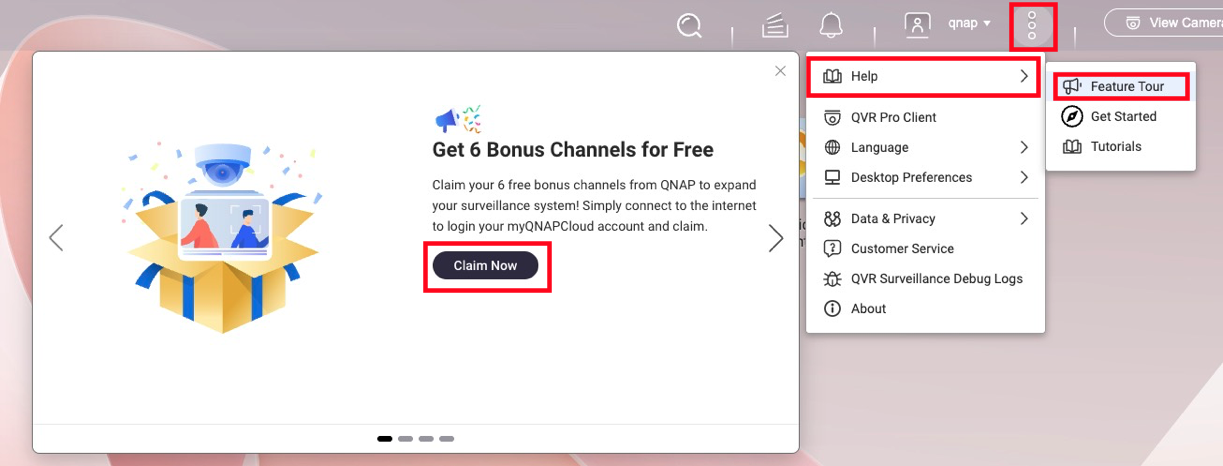
To activate a total of 8 free channels, follow these steps below:
- Ensure your NAS is linked to your QID (QNAP ID).
- Launch QVR Surveillance 3.0 and click Activate on the initial prompt.
- Missed the prompt? Navigate to
... → Help → Feature Tour to trigger it again. - Once activated, you can log out of QID; the channels remain active offline.
3. What happens to my paid licenses?
All existing licenses (Gold, Lifetime from QVR Pro, or Subscription from QVR Elite) are recognized.
Calculation Example:
If you have QVR Pro (built-in 8ch) + [GOLD (+8ch) + 4ch lifetime licenses], you will have: 2 (built-in) + 6 (bonus) + 8 + 4 = 20 channels total in the new version, ensuring no loss of capacity.
4. Are Face and Human Detection free?
Yes. As long as the camera source is managed within QVR Surveillance, you can create analysis tasks without extra licenses.
- Face Detection: Supported on Celeron-based NAS or higher.
- Human Detection: Requires Core i-series (Intel) or higher due to processing demands.
- Requirement: Ensure CAYIN Media Viewer is installed and activated for obtain streams from cameras.
5. How does High Availability (HA) work in QTS 6?
While QTS 6 supports HA for QVR Surveillance 3.0, there is a 50% performance trade-off.
For more information on QTS 6 High Availability's compatibility with QVR Surveillance, see the FAQ page: Can I continue recording via QVR Surveillance before/after creating Cluster in HA Manager?
Note
For surveillance workloads, QVR Center Failover is more efficient than native QTS 6 HA when handling multiple recording NAS servers.
6. What is "myQNAPcloud Surveillance"?
Launching alongside the update, this is a subscription-based cloud backup service. It allows you to back up specific camera channels to the cloud and access them via a web interface for playback and sharing, independent of your local storage.
For more information on myQNAPcloud Surveillance, see product page; for how to start using myQNAPcloud Surveillance, see the tutorial page How to start uploading recordings to myQNAPcloud Surveillance?
QVR Surveillance 3.0 是升级版的 NVR 解决方案,适用于QVR Elite,并且将直接从QVR Elite更新。
在 NAS App Center 中,即使系统尚未更新,图标也会自动更改为“QVR Surveillance”(这是 App Center 中的设计)。
注意
如果您当前正在使用QVR Elite 2.7.1,升级到 Surveillance 3.0.0 不需要数据迁移,所有现有的许可证仍然有效。
比较表
| 功能 | QVR Pro | QVR Elite | QVR Surveillance |
|---|
| 免费通道 | 8 个通道 | 2 个通道 | 8 个通道(2 个标准 + 6 个奖励) |
| AI 包 / 智能搜索 | 付费附加 | 付费附加 | 免费包含免费 |
| 授权选项 | 买断为主 | 订阅为主 | 终身和订阅 可用 |
| 集中管理 | 需要 QVR Pro Gold 或 QVR Center 许可证 | 需要 QVR Center 许可证 | 免费QVR Center 完整集成 |
| 云集成 | 与 HBS 或 HybridMount | 与 HBS 或 HybridMount | 原生myQNAPcloud Surveillance支持 |
常见问题
1. 如何从当前版本过渡?
- 对于 QVR Elite 用户:更新到 3.0 是无缝的。不需要数据迁移,您现有的许可证将自动继承。
- 对于 QVR Pro 用户:版本 2.8.x(将在 2026 年发布)将包含一个迁移工具,用于将您的配置转移到新平台。QVR Pro 将在大约 3 年内继续获得安全更新。
- 开发者注意:QVR Surveillance 使用以 /qvrsurveillance/ 开头的 API,而 QVR Pro 使用 /qvrpro/ 开头,QVR Elite 使用 /qvrelite/ 开头。请确保路径相应调整。
2. 如何申请额外的 6 个免费通道?
要激活总共 8 个免费通道,请按照以下步骤操作:
- 确保您的 NAS 已连接到您的QID(QNAP ID)。
- 启动 QVR Surveillance 3.0 并点击激活在初始提示上。
- 错过了提示?导航到
... → 帮助 → 功能导览以再次触发。 - 激活后,您可以退出 QID;通道在离线状态下仍然保持激活。
3. 我的付费许可证会怎样?
所有现有的许可证(Gold、QVR Pro 的终身版或 QVR Elite 的订阅版)都被支持。
计算示例:
如果您有 QVR Pro(内置8通道)+ [GOLD (+8通道 ) + 4通道终身许可证 ],您将拥有:2(内置)+ 6(奖励)+ 8 +#htmlTag_24; 4 = 20通道总数在新版本中,确保容量不损失。
4. 人脸和人体检测是免费的吗?
是的。只要摄像头源在 QVR Surveillance 中管理,您可以创建分析任务而无需额外的许可证。
- 人脸检测: 支持基于赛扬的 NAS 或更高版本。
- 人脸检测: 由于处理需求,需要酷睿 i 系列(英特尔)或更高版本。
- 要求: 确保 CAYIN Media Viewer 已安装并激活以从摄像机获取流。
5. 高可用性 (HA) 在 QTS 6 中如何工作?
虽然 QTS 6 支持 QVR Surveillance 3.0 的 HA,但存在 50% 的性能折扣。
有关 QTS 6 高可用性与 QVR Surveillance 兼容性的更多信息,请参阅常见问题页面:在 HA 管理器中创建集群之前 / 之后,我可以继续通过 QVR Surveillance 进行录制吗?
注意
对于监控工作负载,QVR Center 故障转移 在处理多个录制 NAS 服务器时比原生 QTS 6 HA 更高效。
6. 什么是 "myQNAPcloud Surveillance"?
与更新一起推出,这是一个基于订阅的云备份服务。它允许您将特定摄像机通道备份到云端,并通过网络界面进行回放和共享,独立于本地存储。
有关 myQNAPcloud Surveillance 的更多信息,请参阅 产品页面;有关如何开始使用 myQNAPcloud Surveillance,请参阅教程页面 如何开始将录制上传到 myQNAPcloud Surveillance?


