


How to keep a temporal snapshot permanently
最后修订日期:
2022-06-24
Applied models:
-
All NAS Series
Applied Firmware:
-
All QTS Firmware Versions
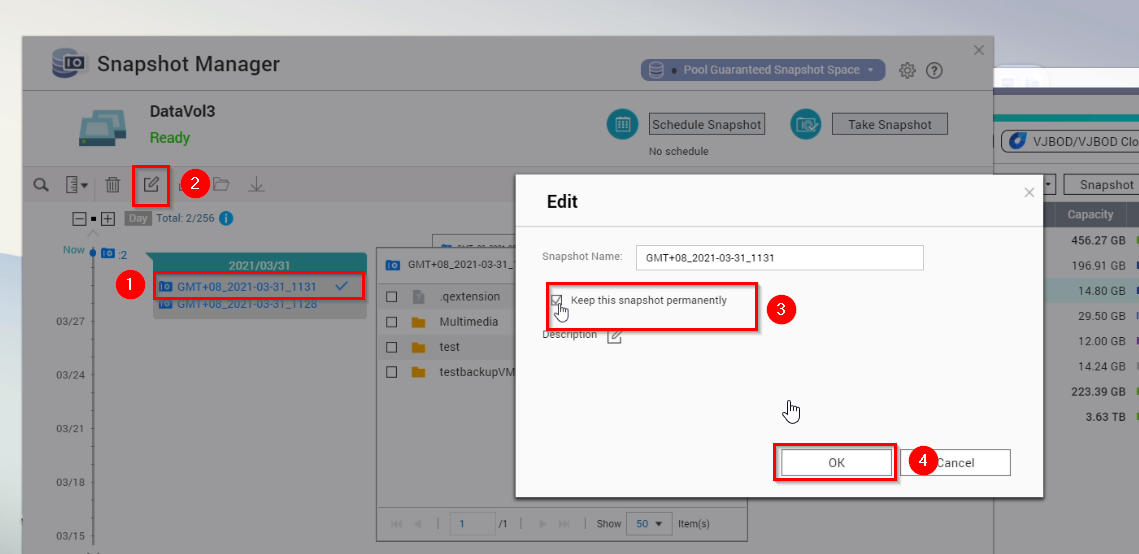
If you are running scheduled snapshot and you fixed the expiration date, for example to 7 days, but you want to keep it permanently, it is possible. You can go to snapshot manager before the snapshot expired and change the retention policy
To do this, select the snapshot you want and click on edit. Finally enable “Keep this snapshot permanently”
需要进一步协助,欢迎前往官方社区发帖,与其他用户及 QNAP 专家交流。 前往 QNAP 官方社区


