


How to check the Qsync file versions then Restore?
Applied models:
-
All NAS Series
Applied Firmware:
-
All QTS Firmware Versions
-
Qsync Central 4.3.0.x and later
Please Note: Applicable only in paired Qsync user home folder.
Windows Qsync Client:
-
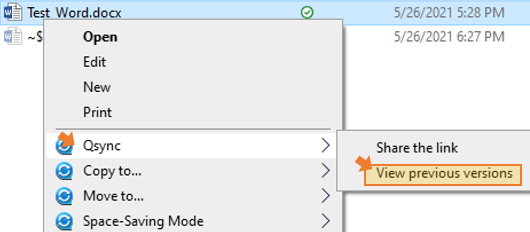
Select the file in the Windows Qsync folder.
-
Right click the file, then select the “Qsync”, then click the “View previous versions”
MAC Qsync Client:
-
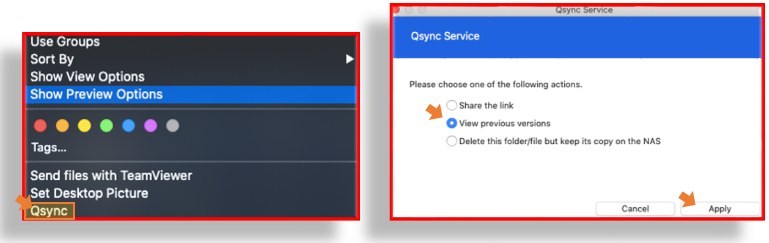
Select the file in the Mac Qsync folder.
-
Right click the file, then select the “Qsync”, then click the “View previous versions”
-
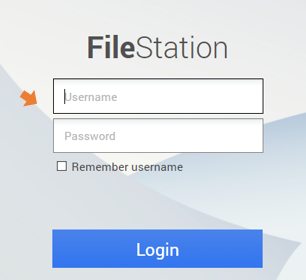
Login with qsync account when file station login page prompt.
-
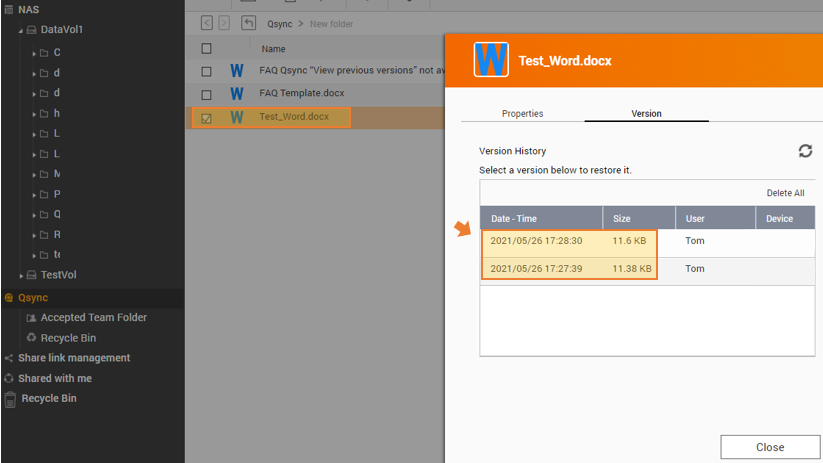
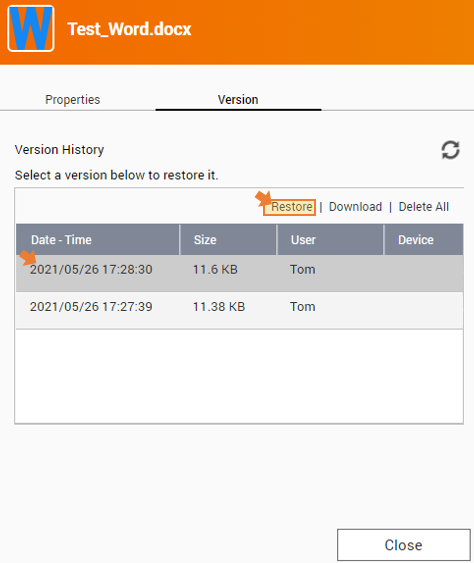
The available version of the file will be displayed.
If not displayed, select the File, then right click, and select the “previous version”
-
Select the file version to restore, then click Restore button
-
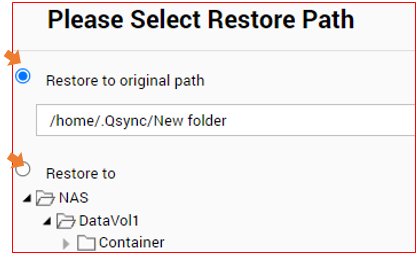
Select the path you want to restore the file version, then click OK button
Related Articles:
Qsync “View previous versions” not available even the Version control in Qsync Central is enabled
需要进一步协助,欢迎前往官方社区发帖,与其他用户及 QNAP 专家交流。 前往 QNAP 官方社区


