


How can I specify time schedule to turn ON the LED light on QNAP NAS?
最后修订日期:
2022-06-24
Applicable Products:
- Hardware
By default, the LED light is always at 100% when the function "Turn on LED light" in System > Hardware > General is activated, if you want them to turn off during a specific time slot of the day, you may set the LED lightness at its minimum (slide the ball bar at the left corner), then enable the function "Apply this setting during a specific time", so you can determine at what time you do not want the LED light to be turned on, please, see an example on the picture below. 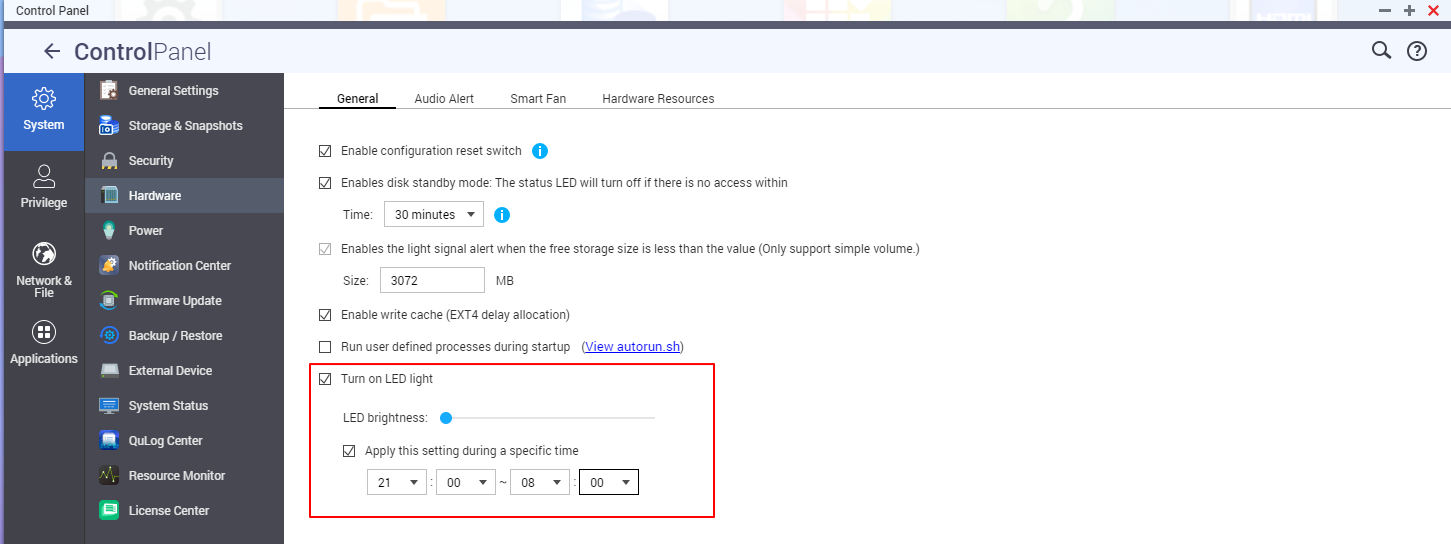
需要进一步协助,欢迎前往官方社区发帖,与其他用户及 QNAP 专家交流。 前往 QNAP 官方社区


