


Why do I receive “Storage pool 1 has reached the space alert threshold” Notification Despite Having Space Available
Applied Models:
-
All HAL type models
Applied Firmware:
-
4.4.1 and above
You may receive a notification “Storage pool 1 has reached the space alert threshold”, despite having plenty of space available in the volume. This is due to the allocated capacity having reached the defined threshold.
The Storage Pool capacity used to create Volumes/LUNs are considered as allocated, despite the available capacity in the volumes/LUNs itself. If the capacity of the created volume is larger than the configured Storage Pool threshold, the error message will appear. To work around this, you could adjust or disable the predefined threshold. This can be done from Storage & Snapshots > Storage/Snapshots > select the Storage Pool and click “Manage” > select “Action” then “Set Threshold”.
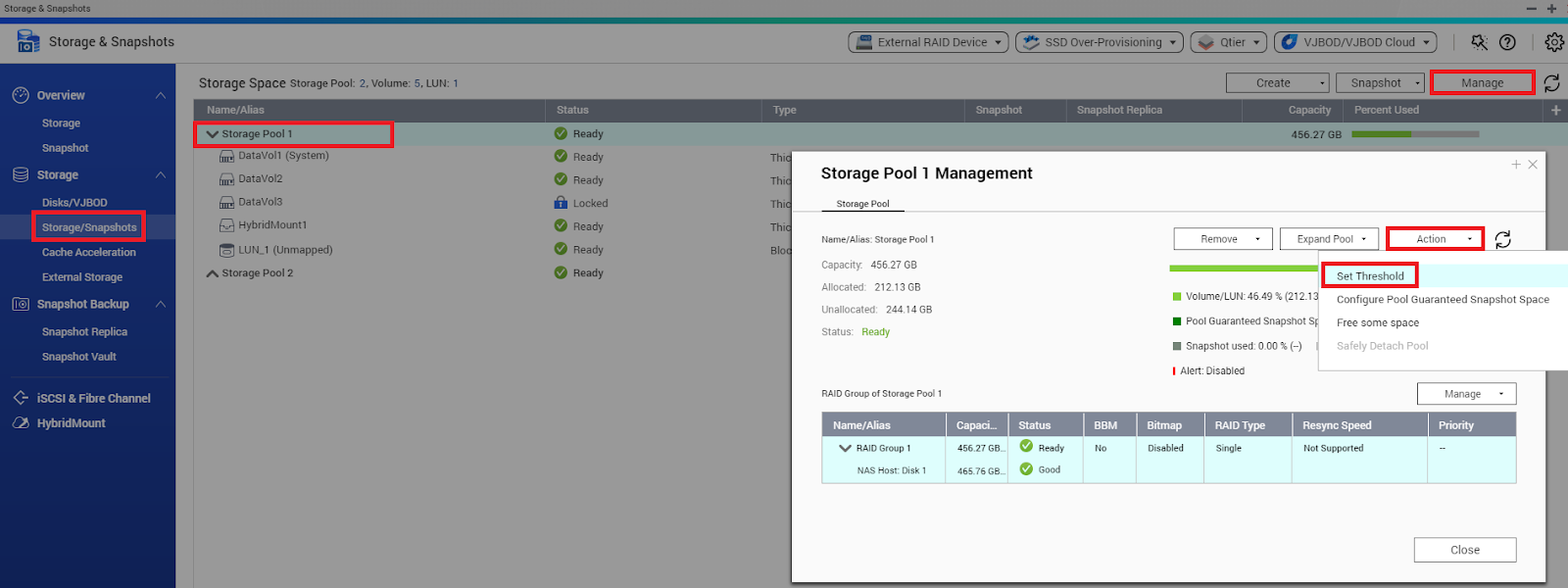
Another option is to shrink the volume size, such that the allocated capacity becomes lower than the predefined threshold. Steps to resize the volume can be found in the below link:
https://www.qnap.com/en/how-to/knowledge-base/article/will-expanding-a-volume-delete-my-data
需要进一步协助,欢迎前往官方社区发帖,与其他用户及 QNAP 专家交流。 前往 QNAP 官方社区


