


Wish to disable TLS v1.0 and v1.1 (HTTPS)
最后修订日期:
2023-03-23
Applied models:
All models
Applied Firmware:
All versions
Please try to run the 3 steps below to change the TLS settings. :
- Please use putty to login to NAS SSH consoleShellShell
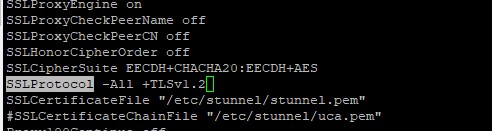
<span class="token function">vi</span> /etc/apache-sys-proxy-ssl.conf - Find "SSLProtocol" and set its value to "-all +TLSv1.2"
- Reload SSL serviceShellShell
/etc/init.d/stunnel.sh reload
Further Reading
需要进一步协助,欢迎前往官方社区发帖,与其他用户及 QNAP 专家交流。 前往 QNAP 官方社区


