


Why are my Live Photos shown as still pictures?
Applied models:
NAS Series that have the latest QuMagie(QPKG) version installed.
Applied firmware:
NAS firmware that allows installing QuMagie.
Scenarios:
Uploading Live Photos from iOS device to NAS via Qfile/QuMagie’s auto upload function and all I see are just still pictures without the related 3 seconds videos.
Solution:
1. Please make sure you use Qfile/QuMagie’s auto upload function to upload those Live Photos to a NAS. Also, please check that “Upload photo and video” are set in Qfile’s auto upload settings (QuMagie’s backup settings) page. Now, Qfile/QuMagie also supports using manual upload function to upload a Live Photo as a Live Photo but please make sure “Upload photo and video” is selected in Qfile/QuMagie Settings page.
2. Please make sure that the latest QuMagie version is installed in your NAS.
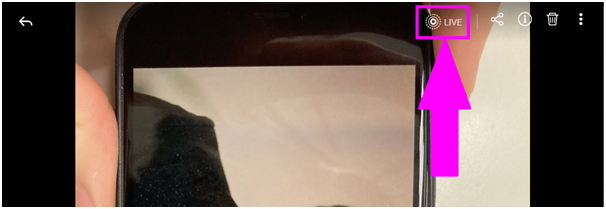
3. Use your issue account to log in to the NAS web management interface > QuMagie to find a live photo and click on the photo to check if it’s recognized as a Live Photo with “LIVE” icon (like picture below)
4. if there is no Live icon of the picture, please go to File Station of NAS web management interface. Go to the folder where the live photo is saved and check if there is a thumbnail of the video file that belongs to the Live Photo. Please refer to the picture below for examples.
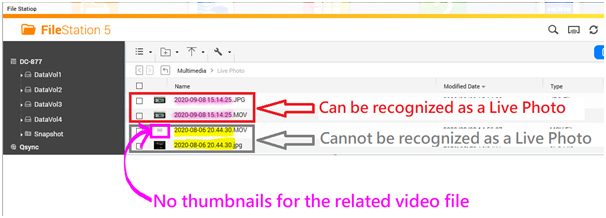
Please note that a live photo is combined by a still photo and a 3 seconds video share the same filenames. For example, IMG_0001.JPG and IMG_0001.MOV
If there is no thumbnail of the related video file, the photo cannot be recognized as a Live photo (like the picture above shown) due to the video file is not recognized as a support video format which often happens if videos are taken in HEVC/H.265 format by iOS’ system default.
5. To get thumbnails of those video files, there are 3 ways:
- Subscribe the Plus version CAYIN MediaSign Player which offers additional support for HEVC (H.265). For more information, please refer to the links below for more detail.
How to Transcode Videos and View HEIC Photos With CAYIN MediaSign Player Installed
Subscribe the Plus version CAYIN MediaSign Player - Go Setting in iOS system > Camera > Formats, change from “High Efficiency” to “Most Compatible”
- If you don’t want to purchase CAYIN MediaSign Player nor change settings in your phone, please refer to methods provided by Apple to convert HEVC to H.264 in the link below.
Using HEIF or HEVC media on Apple devices
需要进一步协助,欢迎前往官方社区发帖,与其他用户及 QNAP 专家交流。 前往 QNAP 官方社区


