


Can I enable QSAL on an existing storage pool?
最后修订日期:
2023-10-31
Applicable Products
QuTS hero
Answer
The ability to enable QNAP SSD Antiwear Leveling (QSAL) on an existing storage pool depends on the QuTS hero version running on your NAS:
| Firmware Version | Can I Enable QSAL on an Existing Storage Pool? |
|---|---|
| QuTS hero h4.5.2–h5.0.1 | No. QSAL can only be enabled when creating a new storage pool and cannot be disabled later. |
| QuTS hero h5.1.0 or later | Yes. You can enable or disable QSAL on a storage pool at any time. |
To enable or disable QSAL on an existing storage pool in QuTS hero h5.1.0 or later, follow these steps:
- Open Storage & Snapshots.
- Go to Storage > Storage/Snapshots.
- Select a storage pool.Note
To enable QSAL on a storage pool, the pool must contain a RAID group that meets the following requirements:
- The RAID group must be one of the following RAID types: RAID 5, 6, 50, 60, TP.
- The RAID group must contain at least two SSDs that can provide estimated life remaining.
- At least one SSD in the RAID group must have over 3% estimated life remaining.
- Click Manage.
The storage pool management window opens. - Click QSAL.
This tab only appears if the storage pool contains a RAID group that meets the requirements for QSAL. - Optional: Select a different RAID group.
- Click the toggle button to enable or disable QSAL.
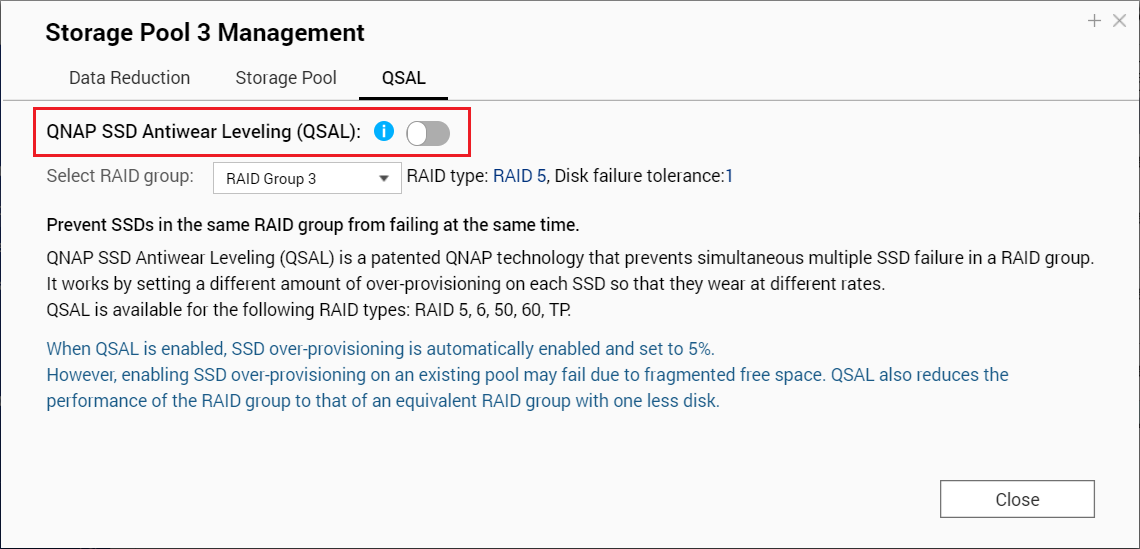
- Click Close.
Further Reading
需要进一步协助,欢迎前往官方社区发帖,与其他用户及 QNAP 专家交流。 前往 QNAP 官方社区


