Applicable Products
- NAS with QTS or QuTS Hero system
- Storage Manager
Root Cause
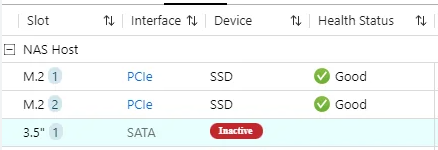
The Inactive disk status means that your NAS cannot detect the disk in the drive bay. This can happen for several reasons, such as:
- The disk is not fully inserted or properly connected.
- There is a loose connection or hardware issue with the drive bay.
- The disk has failed and is no longer recognized by the system.
When a disk is inactive, it is unavailable for storage pools, volumes, or as a spare. Data redundancy may be affected if the inactive disk is part of a RAID group.
Solution
You can try the following steps to identify and resolve the issue:
- Power off the NAS if you need to remove or reseat the disk to avoid potential data loss. If your NAS supports hot swapping, refer to the user manual.
- Check that the disk is properly and securely inserted in the drive bay.
- If the disk was recently removed, reinsert it and wait for the NAS to detect the disk status.
- Inspect both the disk and the drive bay for any visible damage or connection issues such as bent pins or debris.
- If the disk remains inactive, test it in another slot to determine if the problem is with the disk or the NAS.
- If the disk is confirmed to be faulty, replace it with a new disk as soon as possible to maintain storage integrity and data protection. Follow QNAP guidelines when replacing drives in a RAID group.
Reminder: Always back up important data regularly. Do not attempt to forcibly remove or insert disks while the NAS is running unless your model supports hot swapping.
If you have followed these steps and the disk status remains inactive, or if you are unsure how to proceed, please contact QNAP support for further assistance.
Further Reading
适用产品
- NAS with QTS or QuTS Hero system
- Storage Manager
根本原因
该不活动磁盘状态意味着您的 NAS 无法检测到驱动器槽中的磁盘。这可能由于多种原因,例如:
- 磁盘未插入或连接不正确。
- 驱动器槽连接松动或存在硬件问题。
- 磁盘已损坏,系统不再识别。
当磁盘处于不活动状态时,它无法用于存储池、卷或作为备用。如果不活动磁盘是 RAID 组的一部分,数据冗余可能会受到影响。
解决方案
您可以尝试以下步骤来识别和解决问题:
- 如果需要移除或重新插入磁盘,请关闭 NAS 以避免潜在的数据丢失。如果您的 NAS 支持热插拔,请参考用户手册。
- 检查磁盘是否正确且牢固地插入驱动器槽中。
- 如果磁盘较近被移除,请重新插入并等待 NAS 检测磁盘状态。
- 检查磁盘和驱动器槽是否有任何可见的损坏或连接问题,例如弯曲的针脚或碎屑。
- 如果磁盘仍然不活动,请在另一个插槽中测试,以确定问题是出在磁盘还是 NAS。
- 如果确认磁盘故障,请尽快更换新磁盘以维护存储完整性和数据保护。更换 RAID 组中的驱动器时,请遵循 QNAP 指南。
提醒:定期备份重要数据。除非您的型号支持热插拔,否则请勿在 NAS 运行时强行移除或插入磁盘。
如果您已按照这些步骤操作但磁盘状态仍然不活动,或不确定如何继续,请联系QNAP 支持以获取进一步帮助。
进一步阅读


