Applicable Products
- QNAP TR-004
- MacBook (macOS)
- QNAP External RAID Manager
Overview
When connecting a USB external enclosure to your MacBook, you have a flexible and convenient way to expand your storage and safeguard your data. However, it's important to note that macOS's built-in Disk Utility only supports certain RAID levels: RAID 0 (striping), RAID 1 (mirroring), and JBOD (Just a Bunch Of Disks). macOS Disk Utility does not natively support RAID 5, which is a popular option for balancing performance, capacity, and redundancy.
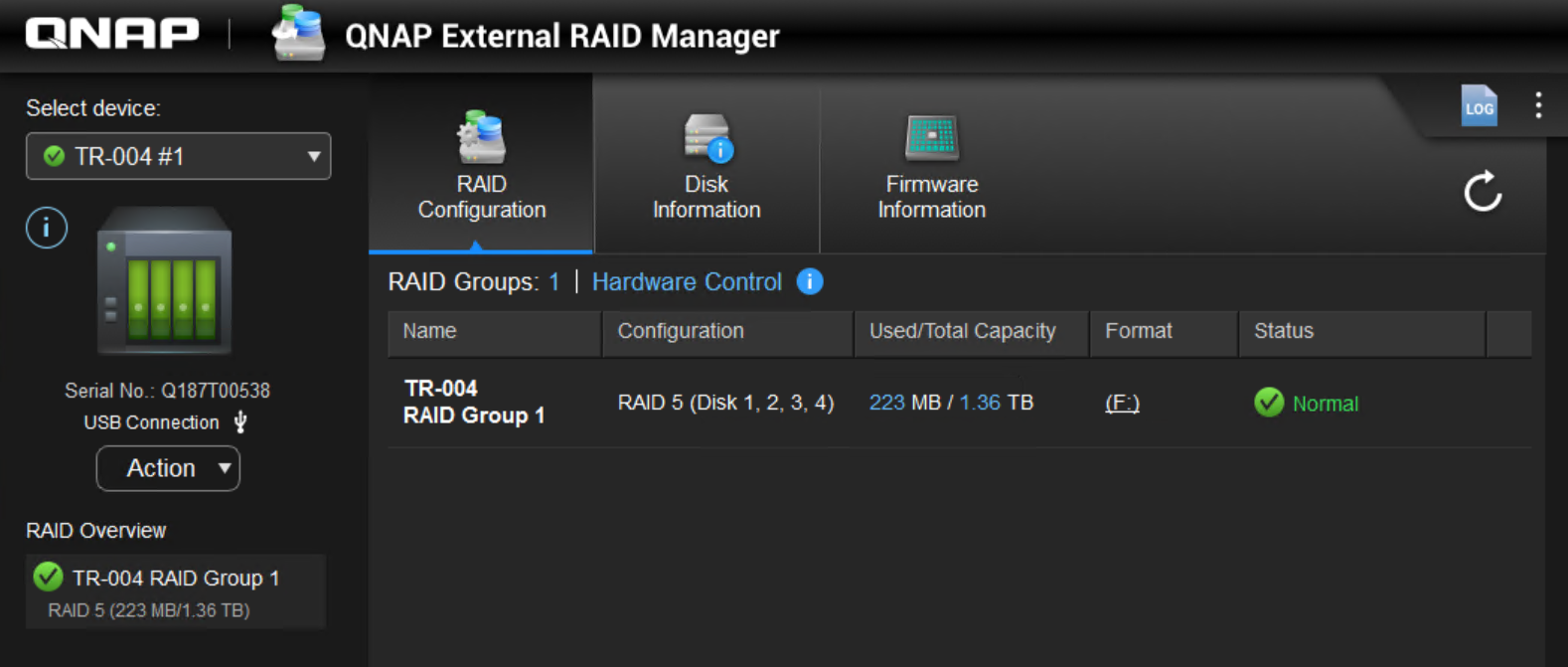
The QNAP TR-004 provides a significant advantage by allowing you to create and manage RAID 5 (and other RAID types) directly within the hardware enclosure by using the QNAP External RAID Manager on your Mac. This enables enhanced data protection compared to standard macOS options. Once configured as RAID 5, the TR-004 appears as a single disk on your Mac.
Best Practices for Data Safety
- Choose the right RAID mode: Use the QNAP External RAID Manager to configure the TR-004 in RAID 1 or RAID 5 for redundancy. RAID 5 offers both fault tolerance and efficient storage usage, which is not available via macOS Disk Utility alone.
- Back up data regularly: Even with RAID protection, regular backups remain essential. Use Time Machine or a third-party backup solution to back up important files in case of accidental deletion or other issues.
- Safely eject the device: Always use the “Eject” option in Finder before disconnecting the TR-004 to prevent data corruption.
- Keep your system updated: Regularly update macOS, QNAP firmware, and QNAP External RAID Manager for best security and compatibility.
- Monitor the enclosure environment: Store the enclosure in a cool, dry location and avoid physical shocks.
Note: Initializing or changing RAID settings will erase all disk data. Always back up important files before modifying the configuration.
Further Reading
适用产品
- QNAP TR-004
- MacBook (macOS)
- QNAP External RAID Manager
概述
当将 USB 外置机箱连接到您的 MacBook 时,您可以灵活方便地扩展您的存储并保护您的数据。然而,它的内置磁盘工具仅支持某些 RAID 级别:RAID 0(条带化)、RAID 1(镜像)和 JBOD(仅一堆磁盘)。macOS 磁盘工具不原生支持 RAID 5,这是一种平衡性能、容量和冗余的流行选项。
QNAP TR-004 提供了的优势,允许您通过使用 Mac 上的QNAP 外部 RAID 管理器直接在硬件机箱内创建和管理 RAID 5(及其他 RAID 类型)。这相比标准的 macOS 选项提供了增强的数据保护。一旦配置为 RAID 5,TR-004 在您的 Mac 上显示为单个磁盘。
数据安全较佳实践
- 选择合适的 RAID 模式: 使用 QNAP External RAID Manager 将 TR-004 配置为 RAID 1 或 RAID 5 以实现冗余。RAID 5 提供了容错能力和高效的存储使用,这是 macOS 磁盘工具单独无法实现的。
- 定期备份数据: 即使有 RAID 保护,定期备份仍然是必要的。使用 Time Machine 或第三方备份解决方案备份重要文件,以防意外删除或其他问题。
- 安全弹出设备: 在断开 TR-004 之前,始终在 Finder 中使用“弹出”选项以防止数据损坏。
- 保持系统更新: 定期更新 macOS、QNAP 固件和 QNAP External RAID Manager 以确保较佳的安全性和兼容性。
- 监控机箱环境: 将机箱存放在阴凉、干燥的地方,并避免物理冲击。
注意: 初始化或更改 RAID 设置将擦除所有磁盘数据。修改配置前请务必备份重要文件。
进一步阅读


