Applicable Products
Qsirch 5.6.0 or later versions on all platforms
What is "OpenAI-Compatible"?
Some language-model providers offer APIs that match OpenAI's REST format (same request and response structure). Qsirch can connect to these services by configuring three fields: API endpoint URL, API key, and Model name. Once set, Qsirch's RAG workflow - retrieving content from your selected files and returning answers with source citations - operates the same as with OpenAI.
Recomended services for OpenAI-Compatible
The services listed below are the ones we have validated with Qsirch using the OpenAI-compatible interface. Other providers may also work - refer to each provider's OpenAI-compatible documentation for details.
xAI Grok
Grok provides an OpenAI-compatible REST API that can be used as a drop-in alternative.
- Sign up in the xAI Console: https://console.x.ai/.
- Create an API key in your account.
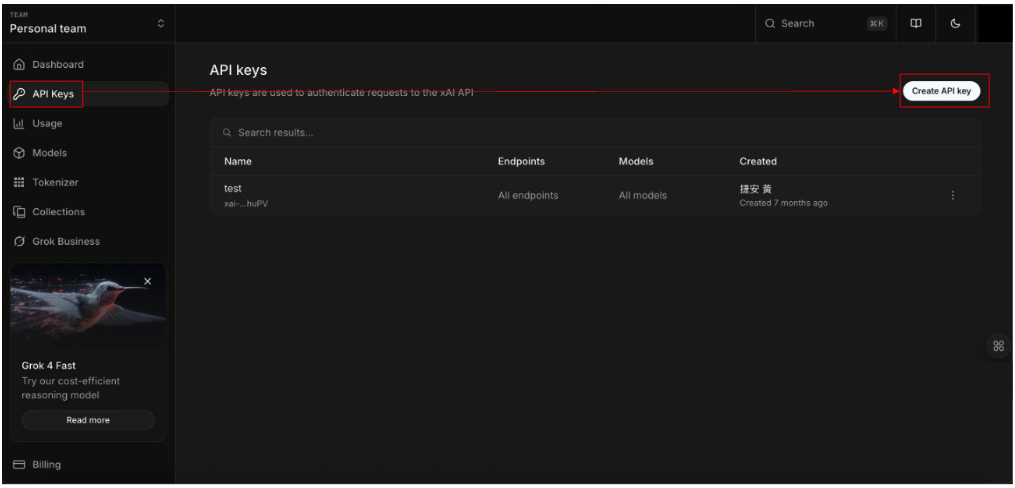
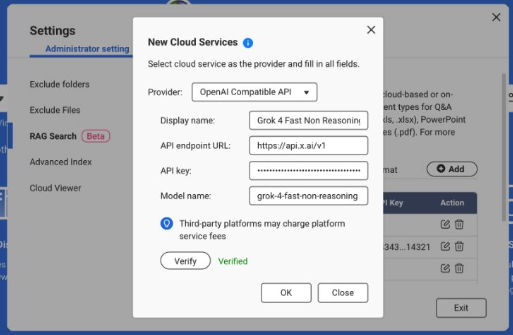
3.Note the API endpoint URL: https://api.x.ai/v1
4.Pick a Model name, e.g., grok-4-fast-non-reasoning
5.In Qsirch → Settings → Administrator setting → RAG Search → Cloud Services → Add, choose OpenAI-Compatible, then enter the API endpoint URL, API key, and Model name.
For more information, see the xAI API Documentation: https://docs.x.ai/docs/api-reference.
DeepSeek
DeepSeek offers OpenAI-style endpoints for chat and reasoning models.
1. Open the DeepSeek API portal: https://platform.deepseek.com/api_keys.
2. Create an API key.
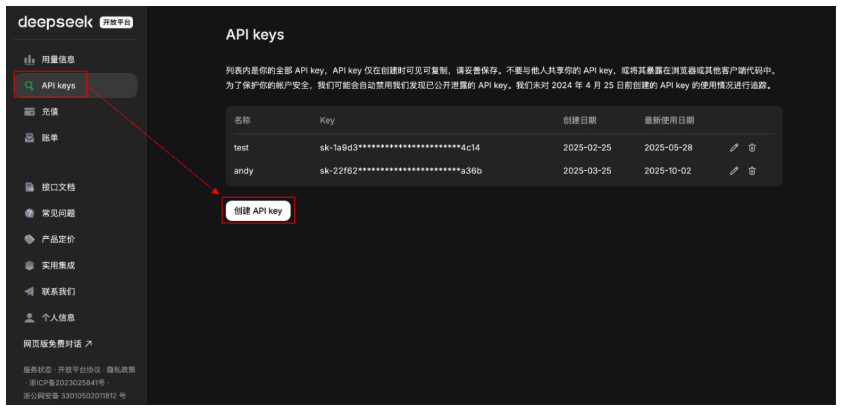
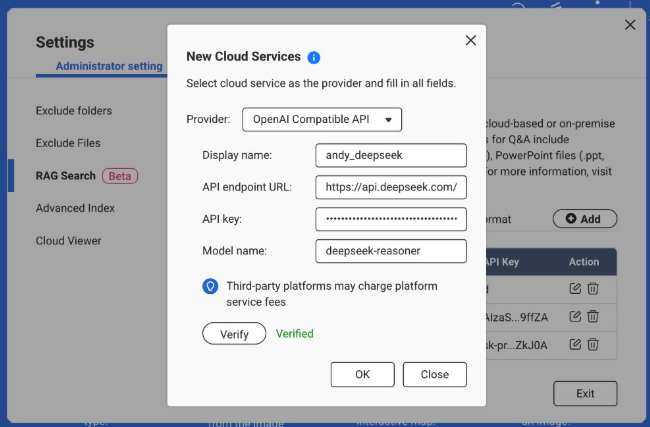
3. Note the API endpoint URL: https://api.deepseek.com (some environments use …/v1).
4. Choose a Model, e.g., deepseek-chat or deepseek-reasoner.
5. In Qsirch → Settings → Administrator setting → RAG Search → Cloud Services → Add, select OpenAI-Compatible and enter the API endpoint URL, API key, and Model name.
For more information, see the DeepSeek API Documentation: https://api-docs.deepseek.com/.
Baidu Qianfan
Qianfan provides ERNIE and other models; some routes emulate OpenAI patterns, but authentication typically uses AK/SK and provider-specific endpoints.
1. Sign in to Baidu AI Cloud and enable Qianfan: https://cloud.baidu.com/doc/qianfan-api/s/3m7of64lb.
2. Create an API key https://cloud.baidu.com/doc/qianfan-api/s/ym9chdsy5.
3. Note the API endpoint URL: https://qianfan.baidubce.com/v2.
4. Choose a Model, e.g., ernie-4.5-turbo-128k . https://cloud.baidu.com/doc/qianfan-docs/s/7m95lyy43.
5. In Qsirch → Settings → Administrator setting → RAG Search → Cloud Services → Add, choose OpenAI-Compatible, then enter the API endpoint URL, API key, and Model name.
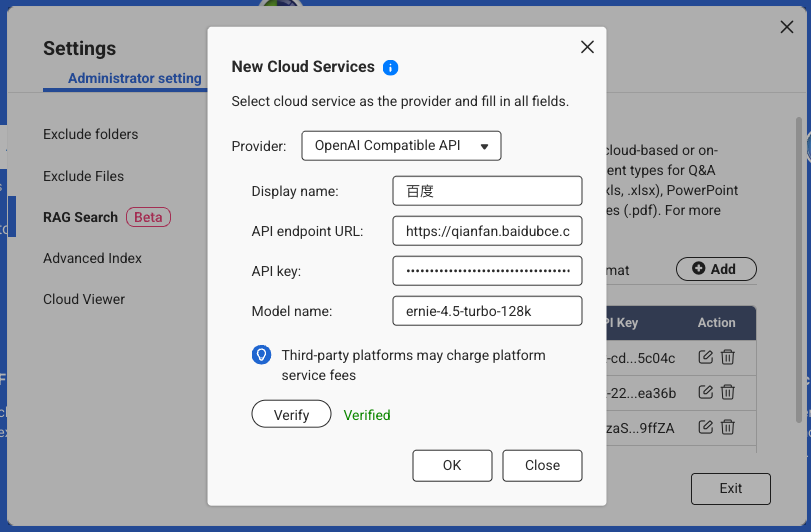
For more information, see the Qianfan Documentation: https://cloud.baidu.com/doc/WENXINWORKSHOP/index.html
Alibaba Cloud
DashScope exposes OpenAI-compatible endpoints for Qwen models and can be used as a drop-in provider.
Sign in to Alibaba Cloud Model Studio (DashScope) and create an API key: https://dashscope.console.aliyun.com/apiKey.
Note the API endpoint (Base URL):
Pick a Model, e.g., qwen-turbo, qwen-plus, or qwen-max. (Availability varies by region/account.)
In Qsirch → Settings → Administrator setting → RAG Search → Cloud Services → Add, choose OpenAI-Compatible, then enter the API endpoint URL, API key, and Model name.
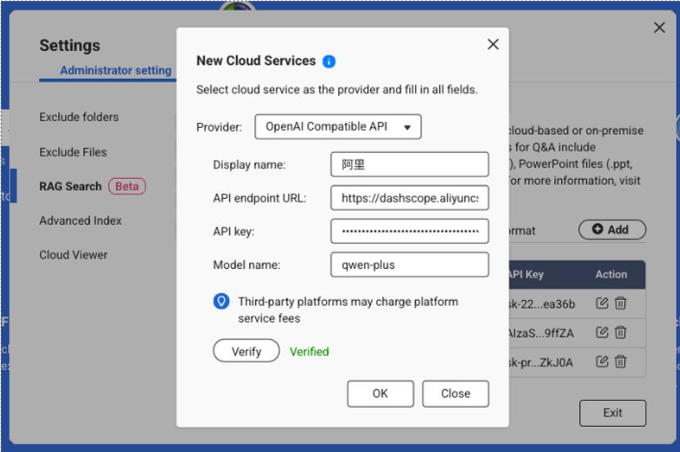
For more information, see Qwen API Documentation: https://bailian.console.aliyun.com/?spm=5176.29597918.J_SEsSjsNv72yRuRFS2VknO.2.40e47b08Xrh14n&tab=api#/api/?type=model&url=2833609
适用产品
所有平台上的 Qsirch 5.6.0 或更高版本
什么是“OpenAI 兼容”?
一些语言模型提供商提供与 OpenAI's REST 格式(相同的请求和响应结构)。通过配置三个字段:API 端点 URL、API 密钥和模型名称,Qsirch 可以连接到这些服务。一旦设置,Qsirch' 的 RAG 工作流程匹配的 API——从您选择的文件中检索内容并返回带有来源引用的答案——与 OpenAI 的操作相同。
推荐的 OpenAI 兼容服务
下面列出的服务是我们使用 OpenAI 兼容接口验证过的 Qsirch 服务。其他提供商也可能适用——请参考每个提供商的 OpenAI 兼容文档以获取详细信息。
xAI Grok
Grok 提供一个 OpenAI 兼容的 REST API,可以作为替代方案使用。
- 在 xAI 控制台中注册:https://console.x.ai/。
- 在您的账户中创建一个 API 密钥。
3. 记录 API 端点 URL:https://api.x.ai/v1
4. 选择一个模型名称,例如 grok-4-fast-non-reasoning
5. 在Qsirch → 设置 → 管理员设置 → RAG 搜索 → 云服务 → 添加,选择OpenAI 兼容,然后输入 API 端点 URL、API 密钥和模型名称。
有关更多信息,请参阅 xAI API 文档:https://docs.x.ai/docs/api-reference。
DeepSeek
DeepSeek 提供 OpenAI 风格的聊天和推理模型端点。
1. 打开 DeepSeek API 门户:https://platform.deepseek.com/api_keys。
2. 创建一个 API 密钥。
3. 记录 API 端点 URL:https://api.deepseek.com(某些环境使用…/v1)。
4. 选择一个模型,例如 deepseek-chat 或 deepseek-reasoner。
5. 在Qsirch → 设置 → 管理员设置 → RAG 搜索 → 云服务 → 添加,选择 OpenAI 兼容并输入 API 端点 URL、API 密钥和模型名称。
更多信息,请参阅 DeepSeek API 文档:https://api-docs.deepseek.com/。
百度千帆
千帆提供 ERNIE 和其他模型;某些路径模拟 OpenAI 模式,但认证通常使用 AK/SK 和特定提供商的端点。
1. 登录百度智能云并启用千帆:https://cloud.baidu.com/doc/qianfan-api/s/3m7of64lb。
2. 创建一个 API 密钥https://cloud.baidu.com/doc/qianfan-api/s/ym9chdsy5。
3. 记录 API 端点 URL:https://qianfan.baidubce.com/v2。
4. 选择一个模型,例如,ernie-4.5-turbo-128k 。https://cloud.baidu.com/doc/qianfan-docs/s/7m95lyy43。
5. 在Qsirch → 设置 → 管理员设置 → RAG 搜索 → 云服务 → 添加,选择 OpenAI 兼容,然后输入 API 端点 URL、API 密钥和模型名称。
欲了解更多信息,请参阅乾帆文档:https://cloud.baidu.com/doc/WENXINWORKSHOP/index.html
阿里云
DashScope 提供 OpenAI 兼容的端点用于 Qwen 模型,并可作为替代提供商使用。
登录阿里云模型工作室(DashScope)并创建 API 密钥:https://dashscope.console.aliyun.com/apiKey。
请注意 API 端点(基础 URL):
选择一个模型,例如 qwen-turbo、qwen-plus 或 qwen-max。(可用性因地区 / 账户而异。)
在Qsirch → 设置 → 管理员设置 → RAG 搜索 → 云服务 → 添加,选择OpenAI 兼容,然后输入 API 端点 URL、API 密钥和模型名称。
欲了解更多信息,请参阅 Qwen API 文档:https://bailian.console.aliyun.com/?spm=5176.29597918.J_SEsSjsNv72yRuRFS2VknO.2.40e47b08Xrh14n&tab=api#/api/?type=model&url=2833609


