阅读约 9 分钟


What is the 3-2-1 backup principle?
The 3-2-1 backup principle means keeping at least 3 copies of important data on 2 different types of storage media, with 1 copy stored offsite. These 3 copies include the original data you actively use, so in practice, that means “1 original copy plus 2 backup copies.”
The 3-2-1 rule is designed to ensure that no single incident can wipe out all your data. If hard disk drives fails, you still have another copy. If an entire device fails, you still have a backup on a different type of media. And if your office suffers a fire or flood, you still have a copy stored offsite.
The 3-2-1 principle was introduced by photographer Peter Krogh in 2005. In 2012, Carnegie Mellon University also adopted it in Data Backup Options, a document written for the United States Computer Emergency Readiness Team (US-CERT). Today, 3-2-1 remains one of the most widely cited fundamental guidelines for protecting personal and business data.
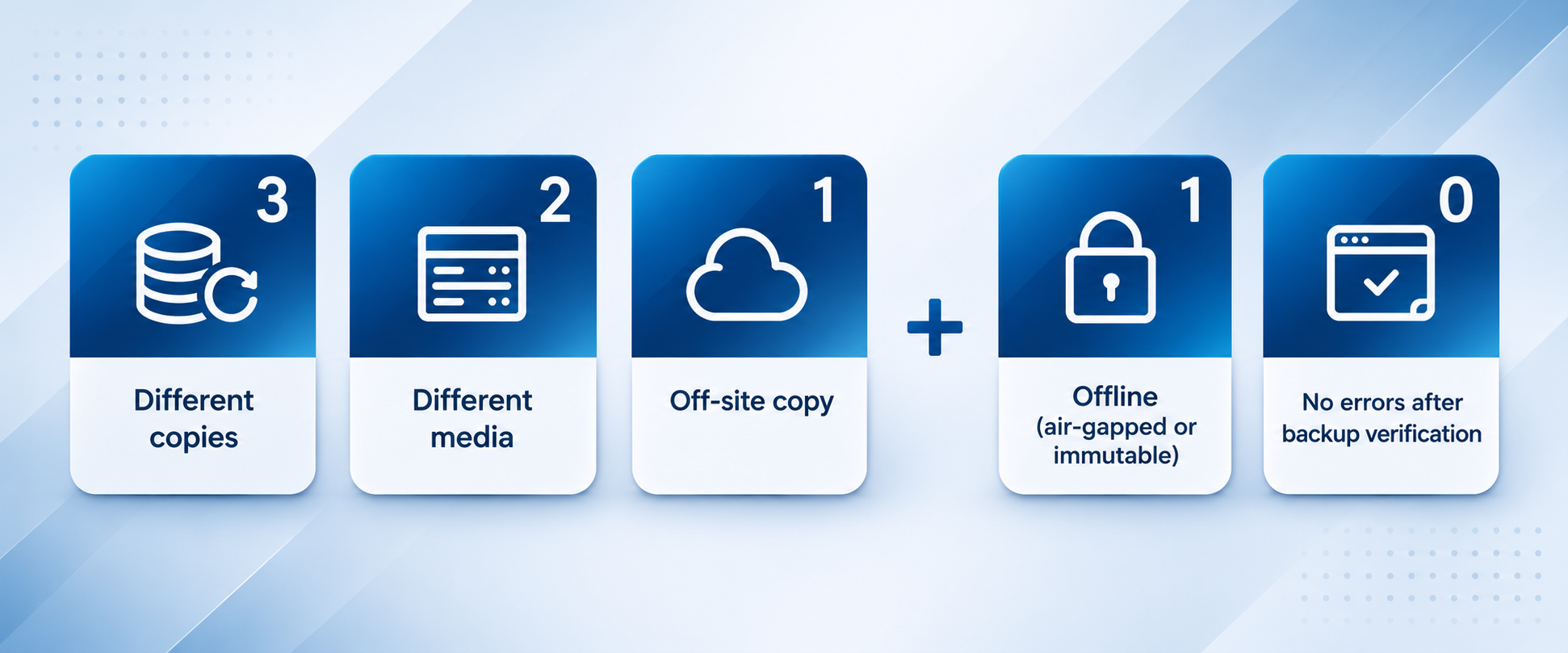
To counter ransomware, the industry has expanded the 3-2-1 backup principle to 3-2-1-1-0, adding an immutable copy and recovery verification.
What do the 3, 2, and 1 in the 3-2-1 backup principle stand for?
Each number in the 3-2-1 principle protects against a different level of risk:
| Number | Rule | Risk addressed | Common practices |
|---|---|---|---|
| 3 | At least 3 copies of your data (including the original) | Failure of a single hard disk drives, file, or backup task | Original data stored on your working NAS, plus 2 backup copies |
| 2 | At least 2 different storage media | Failure of the same type of media or the same device | NAS paired with cloud storage, or NAS paired with external hard disk drives or tape |
| 1 | At least 1 copy stored offsite | Disasters that affect an entire location, such as fire, flooding, or theft | A NAS at another location, or cloud Storage Space |
“2 types of media” isn’t about using media with different names—it’s about ensuring that the same cause won’t make both copies of your data fail at once. The most common combination today is NAS paired with cloud storage.
Having two NAS units back up to each other helps protect against a single host failure. But if both NAS units are in the same server room and use the same batch of hard disk drives, both could still be affected by a power outage, power surge, or a defect in that batch of hard disk drives. That makes that one off-site or cloud copy even more important.
Do RAID, sync, and snapshots count as 3-2-1 backups?
RAID, syncing, and snapshots do not qualify as 3-2-1 backups. Many people think they have a backup in place when they’ve only covered part of the 3-2-1 strategy. The following four approaches are often mistaken for backups:
- RAID is not a backup: RAID keeps NAS running when a single hard disk drives fails, but changes caused by accidental deletion or encryption are written to all hard disk drives at the same time. RAID protects service continuity, not data recoverability.
- Sync is not backup: Cloud sync or data folder sync replicates every change in real time, including deletions and encryption. If the original file is deleted, the synced copy disappears too.
- Snapshots are not backups: Snapshots and the original data reside in the same storage pool, so both can be lost if the device is damaged. Snapshots are a great tool for fast recovery, but they only count as one of your 3 copies of data once they have been copied to another device.
- Keeping backups in the same location: Keeping your NAS and external hard disk drives in the same office meets the “3 copies” and “2 types of media” requirements, but misses “1 offsite copy.” A single fire or flood could wipe out all your data at once.
Further reading: Snapshots or backups? The difference between snapshots and backups
How can individuals and businesses implement 3-2-1 backup?
The 3-2-1 principle works at any scale. The only differences between individuals and businesses are the number of devices and how often backups are performed.
Individuals and families: Photos and documents on your computers and phones are the original data. Back them up regularly to your home NAS, then back up another copy from NAS to the cloud. Your home NAS and the cloud are 2 different storage media, and the cloud copy also serves as your off-site copy.
Small and medium-sized businesses: Store original data on your primary NAS, back it up daily to another NAS or an external device, and regularly back up an additional copy to the cloud or another location. Ideally, place the second NAS on a different floor or in a different office, and use the cloud for an off-site copy.
How often you back up depends on how quickly your data changes. For business data updated daily, we recommend backing up at least once a day. For archived data that rarely changes, once a week is enough.
What’s the difference between 3-2-1 and 3-2-1-1-0?
3-2-1-1-0 expands on the 3-2-1 backup principle: in addition to 3 copies of your data, 2 types of storage media, and 1 offsite copy, it requires 1 immutable or offline copy and recovery verification with 0 errors.
When the 3-2-1 rule was introduced, it primarily addressed hard disk drives damage and physical disasters. With the rise of ransomware, attackers deliberately seek out backups accessible over the network and delete or encrypt them first, leaving victims unable to restore their data. In its #StopRansomware Guide, the U.S. Cybersecurity and Infrastructure Security Agency (CISA) also recommends that businesses keep offline, encrypted backups and regularly test recovery.
Attackers now routinely target backups. According to Veeam’s 2025 Ransomware Trends Report, backup repositories were targeted in 89% of affected organizations, and only 10% of victims recovered more than 90% of their data. In 2023, a German mobile device insurer had both its production data and backups encrypted. With no trusted copy to restore from, the company ultimately declared bankruptcy.
The two requirements are:
- +1: At least 1 immutable or offline copy that attackers cannot alter, even if they gain access to the account.
- +0: Zero errors in restore verification—regularly confirm that every backup can actually be restored.
3-2-1-1-0 doesn't replace 3-2-1—it builds on it. A practical approach is to implement 3-2-1 first, then add an immutable copy and restore verification.
Learn More: 3-2-1-1-0 backup principle »
How can you implement 3-2-1 backup with QNAP NAS?
QNAP NAS can serve as both the primary data storage and the backup destination in a 3-2-1 strategy, with built-in features to meet each requirement:
| Rule | Corresponding QNAP features |
|---|---|
| 3 copies of your data | Back up computers, servers, and virtual machines to NAS using HDP for PC/VM; then back up the data on NAS to another destination using Hybrid Backup Sync (HBS 3) |
| 2 types of media | HBS 3 can back up data to another NAS, a remote server, an external device, or over 20 cloud services |
| 1 offsite copy | Back up to NAS at another location, or cloud storage such as myQNAPcloud Storage |
| Extend to 3-2-1-1-0 | QuTS hero WORM, QuObjects, Immutable Snapshot and Airgap+ provide immutable and offline copies |
For small and medium-sized businesses, one practical setup is to enable snapshots on your primary NAS to recover accidentally deleted files, use HBS 3 to back up to another NAS daily, and back up to the cloud weekly for an offsite copy. With 1 original copy plus 2 backups across 2 types of storage media—NAS and the cloud—and the cloud copy stored offsite, this setup meets all three requirements of the 3-2-1 rule.
FAQ
Do the 3 copies in the 3-2-1 backup principle include the original data?
Yes. The 3 copies in the 3-2-1 backup principle include the original data you're currently using, so you need 1 original copy plus 2 backup copies.
Does using RAID on NAS count as having a backup?
No. RAID only keeps hard disk drives failures from interrupting NAS operation. It cannot recover data lost to accidental deletion, ransomware encryption, or failure of the entire NAS. Data on NAS still needs to be backed up separately to another device.
Do two NAS devices backing up to each other count as two types of storage media?
Strictly speaking, two NAS devices count as the same type of storage media. Backing up two NAS devices to each other protects against a single device failure, but if both are in the same location, the same disaster could still affect them both. To fully meet the 3-2-1 rule, add 1 cloud or offsite backup in addition to the two NAS devices.
Does cloud hard disk drives synchronization count as a backup?
Standard cloud synchronization is not a backup. It also syncs deletions and encryption, so if something happens to the original file, the cloud copy is usually affected too. Only cloud backups that retain multiple historical versions can count as one of the backups in a 3-2-1 strategy.
Does a home NAS also need a 3-2-1 backup strategy?
Yes. Once your photos, videos and important documents at home are lost, they’re usually gone for good. Back up the data on your computer to your home NAS, then back up another copy from NAS to the cloud to follow a basic 3-2-1 backup strategy.
How often should you back up?
How often you back up depends on how quickly your data changes and how much data you can afford to lose. For business data updated daily, we recommend backing up at least once a day. For archived data that rarely changes, once a week is enough.
Already using 3-2-1? Do you still need 3-2-1-1-0?
For businesses, the answer is yes. The 3-2-1 strategy protects against hardware failures and physical disasters, but ransomware can also encrypt connected backups. By adding an immutable copy and recovery verification, 3-2-1-1-0 significantly improves your chances of having clean data to restore after an attack.